Deep Agents from zero: seven small examples
A basic agent is a model calling tools in a loop. That’s enough for simple tool calls, but it falls apart on longer work: the agent loses track of what it was doing, its context fills up with tool output, and it has nowhere to put intermediate results. 🤷
LangChain’s Deep Agents library adds the harness that tools like Claude Code have around that loop: a filesystem, subagents, skills, planning and context management. I build most of my agents with Deep Agents these days, and a few people asked how to get started with it. So this post is the introduction I would have liked: seven small examples that build on each other, each one small enough to read in one go.
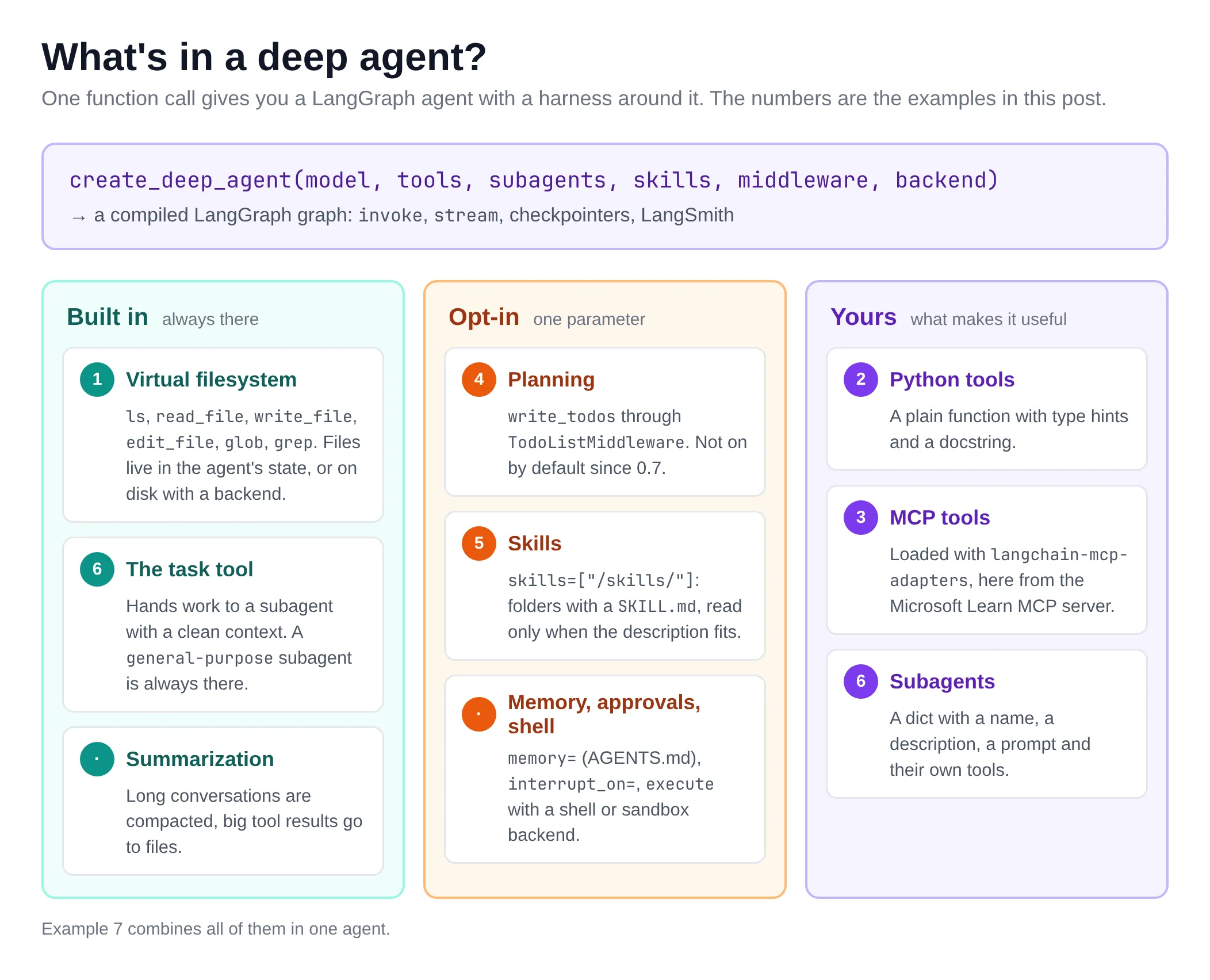
The diagram shows what we’ll cover. The numbers are the examples below.
What are Deep Agents?
deepagents is a Python library (there’s a TypeScript version too) with one main function: create_deep_agent. It builds a LangChain agent with a set of middleware already wired in, and returns a compiled LangGraph graph. So everything you know from LangGraph still works: invoke, stream, checkpointers, LangSmith tracing.
What you get out of the box:
- A virtual filesystem:
ls,read_file,write_file,edit_file,globandgrep. Virtual is the important word: by default the files live in the agent’s state, not on your disk. When the agent writes a file, nothing shows up in your folder. To get real files on disk, you configure the agent with a different backend, such asFilesystemBackend(root_dir=...). We’ll do that in example 5. More in the Backends docs. - The
tasktool: the agent can hand work to a subagent that starts with a clean context, and only gets the result back. See Subagents. - Context management: long conversations get summarized, and large tool results are moved to files instead of filling the context window. See Context engineering.
Other features are off until you ask for them. Each one is a single argument to create_deep_agent:
- Planning:
middleware=[TodoListMiddleware()]adds thewrite_todostool, so the agent writes a plan and ticks items off as it works. We do that in example 4. - Skills:
skills=["/skills/"]points the agent to folders with aSKILL.md. It only sees each skill’s name and description, and reads the full instructions when it needs them. That’s example 5. See Skills. - Memory:
memory=["/AGENTS.md"]loadsAGENTS.mdfiles into the system prompt at the start of every run. The agent can update them withedit_filewhen it learns something, and with a backend that persists files, it remembers that in the next conversation. See Memory. - Human approval:
interrupt_on={"write_file": True}pauses the agent before that tool runs, so you can approve, edit or reject the call. It needs a checkpointer, more on that near the end. See Human-in-the-loop. - A shell: pass a backend that can run commands as
backend=, such asLocalShellBackend(your own machine) or a sandbox, and the agent gets anexecutetool. See Sandboxes.
⚠️ Important: Deep Agents moves fast. Everything below was tested with deepagents 0.7.32, langchain 1.4.7, langchain-openai 1.7.3, langchain-mcp-adapters 0.3.2, langchain-azure-ai 1.2.12 and langgraph-checkpoint-postgres 3.2.0 (October 2026). Since 0.7, the planning tool is no longer included by default. Older blog posts and tutorials assume it is.
Setup
You need Python 3.11 or later, uv and a model. Let’s create a project:
uv init deepagents-intro && cd deepagents-intro
uv add deepagents langchain-openai langchain-mcp-adapters
The examples use model="openai:gpt-5.4-mini". That string goes to LangChain’s init_chat_model, so any provider works: anthropic:claude-sonnet-4-6, google_genai:..., ollama:.... Install the matching langchain-<provider> package and set its key. Pass a model explicitly: relying on the default model is deprecated.
I ran everything against a gpt-5.4-mini deployment in Azure AI Foundry. Its OpenAI v1 endpoint works with the plain OpenAI client, so two environment variables are enough:
export OPENAI_BASE_URL=https://<your-resource>.openai.azure.com/openai/v1/
export OPENAI_API_KEY=<your key>
# no keys? an Entra token works too (it expires after about an hour)
export OPENAI_API_KEY=$(az account get-access-token --resource https://cognitiveservices.azure.com --query accessToken -o tsv)
The deployment name is the model name, so with a deployment called gpt-5.4-mini the model string stays the same. With plain OpenAI, set only OPENAI_API_KEY.
⚠️ For openai: models, Deep Agents uses the Responses API by default. The Foundry v1 endpoint supports it. If your gateway only does chat completions, pass init_chat_model("openai:...", use_responses_api=False) as the model instead of the string.
There’s also a class made for Foundry: AzureAIOpenAIApiChatModel in the langchain-azure-ai package. It takes your Foundry project endpoint and an Azure credential, so there’s no key or expiring token to put in an environment variable. Install it with uv add langchain-azure-ai azure-identity and pass the model object instead of the string:
from azure.identity import DefaultAzureCredential
from langchain_azure_ai.chat_models import AzureAIOpenAIApiChatModel

# reads AZURE_AI_PROJECT_ENDPOINT=https://<resource>.services.ai.azure.com/api/projects/<project>
model = AzureAIOpenAIApiChatModel(model="gpt-5.4-mini", credential=DefaultAzureCredential())
agent = create_deep_agent(model=model, system_prompt="...")
I kept the openai: string in the examples so they work with any OpenAI-compatible endpoint, but if you build on Foundry, this is the cleaner option. See Microsoft Foundry in the LangChain docs.
Tip: set LANGSMITH_TRACING=true and LANGSMITH_API_KEY to see every model call and tool call in LangSmith. It’s optional, but it makes the examples a lot easier to follow. 😊
1. A minimal deep agent
Let’s start with the smallest possible agent: a model and a system prompt, no tools of our own.
from deepagents import create_deep_agent

agent = create_deep_agent(
    model="openai:gpt-5.4-mini",
    system_prompt="You are a concise assistant. Save anything longer than a few lines to a file.",
)

result = agent.invoke(
    {"messages": [{"role": "user", "content": "Write three tips for naming Azure resources to /tips.md, then summarize them in one line."}]}
)

print(result["messages"][-1].text)
print("\nFiles in the agent's state:", list(result["files"]))
print(result["files"]["/tips.md"]["content"])
Save it as 01_minimal.py in the project and run it with uv run python 01_minimal.py:
Saved to `/tips.md`.

Summary: Use a consistent, concise Azure naming convention that encodes type/environment/workload, avoids special characters, and standardizes casing/separators.

Files in the agent's state: ['/tips.md']
1. Use a consistent naming convention that includes the resource type, environment, and workload.
2. Keep names short but descriptive, and avoid spaces or special characters.
...
What happened here:
- We gave the agent no tools, yet it wrote a file. That’s the built-in
write_filetool. - The file is not on your disk. The default backend (
StateBackend) keeps files in the graph state, soresult["files"]holds them. Add a checkpointer and they survive between turns of the same thread. result["messages"]is the full conversation, including the tool calls. The last message is the answer.
2. A custom Python tool
A tool is a plain Python function. The type hints become the schema and the docstring becomes the description, so write the docstring for the model. This one calls the free Frankfurter API for exchange rates (no key needed):
import httpx
from deepagents import create_deep_agent


def get_exchange_rate(base: str, target: str) -> str:
    """Get today's exchange rate between two currencies, using ISO codes like EUR or USD."""
    r = httpx.get("https://api.frankfurter.dev/v1/latest", params={"base": base, "symbols": target}, timeout=10)
    r.raise_for_status()
    data = r.json()
    return f"1 {base} = {data['rates'][target]} {target} (ECB rate of {data['date']})"


agent = create_deep_agent(
    model="openai:gpt-5.4-mini",
    tools=[get_exchange_rate],
    system_prompt="You help with travel budgets. Always use get_exchange_rate for rates, never guess.",
)

result = agent.invoke(
    {"messages": [{"role": "user", "content": "I have 1200 EUR for a week in Tokyo. What is that in yen, and per day?"}]}
)

for message in result["messages"]:
    for call in getattr(message, "tool_calls", []):
        print(f"-> {call['name']}({call['args']})")
print(result["messages"][-1].text)
The loop at the end prints every tool call, so we can see what the agent did:
-> get_exchange_rate({'base': 'EUR', 'target': 'JPY'})
Using today's rate:

- 1 EUR = 175.92 JPY
- 1200 EUR = 211,104 JPY
...
So your budget is about ¥211,104 total, or ¥30,159 per day.
tools= is additive: your tools are added to the built-in ones, never replace them. httpx comes with the OpenAI client, so there’s nothing extra to install.
3. Tools from an MCP server
Most tools I use these days come from MCP servers. langchain-mcp-adapters turns them into LangChain tools, and those go into tools= like any other. Let’s use the Microsoft Learn MCP server, which is public and needs no sign-in:
import asyncio

from deepagents import create_deep_agent
from langchain_mcp_adapters.client import MultiServerMCPClient


async def main():
    client = MultiServerMCPClient(
        {
            "learn": {
                "transport": "streamable_http",
                "url": "https://learn.microsoft.com/api/mcp",
            }
        }
    )
    tools = await client.get_tools()
    print("MCP tools:", [t.name for t in tools])

    agent = create_deep_agent(
        model="openai:gpt-5.4-mini",
        tools=tools,
        system_prompt="Answer Azure questions from Microsoft Learn only. Cite the URLs you used.",
    )

    result = await agent.ainvoke(
        {"messages": [{"role": "user", "content": "What is the maximum number of replicas for an Azure Container App?"}]}
    )
    # ... print the tool calls and the answer, as in example 2 ...


asyncio.run(main())
The output:
MCP tools: ['microsoft_docs_search', 'microsoft_code_sample_search', 'microsoft_docs_fetch']
-> microsoft_docs_search({'query': 'Azure Container Apps maximum number of replicas'})
-> microsoft_docs_search({'query': 'Azure Container Apps scaling replicas maximum Microsoft Learn'})
The maximum configurable number of replicas for an Azure Container App is **1,000**. ...

Sources:
- https://learn.microsoft.com/azure/container-apps/scale-app#scale-definition
A few things to know:
- MCP tools are async, so we use
ainvoke(orastream) instead ofinvoke. MultiServerMCPClienttakes several servers at once. Use"transport": "stdio"with acommandandargsfor local servers.get_tools()opens a new MCP session for every tool call. That’s fine here. For servers with state, open one session withclient.session("learn")and load the tools from it.
⚠️ On Foundry? A Foundry toolbox bundles the tools you configure in your project (MCP servers among them) behind one MCP endpoint. langchain-azure-ai can load it: AzureAIProjectToolbox(toolbox_name="my-toolbox") from langchain_azure_ai.tools returns the toolbox tools as LangChain tools that you pass to tools=, with Entra ID authentication handled for you. Its get_skills() even loads the toolbox skills as files for create_deep_agent. It’s in preview, so expect changes. See Use Foundry Toolbox with LangChain.
4. Planning with write_todos
For longer tasks it helps when the agent writes a plan first and ticks items off as it goes. In Deep Agents that’s the write_todos tool, from LangChain’s TodoListMiddleware. Since 0.7 you add it yourself:
from deepagents import create_deep_agent
from langchain.agents.middleware import TodoListMiddleware

agent = create_deep_agent(
    model="openai:gpt-5.4-mini",
    middleware=[TodoListMiddleware()],  # adds the write_todos tool (opt-in since deepagents 0.7)
    system_prompt="You are a technical writer. Plan with write_todos first, one item per section, and keep the list up to date.",
)

task = (
    "Write a short checklist for moving a Flask app to Azure Container Apps to /checklist.md. "
    "Cover the container image, secrets, scaling and monitoring, one section each."
)

todos = []
for state in agent.stream({"messages": [{"role": "user", "content": task}]}, stream_mode="values"):
    if state.get("todos", []) != todos:
        todos = state["todos"]
        print("\n".join(f"  [{t['status']:>11}] {t['content']}" for t in todos), end="\n\n")

print(state["files"]["/checklist.md"]["content"])
This time we stream with stream_mode="values", which gives us the full state after every step. The todo list lives in the state under todos, so we print it whenever it changes:
  [in_progress] Draft checklist sections for container image, secrets, scaling, and monitoring
  [    pending] Write the checklist to /checklist.md
  [    pending] Verify the file content is correct

  [  completed] Draft checklist sections for container image, secrets, scaling, and monitoring
  [  completed] Write the checklist to /checklist.md
  [in_progress] Verify the file content is correct
...
The tool itself does nothing clever: it stores a list of items with a status (pending, in_progress, completed). The value is mostly that your UI can show progress. Note that the model didn’t follow “one item per section”. It’s a hint, not a contract. 😊
⚠️ Why is it opt-in now? LangChain benchmarked the todo list on their Deep Agents evals with GPT-5.6 Terra, Claude Opus 4.8 and GLM 5.2. It gave no significant accuracy gain on any of them, and it cost more tokens on two of the three (GPT-5.6 Terra even scored a bit better without it). Turn it on when you want to show progress in a UI, or when your own evals say it helps.
5. Skills with SKILL.md
A skill is a folder with a SKILL.md file: YAML frontmatter with a name and a description, then instructions in Markdown. Deep Agents puts only the names and descriptions in the system prompt. The agent reads the full file when a task fits the description. That’s called progressive disclosure, and it means you can give an agent dozens of skills without a giant prompt.
Here’s skills/release-notes/SKILL.md:
---
name: release-notes
description: Turn a list of commits or changes into release notes for end users. Use when asked for release notes, a changelog or a "what's new" summary.
---

# Release notes

1. Group the changes under these headings, in this order, and leave out empty ones:
   `### ✨ New`, `### 🛠 Improved`, `### 🐛 Fixed`.
2. Write one bullet per change, in plain language for users, not developers. No commit hashes, no file names.
3. Merge changes that are really one feature into one bullet.
# ...
The name must match the folder name. Skills are read through the agent’s backend, so to load them from disk we switch to a FilesystemBackend:
from pathlib import Path

from deepagents import create_deep_agent
from deepagents.backends import FilesystemBackend

here = Path(__file__).parent

agent = create_deep_agent(
    model="openai:gpt-5.4-mini",
    backend=FilesystemBackend(root_dir=here, virtual_mode=True),  # the agent sees this folder as /
    skills=["/skills/"],
    system_prompt="You are a helpful assistant for a small product team.",
)

commits = """
a1f3c2e feat: export reports to PDF
9b8d7e1 fix: dark mode toggle not saved after restart
4c2a9f0 chore: bump fastapi to 0.142
e7d1b33 feat: PDF export now includes charts
1f0e8a2 perf: dashboard loads 2x faster
"""

result = agent.invoke(
    {"messages": [{"role": "user", "content": f"Release notes for version 2.3, please:\n{commits}"}]}
)
# ... print the tool calls and the answer ...
The prompt doesn’t mention the skill, yet the first thing the agent does is read it:
-> read_file({'file_path': '/skills/release-notes/SKILL.md', 'offset': 0, 'limit': 1000})
Version 2.3 brings faster dashboards, improved PDF exports, and a fix for dark mode settings.

### ✨ New
- Export reports to PDF, including charts.

### 🛠 Improved
- Dashboard pages now load much faster.

### 🐛 Fixed
- Dark mode preferences are now saved correctly after restart.
The two PDF commits became one bullet and the dependency bump is gone, just like the skill says.
⚠️ With a FilesystemBackend, write_file and edit_file change real files in root_dir. virtual_mode=True (the default) keeps the agent inside that folder. Don’t point it at your home directory. Without the backend, skill files have to be passed in the state with invoke(files={...}).
Skills don’t have to live on disk. A StoreBackend keeps files in a LangGraph store, and with PostgresStore (from langgraph-checkpoint-postgres) that store is a Postgres database. Upload the skill once, and every agent and thread that uses the store can load it:
from deepagents.backends import StoreBackend
from langgraph.store.postgres import PostgresStore

with PostgresStore.from_conn_string("postgresql://...") as store:
    store.setup()  # creates the tables, once
    backend = StoreBackend(store=store, namespace=lambda rt: ("skills",))
    backend.upload_files([("/skills/release-notes/SKILL.md", skill_bytes)])
    agent = create_deep_agent(model="openai:gpt-5.4-mini", backend=backend, skills=["/skills/"], store=store)
I tried this with a Postgres container: the skill ends up as a row in the store table, and the agent reads it with read_file just like before. That’s handy when skills are managed centrally, or when the agent runs in a container without the skill files. See Backends and remote skill loading.
6. Subagents
Subagents keep the main agent’s context clean. The main agent calls the task tool with a description, the subagent works in its own context with its own tools, and only its final answer comes back. Every deep agent has a general-purpose subagent. You add your own as dicts with a name, a description (the main agent uses it to decide when to delegate), a system_prompt and tools.
Let’s move the Learn tools from example 3 to a researcher subagent. The main agent gets no tools at all, so it has to delegate:
async def main():
    client = MultiServerMCPClient(
        {"learn": {"transport": "streamable_http", "url": "https://learn.microsoft.com/api/mcp"}}
    )
    learn_tools = await client.get_tools()

    researcher = {
        "name": "docs-researcher",
        "description": "Researches one Azure question on Microsoft Learn and returns a short answer with source URLs.",
        "system_prompt": (
            "Search Microsoft Learn and fetch a page when the search results are not enough. "
            "Return at most 5 bullets with the facts and their URLs. No introduction."
        ),
        "tools": learn_tools,
    }

    agent = create_deep_agent(
        model="openai:gpt-5.4-mini",
        subagents=[researcher],
        system_prompt=(
            "You compare Azure services. You have no documentation tools yourself: "
            "delegate each service to docs-researcher with the task tool, in parallel, then write the comparison."
        ),
    )

    result = await agent.ainvoke(
        {"messages": [{"role": "user", "content": "Compare Azure Container Apps and Azure App Service for a Python API: scaling and pricing model."}]}
    )
    # ... print the tool calls and the answer ...
The main agent makes two task calls in the same step, one per service, and they run in parallel:
-> task({'description': 'Research Azure Container Apps scaling and pricing model for a Python API. ...', 'subagent_type': 'docs-researcher'})
-> task({'description': 'Research Azure App Service scaling and pricing model for a Python API. ...', 'subagent_type': 'docs-researcher'})
Here's the practical comparison for a **Python API**:

## Azure Container Apps
...
All the search results and fetched pages stay in the subagents’ contexts. The main agent only sees two short lists of facts. That’s the whole point: one subagent per task, and the expensive context is thrown away when the task is done.
⚠️ A subagent without tools inherits the main agent’s tools. Give each subagent only the tools it needs. You can also give one a different model, for instance a cheaper model for research.
⚠️ Nice to know: subagents aren’t free. Anthropic’s multi-agent research system beat a single agent by 90.2% on research, but used about 15× the tokens of a chat. And in when to fold subagents into your main agent loop, Anthropic reports that a single agent with skills often did better on quality, cost and latency, because every handoff loses detail. Their advice: use subagents for independent, parallel work like the two research questions above, and start with one agent otherwise.
7. Putting it together
The last example uses everything: a Python tool (a stand-in for an internal app inventory), a researcher subagent with the Learn MCP tools, planning, a tech-brief skill and a filesystem backend, so the result ends up on disk. The question: should we move our invoice-api to Azure Container Apps?
def get_app_profile(app_name: str) -> str:
    """Get the hosting profile of one of our internal apps: runtime, traffic, resources and current hosting."""
    profiles = {  # stand-in for a CMDB or monitoring API
        "invoice-api": {
            "runtime": "Python 3.13, FastAPI, one container image",
            "hosting": "a single VM, always on",
            # ...
        }
    }
    return json.dumps(profiles.get(app_name, {"error": f"unknown app {app_name}"}))


async def main():
    # ... MCP client and the docs-researcher subagent from example 6 ...

    agent = create_deep_agent(
        model="openai:gpt-5.4-mini",
        tools=[get_app_profile],
        subagents=[researcher],
        middleware=[TodoListMiddleware()],
        skills=["/skills/"],
        backend=FilesystemBackend(root_dir=here, virtual_mode=True),
        system_prompt=(
            "You are a cloud architect. Plan with write_todos first. Get facts about our apps with get_app_profile, "
            "and facts about Azure only through docs-researcher. Before writing a document, read the skill that matches it. "
            "Save documents under /out/."
        ),
    )

    task = "Should we move invoice-api to Azure Container Apps? Write a brief to /out/invoice-api-brief.md."
    async for chunk in agent.astream({"messages": [{"role": "user", "content": task}]}, stream_mode="updates"):
        # ... print each tool call as it happens ...

    print((here / "out" / "invoice-api-brief.md").read_text())
Here’s a run. You can follow the whole harness at work: plan, read the skill, call our tool, delegate the research, write the file and close the plan:
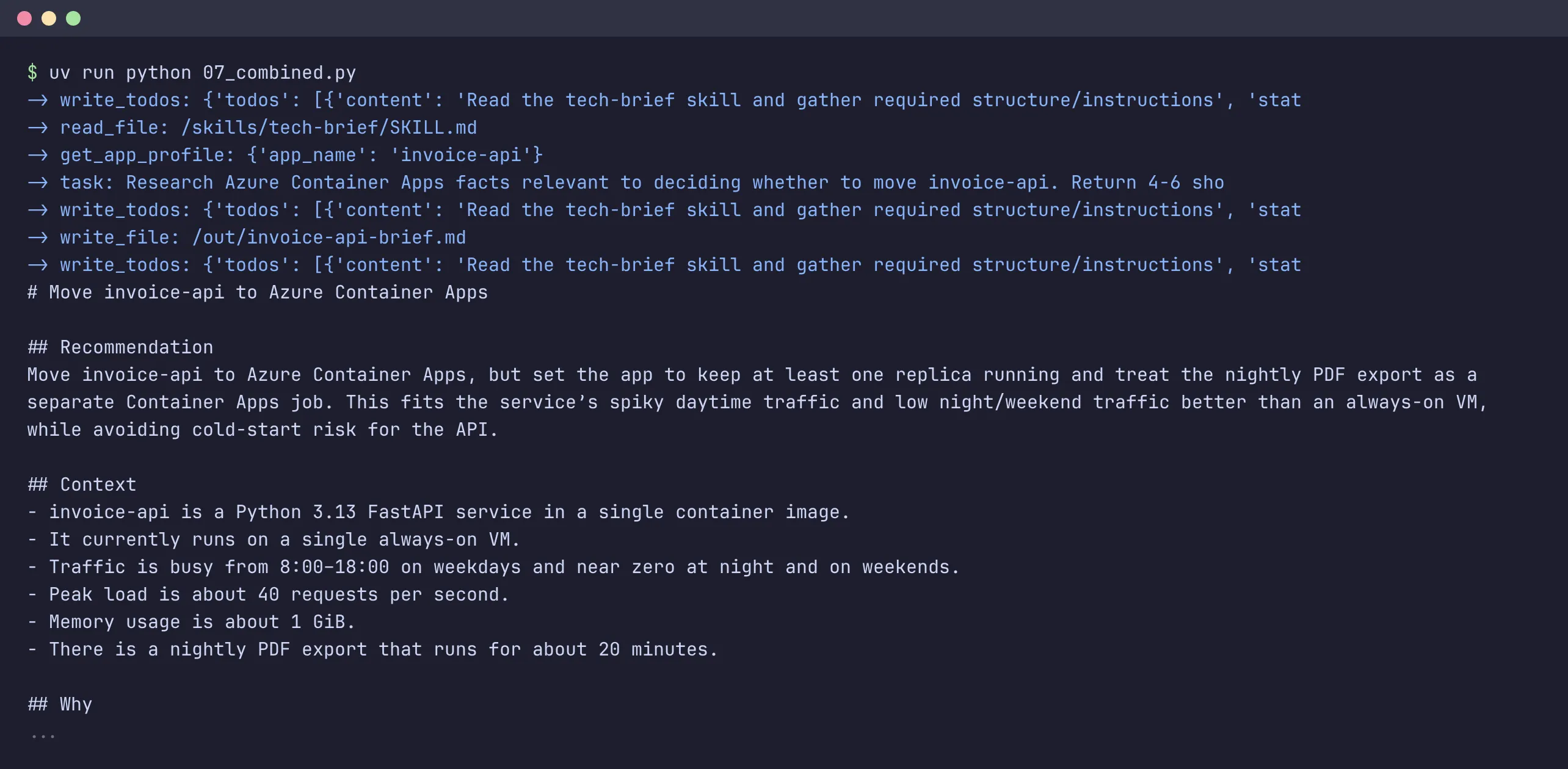
The brief follows the skill’s sections (Recommendation, Context, Why with Learn URLs, Risks, Next steps) and is in out/invoice-api-brief.md on disk, ready to review.
⚠️ In my first run the agent skipped the skill and wrote a brief in its own format. Adding “Before writing a document, read the skill that matches it” to the system prompt fixed that. Smaller models need that nudge more often. A good description in the skill helps too.
Human in the loop
Some tools you don’t want the agent to call on its own: sending an email, deleting a resource, approving an invoice. Human-in-the-loop isn’t really a Deep Agents feature. It’s LangGraph’s interrupt(), wrapped in LangChain’s HumanInTheLoopMiddleware. Deep Agents only gives you the interrupt_on parameter to switch it on per tool.
When the agent wants to call one of those tools, the graph stops before the call and returns an __interrupt__ with the tool name and arguments. Your app shows them to the user, and when the user decides, you resume the same thread with Command(resume=...).
To resume, LangGraph needs the saved state of the paused graph, so human-in-the-loop requires a checkpointer. MemorySaver is fine for a script, but a user can take minutes or days to answer, and your app may restart in between. With PostgresSaver from langgraph-checkpoint-postgres, the state lives in Postgres:
from langgraph.checkpoint.postgres import PostgresSaver
from langgraph.types import Command

config = {"configurable": {"thread_id": "ticket-42"}}

with PostgresSaver.from_conn_string("postgresql://...") as checkpointer:
    checkpointer.setup()  # creates the tables, once
    agent = create_deep_agent(
        model="openai:gpt-5.4-mini",
        tools=[send_email],
        interrupt_on={"send_email": {"allowed_decisions": ["approve", "reject"]}},
        checkpointer=checkpointer,
    )

    # first request: the agent stops before send_email
    result = agent.invoke({"messages": [{"role": "user", "content": "Email ops@contoso.com that the deploy is done."}]}, config=config)
    for action in result["__interrupt__"][0].value["action_requests"]:
        print("needs approval:", action["name"], action["args"])

    # ... later, maybe in another process: the user approved
    result = agent.invoke(Command(resume={"decisions": [{"type": "approve"}]}), config=config)
I ran the two halves as two separate processes against a Postgres container. The first one stops:
needs approval: send_email {'to': 'ops@contoso.com', 'subject': 'Deploy complete', 'body': 'Hi Ops,\n\nThe deploy is done.\n\nBest,\n[Your Name]'}The second one picks up the paused thread from Postgres, runs the tool (Email sent to ops@contoso.com) and the agent answers “Sent.” 😎
A few things to know:
- The
thread_idis the key. Resume with the same one, from whichever process or replica handles the user’s answer. - The decisions are
approve,edit(change the arguments first),reject(add amessageso the agent knows what to do instead) andrespond. Limit them per tool withallowed_decisions. - Send one decision per pending action, in order. Parallel tool calls can give several in one interrupt.
See Human-in-the-loop in the Deep Agents docs and Persistence for the checkpointers.
A checkpointer is not crash recovery
Resuming is your job: your app decides when to call invoke again for a thread. That works for an approval, because you know which thread is waiting. It doesn’t protect you against crashes. If your process or container dies in the middle of a run, nothing restarts it, and you’d first have to find out which runs were still busy. That’s not so simple. 🤷
Durable execution engines do this for you. Dapr Workflow runs with open source Dapr, and the Deep Agents integration wraps your agent in a DaprWorkflowDeepAgentRunner: every model call and tool call becomes a workflow activity, and after a crash the run continues where it stopped, without redoing the steps that already finished.
My dapr-workflow sample does exactly that: its analyze service runs a deep agent this way, with Redis as the state store, and you can kill it mid-run and watch it pick up again after a restart.
One thing to check: the wrapper (the diagrid package) is under the Business Source License, so read the terms before you use it in production. See agent integrations in the Dapr docs for LangGraph and other frameworks.
Running and using the agent
A deep agent is just Python, so running it is nothing special: put it in a container like any other app and deploy it wherever you run containers.
The diagram shows the pieces: clients on the left, the container with an API and the agent in the middle, and what the agent talks to on the right.
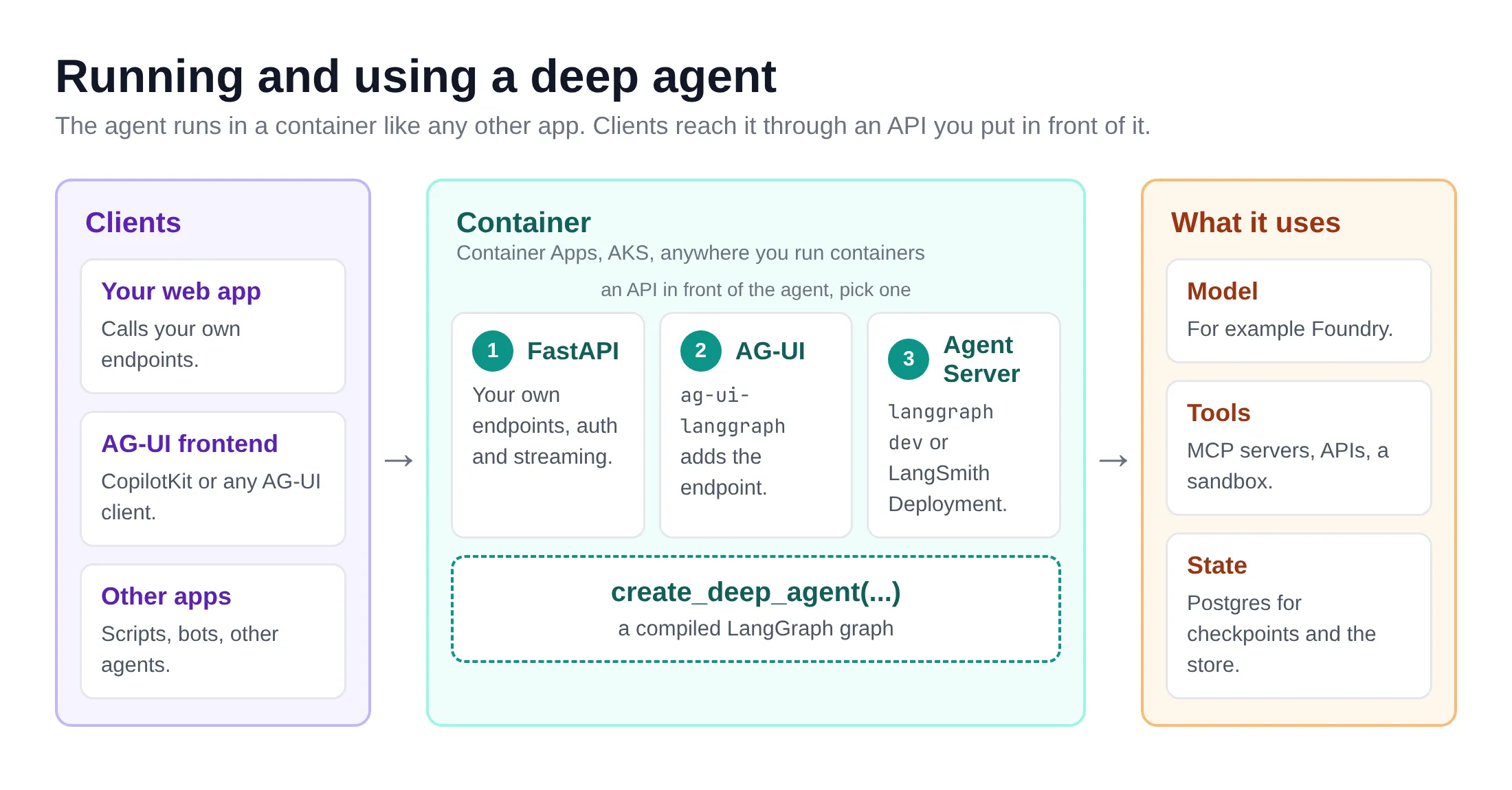
To use it from a client application, you need an API in front of it. I usually wrap the agent in a small custom API with FastAPI, which gives me full control over the endpoints and the auth. You don’t have to build that yourself, though:
- AG-UI: a deep agent is a LangGraph graph, so you can expose it over AG-UI and stream messages, tool calls and state to any AG-UI frontend, such as CopilotKit. In Python, the
ag-ui-langgraphpackage adds the endpoint to a FastAPI app. I wrote about AG-UI with Microsoft Agent Framework before. - Agent Server: serve the graph with the LangGraph CLI (
langgraph devlocally) or deploy it with LangSmith Deployment, and you get threads, streaming and human-in-the-loop over a ready-made API.
What you don’t get
A few honest caveats:
- No shell by default. The agent only gets the
executetool when its backend can run commands. With the backends in this post, it can read and write files but not run them. The easiest option isLocalShellBackend(root_dir=...), but it runs commands on your own machine, with your permissions, so be careful. For anything beyond a quick test, use a sandbox backend: LangSmith, Daytona, E2B, Modal and Runloop have integrations. Is your provider not in the list, for example Azure Container Apps sandboxes? SubclassBaseSandboxand implementexecute()(plusupload_files(),download_files()and anid). The base class buildsls,read_file,edit_file,grepand the other file tools on top ofexecute(). - The harness doesn’t make a small model smart. Planning and skills are prompts and tools. A model that ignores them will still ignore them, as we saw in example 7.
- The API moves. Between 0.5 and 0.7 the default model was deprecated and planning became opt-in. Pin your versions and read the release notes when you upgrade.
Wrapping up
Deep Agents gives you the parts that turn a tool-calling loop into an agent that can handle longer work: a filesystem to put things in, subagents to keep the context clean, skills that load only when needed, and a plan if you want one. And because it’s all LangGraph underneath, streaming, checkpointers and LangSmith work as you would expect. When you run it for real, add a checkpointer for approvals, and a durable engine like Dapr Workflow if runs must survive a crash.
Start with example 1, add one feature at a time, and look at the tool calls at every step. That’s the fastest way to understand what the harness does for you. 😎
If you spot any errors or have questions, feel free to reach out!