Agent 365: who's keeping an eye on your agents?
Agents are popping up everywhere. Makers build them in Copilot Studio, developers ship them on Foundry, SharePoint sites come with a ready-made one, and partners sell them in the store. That’s great, until someone asks a simple question: how many agents do we have, who owns them, and what are they allowed to touch?
In my test tenant, with seven users, the Microsoft 365 admin center counts 357 agents, and tells me that 345 of them don’t have an owner. I certainly didn’t build 357 agents. 🤷
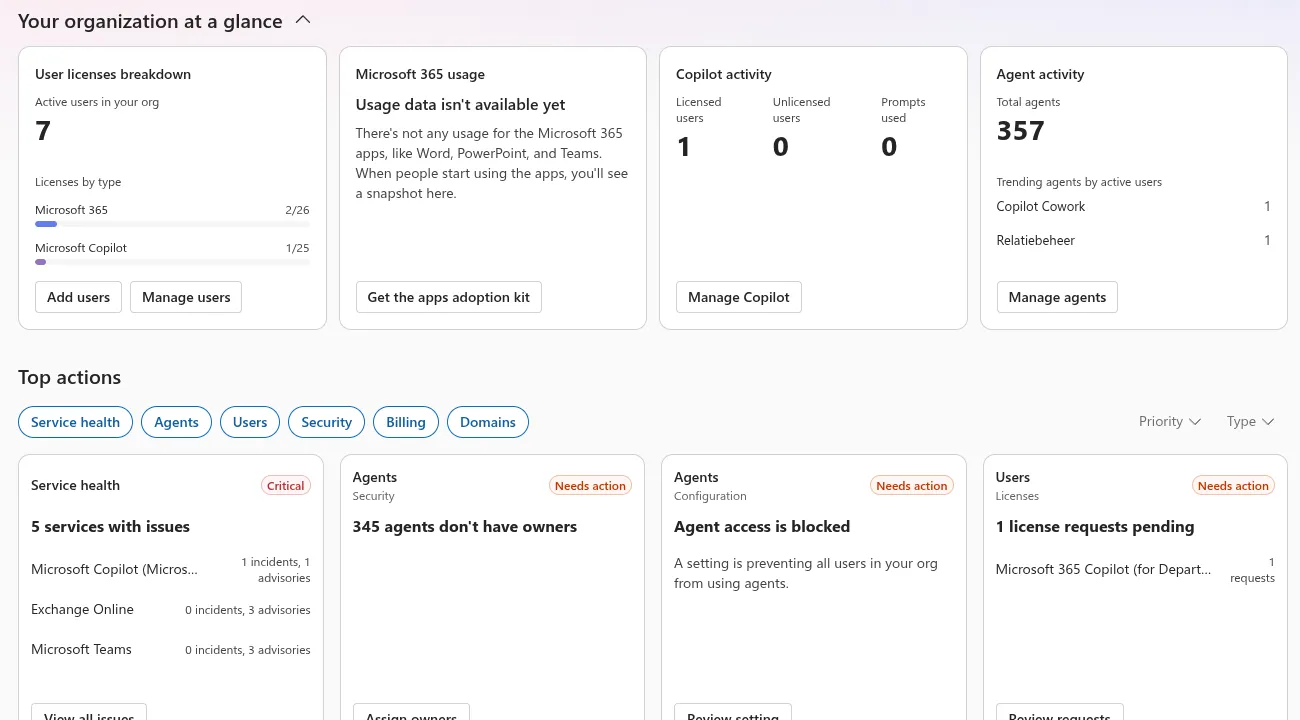
That’s the problem Agent 365 is meant to solve. In my autopilots post I built DocHelper, a digital coworker with its own mailbox and Teams account. In this post we’ll look at the other side: what an admin sees and controls once agents like DocHelper show up. Not the code this time, but the control plane. 😊
What is Agent 365?
Agent 365 is Microsoft’s control plane for agents. It’s not where agents run, and it’s not where they’re built. It’s where admins find them, approve them, lock them down and watch what they do, whatever platform they come from.
It helps to see it as two products stacked on top of each other:
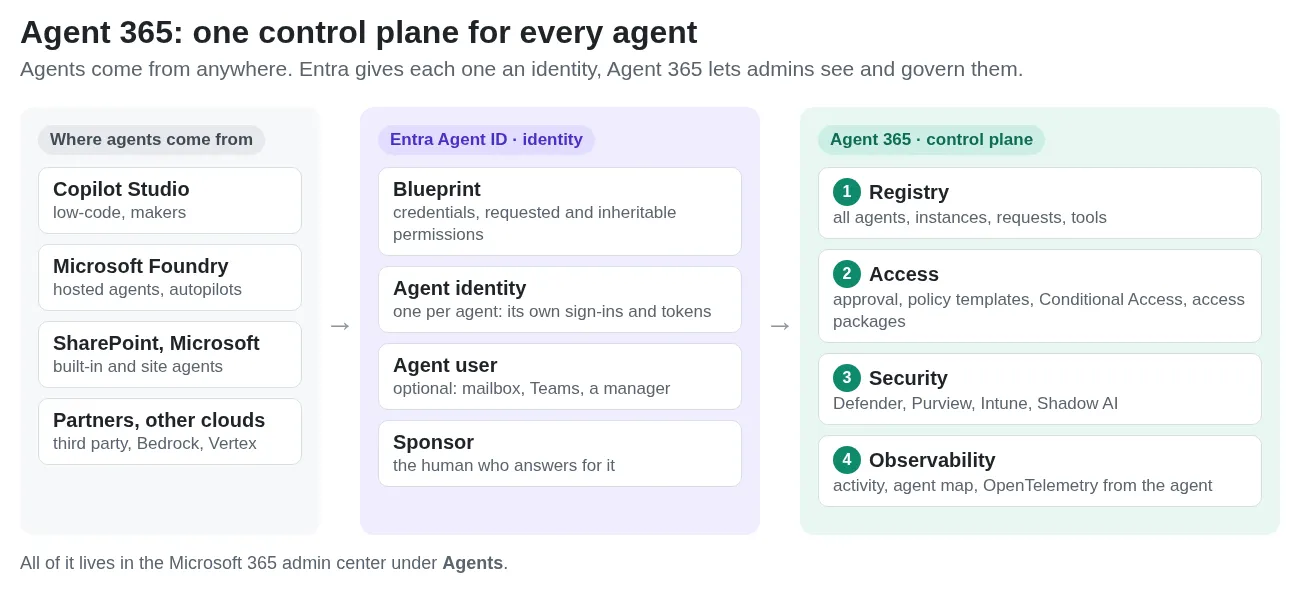
- Microsoft Entra Agent ID is the identity layer. Agents built on supported platforms (Foundry, Copilot Studio, the Agent 365 SDK) get their own identity, created from a blueprint that holds the credentials and declares the permissions the agent asks for. An admin still has to consent to those. Agents that act like a colleague, such as autopilots, also get an agent user with a mailbox and a Teams account. Every agent identity and blueprint needs a sponsor: a person or group who answers for it.
- Agent 365 is the management layer on top. It brings the registry, the approval flow and the admin pages, and it extends Entra, Defender, Purview and Intune to agents, so they get the same treatment as users.
Agent 365 itself lives in the Microsoft 365 admin center under Agents. Identities and Conditional Access are still managed in the Entra admin center, and Defender and Purview keep their own portals.
⚠️ Important: Agent 365 has been generally available since May 1, 2026, licensed per user: it’s part of Microsoft 365 E7 or an add-on to E5, A5 or Business Premium, and agents owned or managed by a licensed user are covered. Agents with their own user account (autopilots, AI teammates) are still a Frontier preview, and the Frontier page asks for at least one E7 license in the tenant. In my tenant, only E7 did the trick. That last bit cost me a few evenings. 🤷
The registry: your agents in one list
Agents > All agents is the inventory. The Registry tab lists the agents available in your tenant, each with a publisher type: Microsoft, external partners, published by your org, and shared by their creator. You can filter by platform. Foundry agents show up on their own, and once you connect a platform under Connected platforms (registry sync, in preview), agents from Amazon Bedrock, Google Vertex AI and others land in the same list. Templates for agents with their own account carry an AI teammate tag and show how many instances were hired.
⚠️ Important: if you remember the Agent registry blade in the Entra admin center: it was retired on May 1, 2026. The admin center list is the inventory now.
Open an agent and you get one page with everything about it. Here’s DocHelper’s template, coworker, built on Foundry:
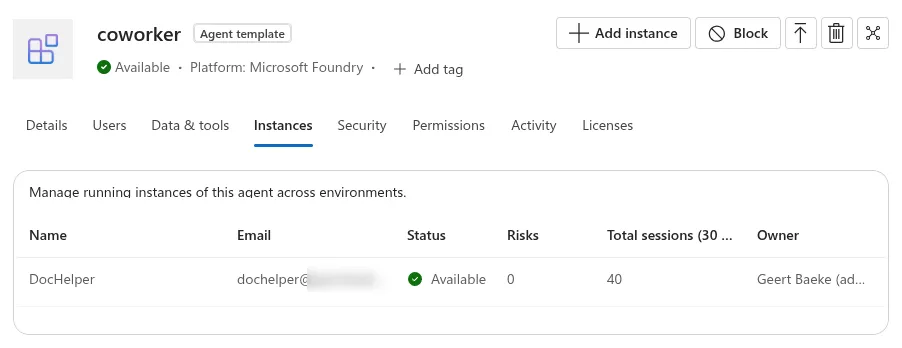
Notice the tabs: Users, Data & tools, Security, Permissions, Activity and Licenses. And the Block button, top right. We’ll get to those.
Approving an agent
Not every agent needs an admin’s blessing. It depends on how far it’s shared:
- Shared by its creator. A maker shares a Copilot Studio, Agent Builder or SharePoint agent with a few colleagues, or a Foundry developer publishes for Just you and sends the link. No approval needed. These agents still show up in the registry as Shared by creator, so admins can see and block them. Admins can also limit sharing: for Agent Builder in the Microsoft 365 admin center, for Copilot Studio in the Power Platform admin center.
- Published to the organization. When a maker or developer wants the agent in the org catalog (Built by your org), it lands under Agents > All agents > Requests as Pending review, and nobody gets it until an admin publishes it.
- Autopilots. Agents with their own account come in as Pending activate. Nobody can hire an instance before an admin activates it.
A Global Administrator or AI Administrator handles these requests. Readers can look, but not approve. Approval is a short wizard, and it’s where most of the governance gets decided:
- Who gets it. Everyone, or specific users and groups. For DocHelper, that’s who may hire an instance.
- A policy template. A bundle of controls applied to the agent at activation, which every instance inherits: SharePoint access control, Purview audit, Defender protection and, for autopilots, the license each instance gets. For other agents you can make your own templates with Conditional Access policies, access packages and custom security attributes (templates for autopilots don’t support custom policies yet). A template change only affects new activations, not agents that were already approved, so pick carefully.
- Permissions. The admin reviews what the blueprint asks for and grants admin consent.
My first attempt stopped at the template. The default one refused to continue:

The per-user Agent 365 license doesn’t count here. Autopilots need the Frontier agent licenses (25 free seats, one per instance), and those only showed up after I assigned an E7. After that, the wizard went through.
After consent, you can see exactly what was granted on the blueprint in Entra. Here’s DocHelper’s: Mail.Read and Files.Read.All on Graph, the Agent 365 MCP servers for Mail, Teams, Word and friends, and the permission to send telemetry to Agent 365:
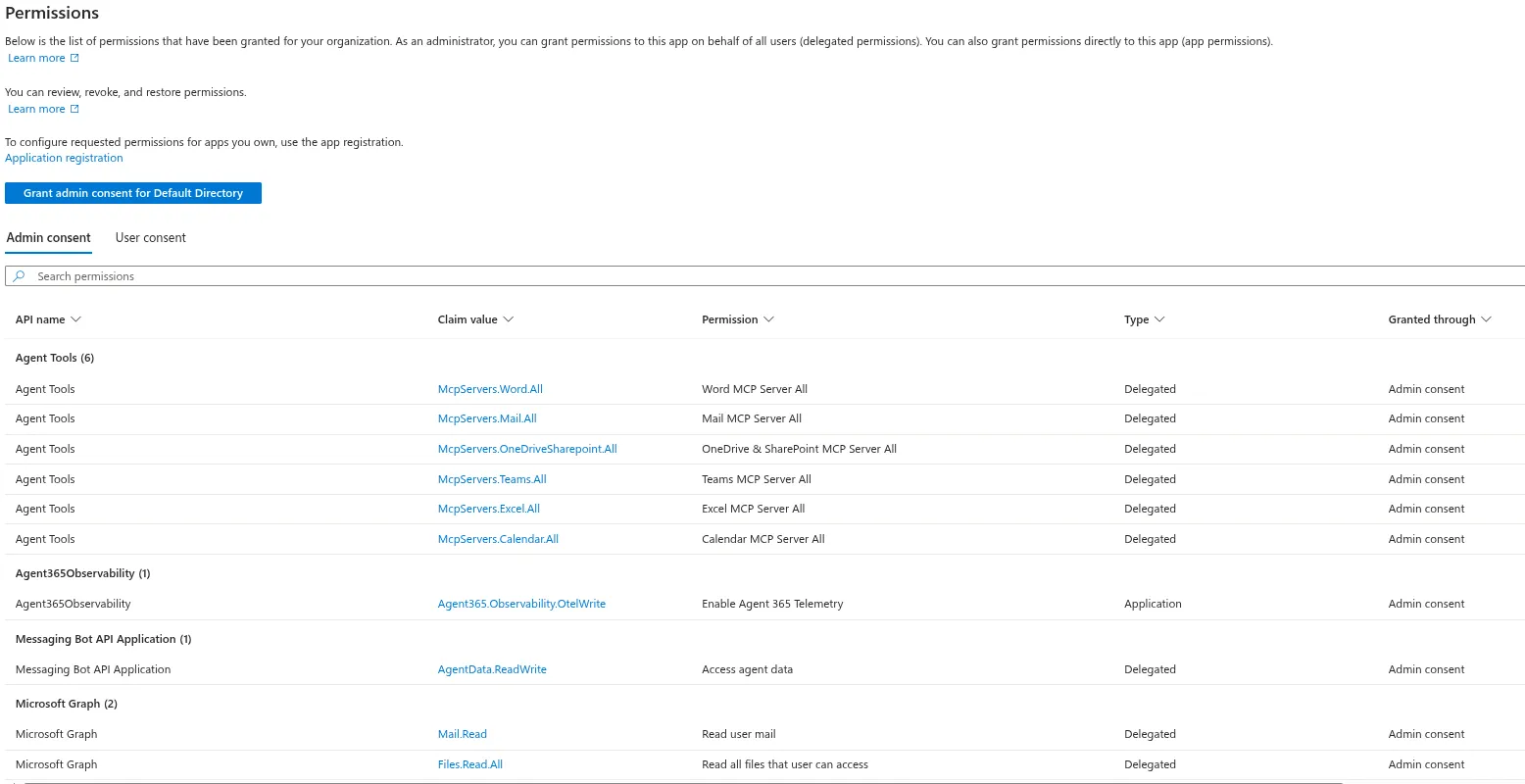
⚠️ Important: consent decides which calls the agent may make. It doesn’t give it anyone’s data. DocHelper acts as its own user account, so it reads its own mailbox and only the files, sites and groups shared with that account, usually by its manager.
Who’s responsible?
Agents get the same kind of accountability as people, split over three roles on purpose:
| Role | Who | Can |
|---|---|---|
| Owner | the technical admin | change the configuration and credentials, disable, re-enable, delete |
| Sponsor | the accountable business person, required | disable the agent, change sponsors, request access on its behalf |
| Manager | the person the agent reports to, by default whoever hired it | request access, sees it in their org chart |
When a sponsor leaves the company, a Lifecycle Workflows leaver workflow can move the sponsorship to their manager. You do have to set that up, and the sponsor needs a manager in Entra. No orphaned agents. Well, apart from the 345 in my tenant. 😎
Locking it down
Because every agent has a real identity, the security tools you use for people work for agents too. A few things I found useful:
- Conditional Access. You can target All agent users or specific agents, and targeting a blueprint covers every agent identity created from it, including future ones (but not their agent users). Two gotchas: a policy for All users does not include agent users, and a policy on the agent identity doesn’t cover its agent user. An autopilot needs both.
- No god mode. Entra simply refuses high-privilege roles for agents (Global Administrator, Privileged Role Administrator, User Administrator) and permissions like
Application.ReadWrite.AllorRoleManagement.ReadWrite.All. Not even a Global Admin can override that. - Access that expires. With access packages, an agent (or its sponsor) requests a bundle of groups and permissions, someone approves it, and it ends on a date. The sponsor gets a heads-up before it expires. Nobody acts, access is gone.
- The Block button. Block a single instance, or block the agent and all its instances stop until an admin unblocks it.
- Tools. Agents > Tools lists the plugins, skills, MCP servers and connectors available to agents in your tenant. For supported MCP servers, admins can allow or block individual tools (still rolling out), enforced at runtime by the Agent 365 Tooling Gateway.
Seeing what agents do
The Activity tab shows who used an agent, and the Agent map also shows which tools it called. Here’s the map for coworker: the two users who worked with DocHelper on the right, and the two tools it called on the left:
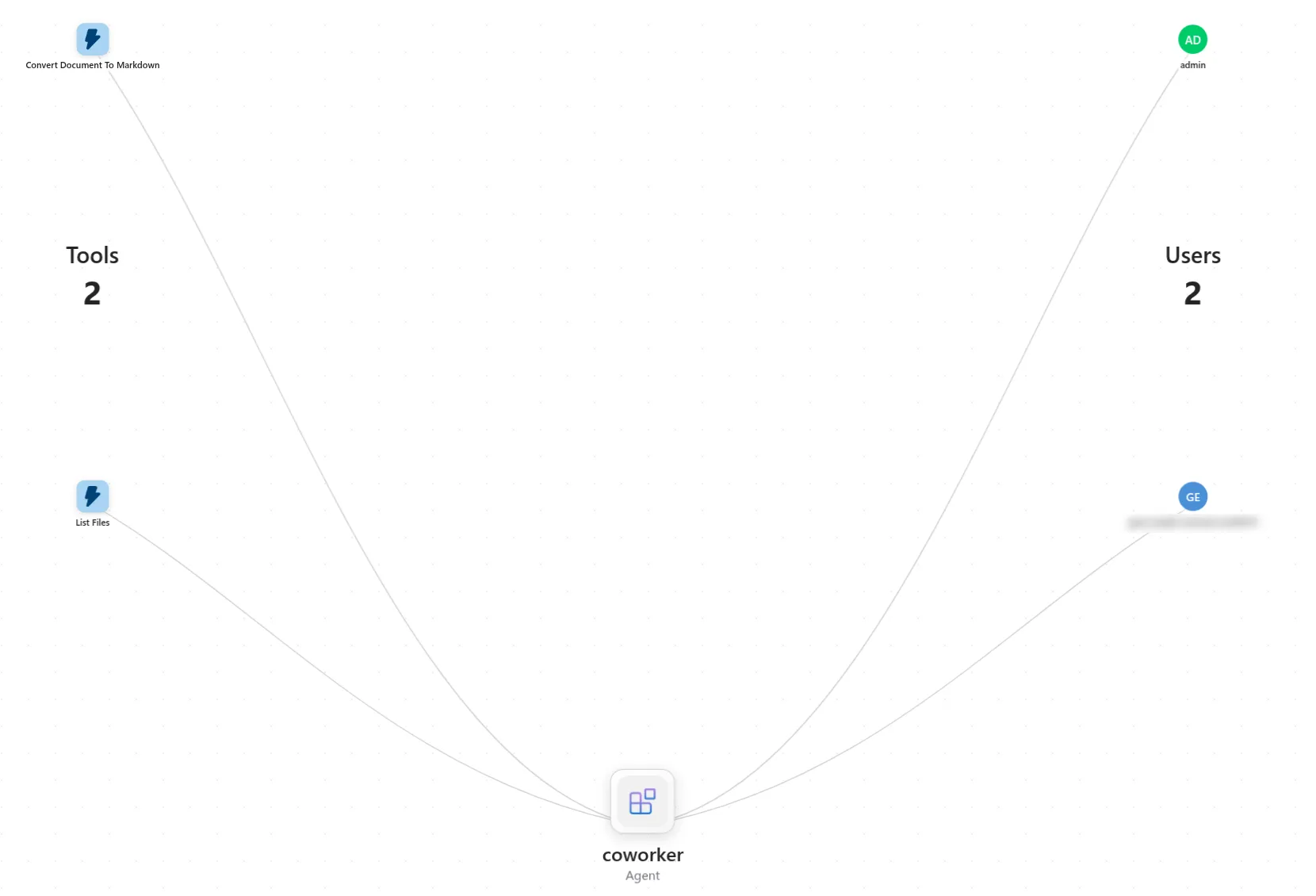
Defender’s advanced hunting and Purview audit use the same data.
That data is OpenTelemetry spans: one invoke_agent per turn, plus chat for model calls and execute_tool for tool calls. For hosted agents, Foundry sends the turn itself (unless Agent 365 data collection is turned off on the Foundry resource), but the tool calls have to come from the agent. In DocHelper I had to get the attributes exactly right before the tools showed up on the map, which is in the autopilots post.
⚠️ Important: at least one user in the tenant needs an E7 or Agent 365 license assigned, or the spans are dropped, even though the export returns a 200. Silent failures are the best failures. 🤷
Shadow AI: the agents nobody published
Not every agent comes through the front door. People install AI apps on their laptops too. The Shadow AI page (Frontier) uses Defender for Endpoint to find them on managed devices:
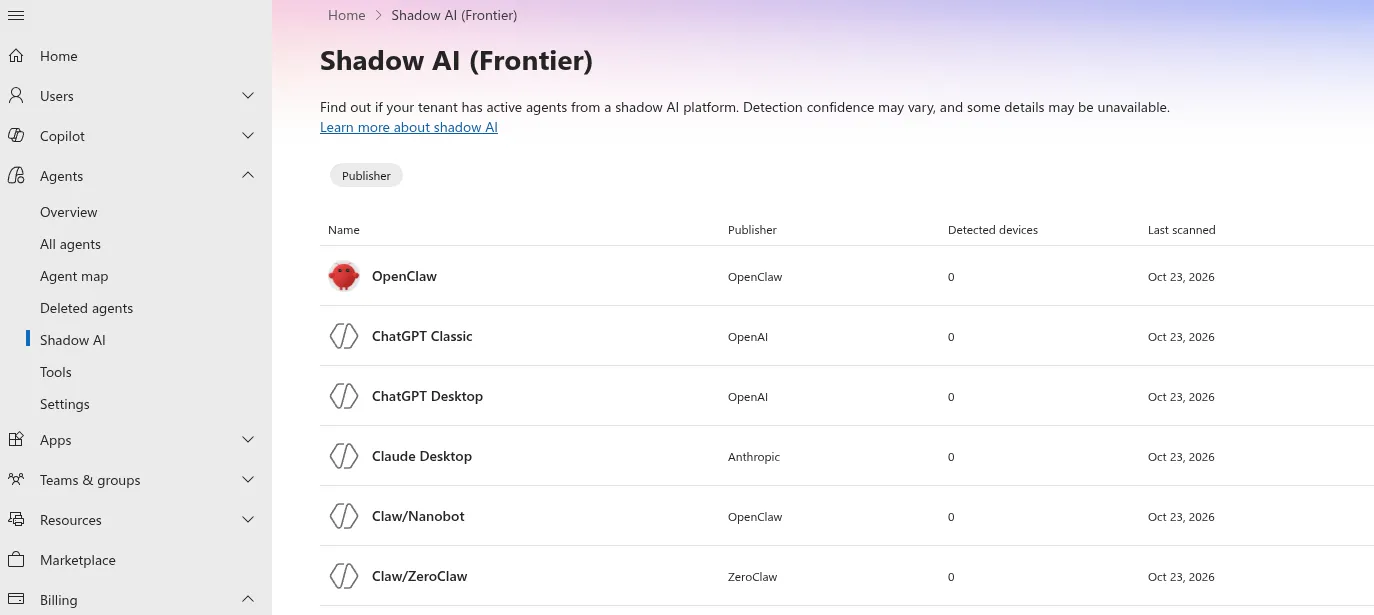
My test tenant has no managed devices, so all counts are zero. The list is short and fixed, and on this page only OpenClaw can actually be blocked, through an Intune policy on managed Windows devices. Learn also describes a newer Local agents page that finds (and can block some) coding agents like Claude Code, Codex and GitHub Copilot CLI. It’s a start, but it won’t find the Python agent someone wrote on Tuesday. 😊
What you don’t get
Agent 365 brings a lot together, but be realistic:
- Licensing is a project of its own. Per-user Agent 365, E7, Frontier seats per instance, E5 plus Defender for Endpoint and Intune for Shadow AI. Figure this out before anything else.
- Lots of preview. Agent users, Conditional Access for agent users, Shadow AI and parts of the observability story are preview, and the docs don’t always agree with each other yet.
- Telemetry is your job. For your own agents, the activity and tool data is only as good as the spans you send.
- Owners don’t appear by magic. The registry shows you the 345 agents without an owner. Assigning them is still work for a human.
Wrapping up
Agent 365 is the control plane for agents in Microsoft 365. Entra Agent ID gives agents an identity with a sponsor, and Agent 365 puts all of them in one registry, runs every new agent through an approval with a policy template, and extends Conditional Access, Defender, Purview and Intune to them. With DocHelper, the whole loop worked: publish, approve, hire, watch, block.
The idea is simple: treat agents like employees. Give them an identity, a boss, limited access and someone who keeps an eye on them. The platform does a lot of that for you, as long as you get the licensing sorted first.
If you want to build an agent that shows up here, Microsoft’s autopilot sample is a good start: https://github.com/microsoft-foundry/foundry-samples/tree/main/samples/python/foundry-autopilot-agent
If you spot any errors or have questions, feel free to reach out!