
I wanted an assistant that is always there. I write to it at 7am and the answer is ready at 7:01. It remembers what I told it last week. I don’t have to start it, and I don’t have to explain myself again.
The obvious way to build that is to keep a container running for every assistant. That works, but you pay for CPU and memory around the clock for something that waits for a message 99% of the time. 🤷
So I built Dottie, a small platform for personal agents I call dotties. A dottie feels like it is always on, but it is awake for only a few minutes a day. The rest of the time nothing runs for it. The trick is a new Azure service: Azure Container Apps Sandboxes.
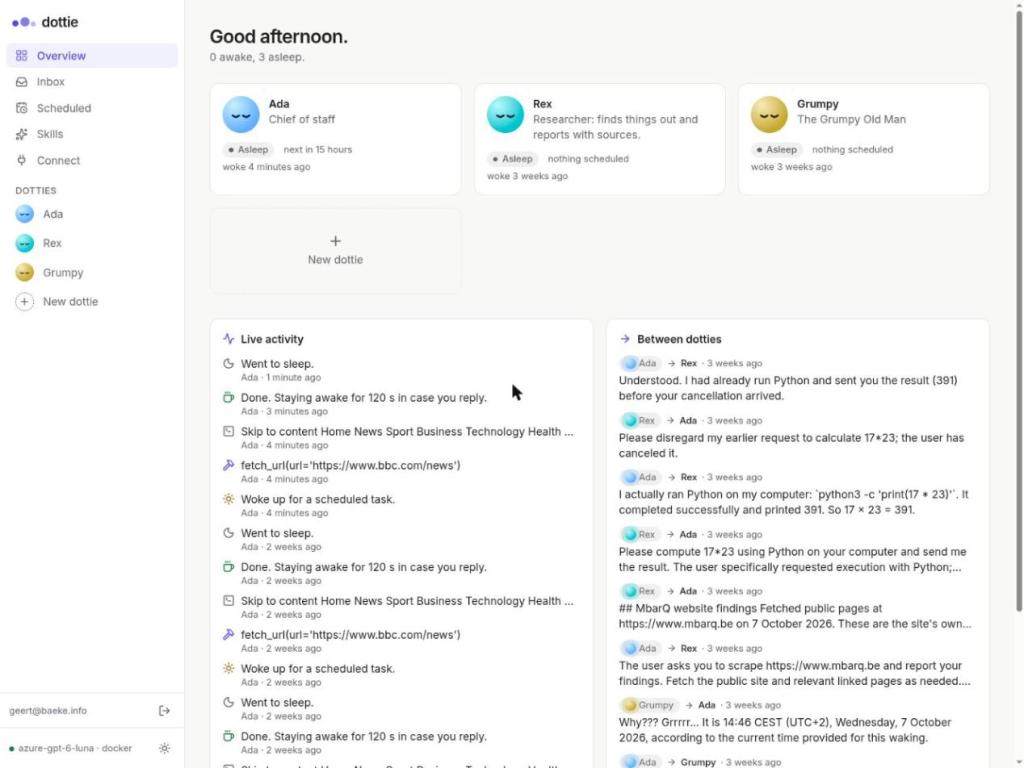
That’s my overview page: Ada, Rex and Grumpy (don’t ask 😊), 0 awake, 3 asleep. That’s how it looks nearly all of the time.
In this post we will look at how that works: what a dottie is, how it wakes up, and how a sandbox gives it a computer that costs nothing while it sleeps. The code is on GitHub: https://github.com/gbaeke/dottie
Two designs that don’t work
There are two obvious designs, and neither is great:
- One container per assistant, always running. The agent loop, its memory and a shell all live in the container. Ten assistants means ten containers running 24/7, mostly to wait.
- No state at all. Every request starts a fresh container and throws it away afterwards. That’s cheap, but now the assistant has no computer. It can’t keep a cloned repo, an installed tool or a half-finished spreadsheet between conversations.
What I wanted sits in between: the assistant keeps its things, but it only costs money while it works.
What are Container Apps Sandboxes?
Azure Container Apps Sandboxes (in preview) are small, isolated microVMs that you create and control from code. If you know Container Apps: apps are services that run all the time, jobs run to completion, and dynamic sessions are throwaway code interpreters. Sandboxes are the machine you can put to sleep.
A few properties make them a good fit here:
- You control the lifecycle. You create a sandbox, run commands in it, upload and download files, and stop it when you decide to.
- Stop means suspend. When a sandbox stops, the platform keeps a snapshot of the disk, or of the disk and memory. When you start it again, it comes back as you left it: same files, same processes.
- A stopped sandbox costs no compute. You don’t pay CPU or memory while it is stopped.
- Each one is isolated. A sandbox has its own CPU, memory, disk and network boundary, and egress policies control what it can reach. Running code an LLM wrote is a lot less scary that way.
- Sandboxes come from prewarmed pools, so starting one is quick.
In other words, a sandbox is exactly the missing middle: a persistent computer that costs nothing while it sleeps.
⚠️ Important: Sandboxes are a preview service, so the API and the details below may change.
So what is a dottie?
A dottie is a personal agent with four things:
- A personality: a short description of who it is and how it talks. Ada is my day-to-day assistant, and Rex does research.
- A wiki: its long-term memory, as markdown pages in PostgreSQL (
people/anna.md,projects/website.md, …). Theindex.mdpage is always in its prompt. It opens the other pages when it needs them, using the normal file tools. - Skills: instructions for specific jobs, such as “write the daily briefing” or “research a topic and report back”. A skill is loaded only when the dottie needs it.
- Tools: message another dottie, tell me something, schedule itself, fetch a web page, run shell commands, and call any MCP server I attach.
You turn on tools per dottie as toolkits. In the screenshots below, the chips at the top right show Ada’s toolkits: computer · docker, messaging, schedule and web.
The wiki is my favorite part. I can read and edit the same pages the dottie uses, so I can see what it knows and correct it when it gets something wrong. Ada wrote this index.md herself:
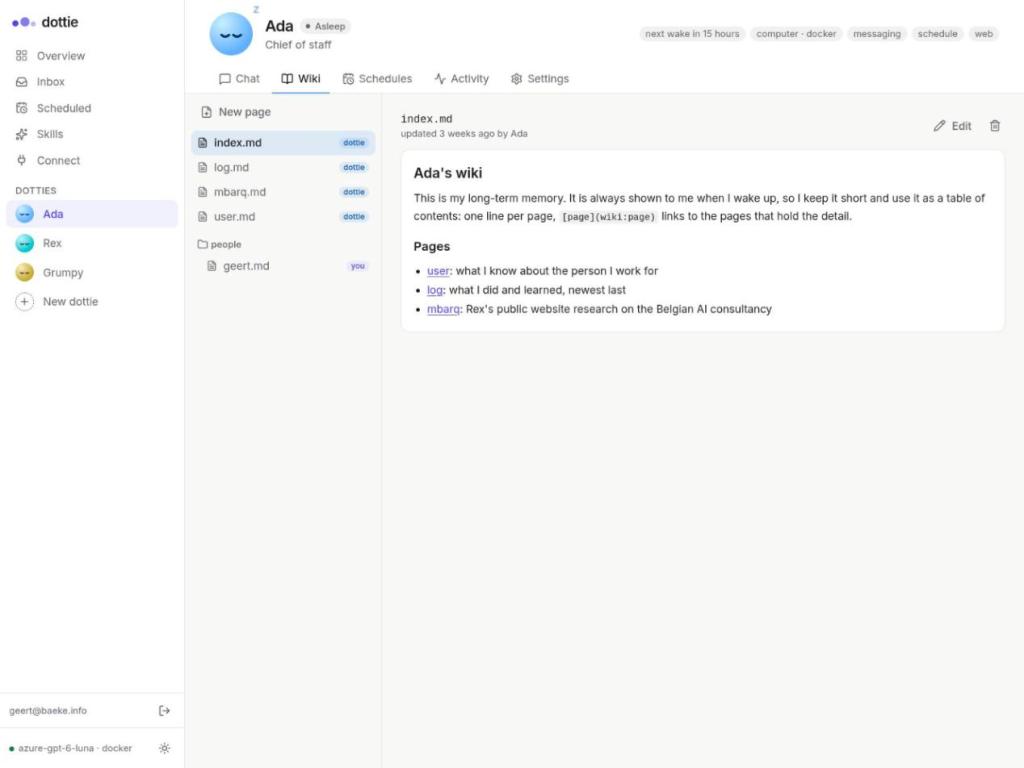
The pages tagged dottie were written by Ada, and people/geert.md was written by me. She reads the index on every waking and opens user.md or log.md only when she needs them.
Notice what is not in the list: a running process. Everything that makes Ada Ada is data in a database: personality, wiki, skills and conversation history. The agent loop is just code that runs on top of that data. I used LangChain’s Deep Agents for it.
That’s the key idea. A dottie is not a process. It is a row, some pages and a history. A process exists only while it works.
Waking up: everything is a message
If dotties are asleep, something has to wake them up. There is one rule for that: the only way to wake a dottie is a message.
All messages go into a single messages table in PostgreSQL, and three kinds of senders write to it:
- You, from the web UI, from Telegram, or from another agent over MCP
- The clock: a scheduler turns due schedules (“every weekday at 7”) into messages
- Other dotties: Ada can message Rex
A dispatcher watches the table. When a dottie has mail, it claims the messages, wakes the dottie, runs the agent until it’s done, delivers the answer, and lets the dottie go back to sleep. The claim is a plain SELECT ... FOR UPDATE SKIP LOCKED, so two workers never take the same messages:
def claim(session: Session, dottie_id: int) -> list[Message]:
    """Take the oldest conversation's pending messages for processing."""
    # ... find the oldest conversation with pending mail ...
    ids = list(
        session.scalars(
            select(Message.id)
            .where(Message.recipient_id == dottie_id, Message.status == "pending", ...)
            .with_for_update(skip_locked=True)
        )
    )
    if ids:
        session.execute(update(Message).where(Message.id.in_(ids)).values(status="processing"))
    ...
Because there is only one way in, everything else gets simple. A schedule is “post a message at a time”. Dottie-to-dottie is “post a message to someone else”. Adding Telegram was a webhook that posts a message. If the table ever needs to become Azure Service Bus, only post and claim change.
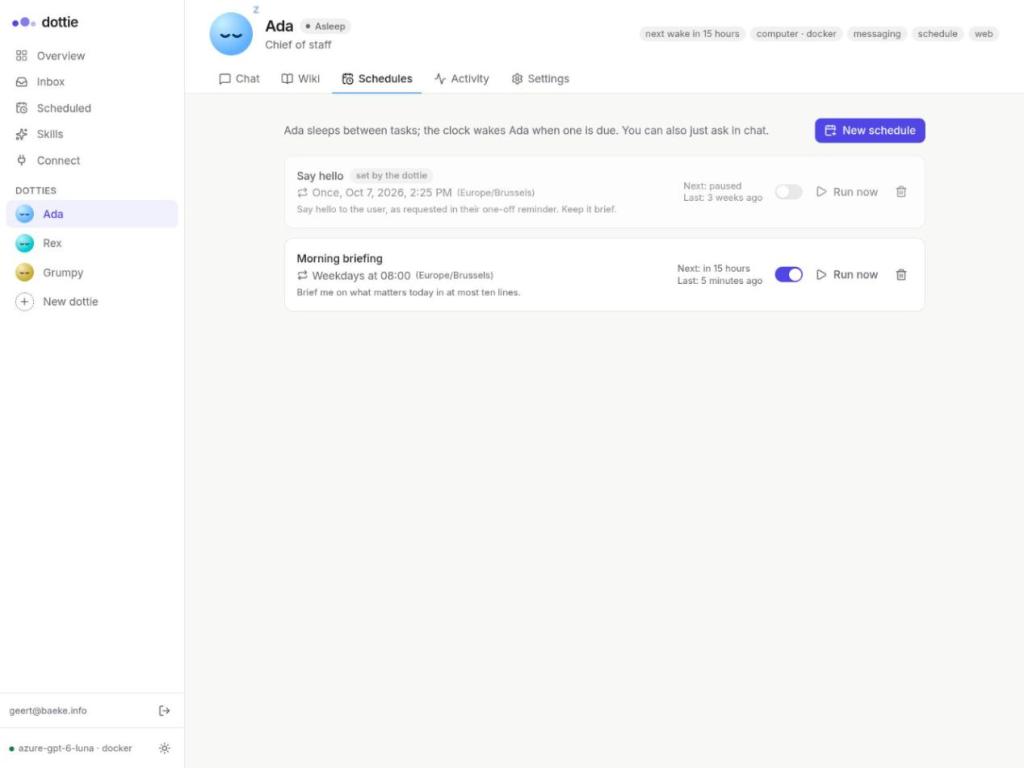
Schedules are also just rows. The Morning briefing below is mine. The Say hello one-off was created by Ada herself after I asked her to remind me of something (note the set by the dottie tag):
⚠️ Dotties that talk to each other can loop forever. 😊 Every message carries a hop counter (MAX_MESSAGE_DEPTH, 5 by default), and a dottie can send only a limited number of messages per waking.
A day with Ada
Let’s see how this works in practice.
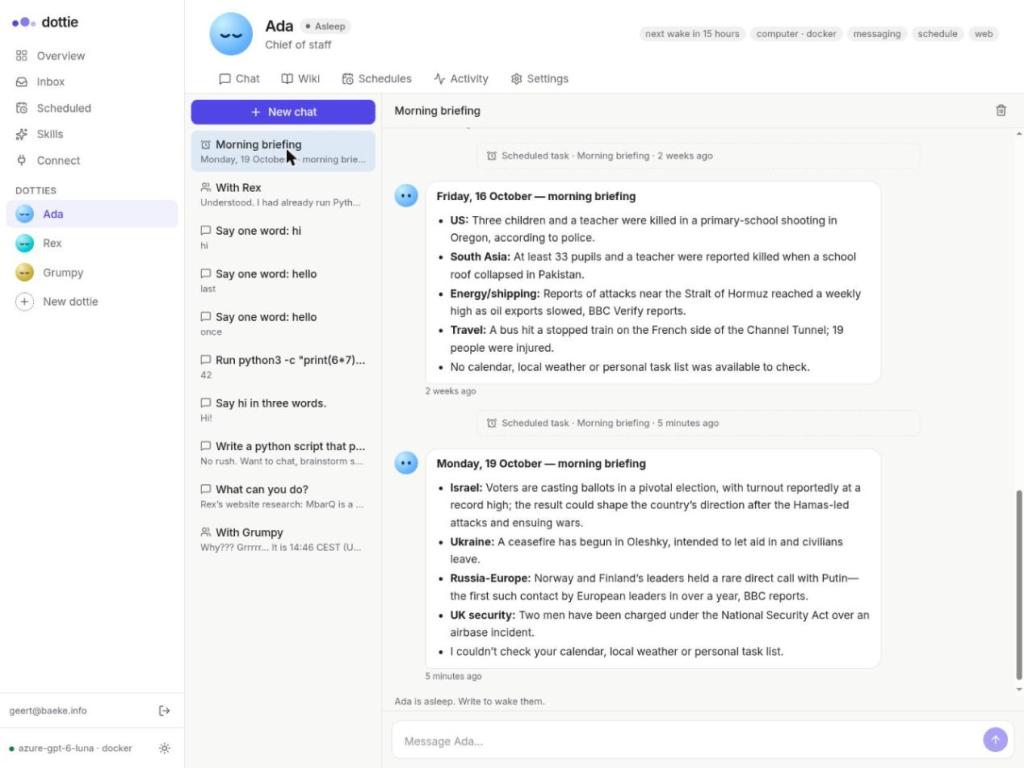
08:00. The clock sees that Ada’s Morning briefing is due and posts a message to her inbox. The dispatcher wakes Ada. She reads her wiki index, fetches the news, writes a short briefing and posts it in the conversation (or on Telegram). Then she goes back to sleep. Each run lands in the same conversation, so she can build on the previous ones:
The activity feed shows what actually happened during that waking. She woke up for the scheduled task, made one fetch_url call, stayed awake for 120 seconds in case I replied, and went to sleep:
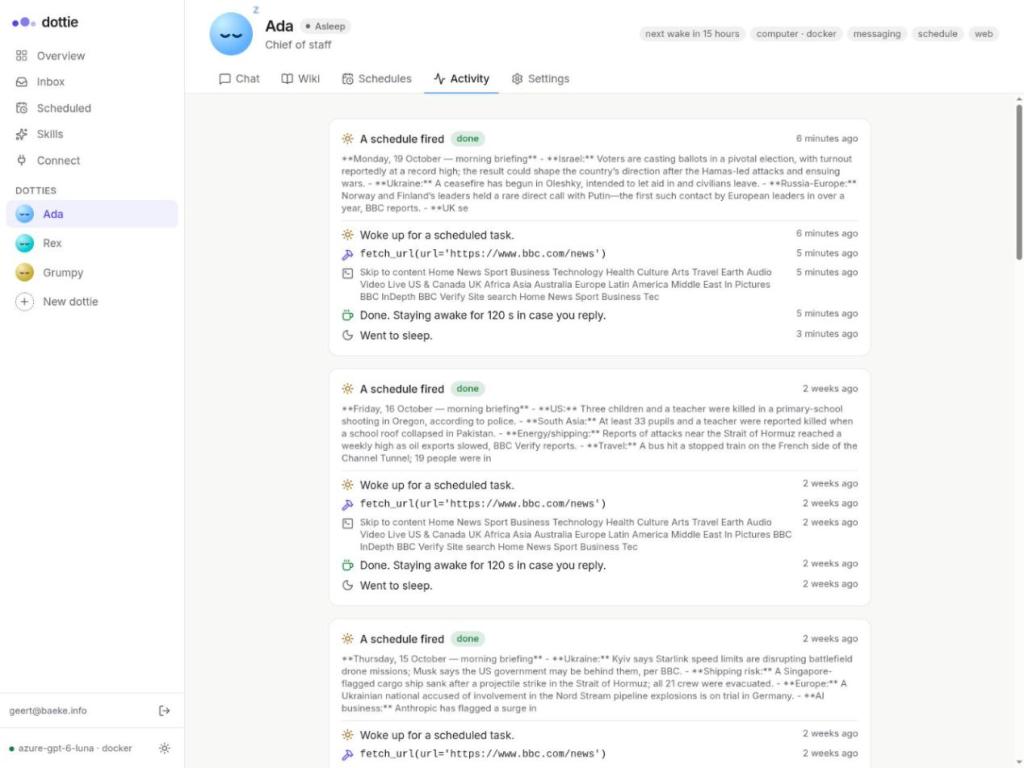
Notice what is missing: she never needed a shell, so no sandbox was started. Most wakings look like this.
Later that day. I ask Ada to write a Python script, run it, and tell me who and where she runs as. Now she needs her computer. The first execute call starts (or resumes) her sandbox, and the script ends up in /workspace:
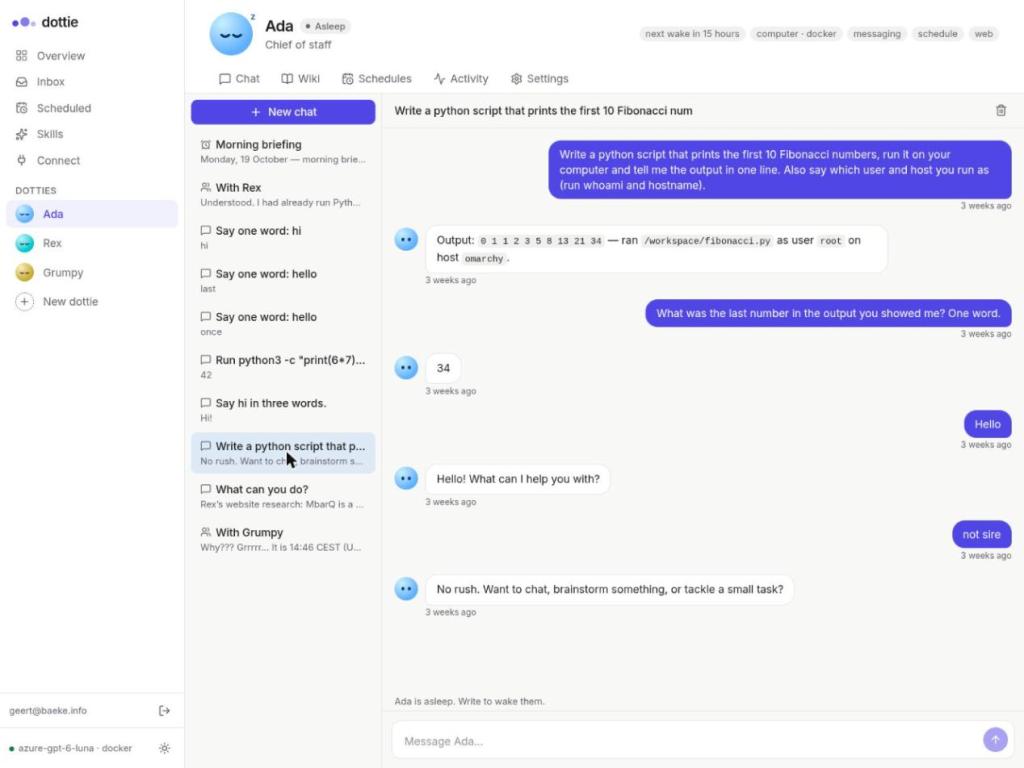
This is my local setup, so her “computer” is a Docker container and the host is my laptop 😎. On Azure it’s a Container Apps sandbox. Two minutes after the last message, the engine stops it. The compute cost goes to zero, and /workspace/fibonacci.py stays on the disk for next time.
Dottie to dottie. Dotties also talk to each other, and every message wakes the recipient. Here Rex asked Ada to compute something with Python on her computer. She did and reported back, and then they sorted out a cancellation between themselves:
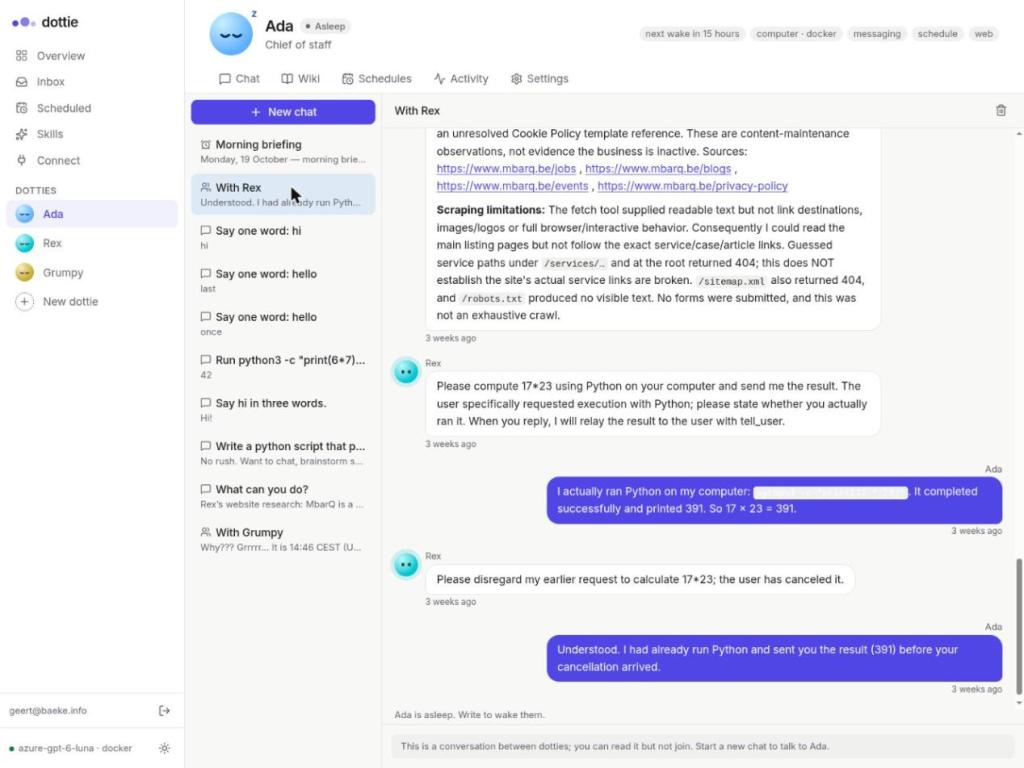
Every bubble in that conversation is a separate waking. In between, nothing ran for either of them.
The sandbox is the dottie’s computer, not the dottie
This is the one rule that drives the design:
- Identity, wiki and history live in PostgreSQL. If a sandbox were lost tomorrow, the dottie would lose its scratch files but not its mind.
- The sandbox is lazy. Most wakings are just chat: read the wiki, think, answer. Starting a sandbox costs time and money, so it starts only when the agent runs its first command or touches
/workspace. - The engine stops the sandbox when the dottie goes back to sleep, after a short warm window (120 seconds) so a follow-up question skips the resume. The platform’s auto-suspend is only a backstop.
- The next waking resumes the same sandbox: same disk, same installed tools, same half-finished work.
The lazy part is a small wrapper around the real sandbox. Nothing starts until the agent first calls execute or touches a file:
class LazySandbox(BaseSandbox):
    """A sandbox that is only started when the agent first uses it."""

    def _sandbox(self) -> SandboxBackendProtocol:
        with self._lock:
            if self._inner is None:
                inner, self.started = self.provider.wake(self.dottie)
                ...
            return self._inner

    def execute(self, command: str, *, timeout: int | None = None) -> ExecuteResponse:
        try:
            return self._sandbox().execute(command, timeout=timeout)
        except Exception as e:
            return ExecuteResponse(output=f"My computer did not start: {e}", exit_code=1)
On Azure, wake either resumes the dottie’s existing sandbox or creates one. With the preview SDK that is only a few lines:
def wake(self, dottie: Dottie) -> tuple[SandboxBackendProtocol, str]:
    if dottie.sandbox_ref:
        client = self.group.get_sandbox_client(dottie.sandbox_ref)
        client.ensure_running()  # resumes a suspended sandbox with its disk (and memory)
    else:
        client = self.group.begin_create_sandbox(
            disk="ubuntu",
            auto_suspend_seconds=max(300, self.idle_seconds * 2),  # a backstop
            labels={"app": "dottie", "dottie": dottie.slug, "user": dottie.owner_id},
        ).result()
    return AcaSandbox(client), client.sandbox_id

def sleep(self, ref: str) -> None:
    self.group.get_sandbox_client(ref).stop()
Locally, the same interface is backed by a Docker container per dottie, so you can try all of this without an Azure subscription.
Where does the agent loop run?
There are two modes, set with AGENT_MODE:
app: the agent thinks in the main app, and the sandbox only runs commands and holds files. It’s simple, but every active agent costs app CPU and memory.sandbox: the agent loop itself runs inside the dottie’s sandbox. The app becomes a control plane (messages, clock, dispatcher, UI), the thinking scales out on the platform, and the app mostly waits.
The diagram below shows a single waking in sandbox mode:
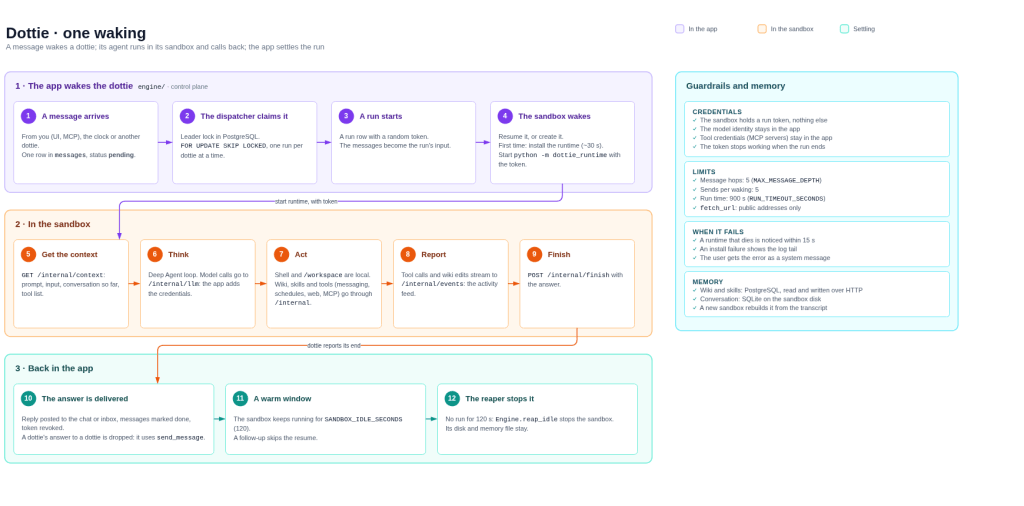
The second mode has a security property I really like: the sandbox gets a random token for that run and nothing else. It has no database password and no model key. When the agent in the sandbox needs the model or a tool, it calls back to the app over /internal, and the app adds the real credentials. The token stops working when the run ends. So even code the agent writes and runs in its sandbox can’t leak anything valuable.
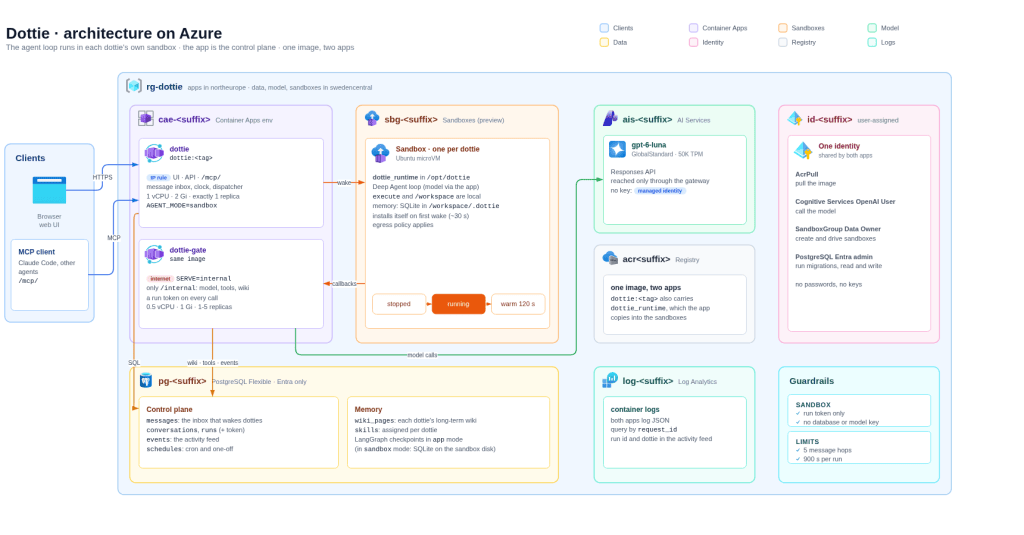
On Azure, that adds up to the architecture below. It uses one container image and two Container Apps: the main app and a small gateway that serves only the /internal API to the sandboxes. A user-assigned managed identity means there are no passwords or keys anywhere:
What you don’t get
A few honest caveats:
- ⚠️ Sandboxes are in preview, so expect changes.
- The first waking in
sandboxmode installs the runtime in the sandbox. That takes about 30 seconds. After that it stays on the disk. - An assistant that sleeps can’t watch for things on its own. If you want it to notice something, give it a schedule or point a webhook at it.
Wrapping up
Always on is a property of the experience, not of the infrastructure. The infrastructure can be asleep nearly all the time, as long as two things hold. First, what makes the assistant itself (memory, personality, history and skills) lives somewhere durable. Second, the thing that wakes it up is one boring, reliable message queue.
Container Apps Sandboxes fill the last gap: a real computer per assistant that you suspend when it’s idle and resume in seconds with everything still on disk. You pay for waking time, not for waiting. Easy does it! 😎
The code is at https://github.com/gbaeke/dottie. It runs locally with Docker and on Azure with a few scripts. If you try it, spot any errors or have questions, feel free to reach out!


Leave a Reply