From WordPress.com to a static site on Azure
baeke.info ran on WordPress.com since 2011. That worked fine for a long time, but lately I write every post in Markdown, in a git repo, with Claude Code next to me. Getting that Markdown into WordPress meant converting it to block markup, uploading images through the admin page and checking that every block was valid. Lots of moving parts for what is, in the end, text and images. 🤷
So I moved the blog to a static site: the posts are Markdown files in git, Astro turns them into HTML, and Azure Static Web Apps serves the result. The migration took about an hour one evening before bed. The redesign happened the next day, from my phone, on the train, while my machine at home did the work. 😎
Here is the before and after:
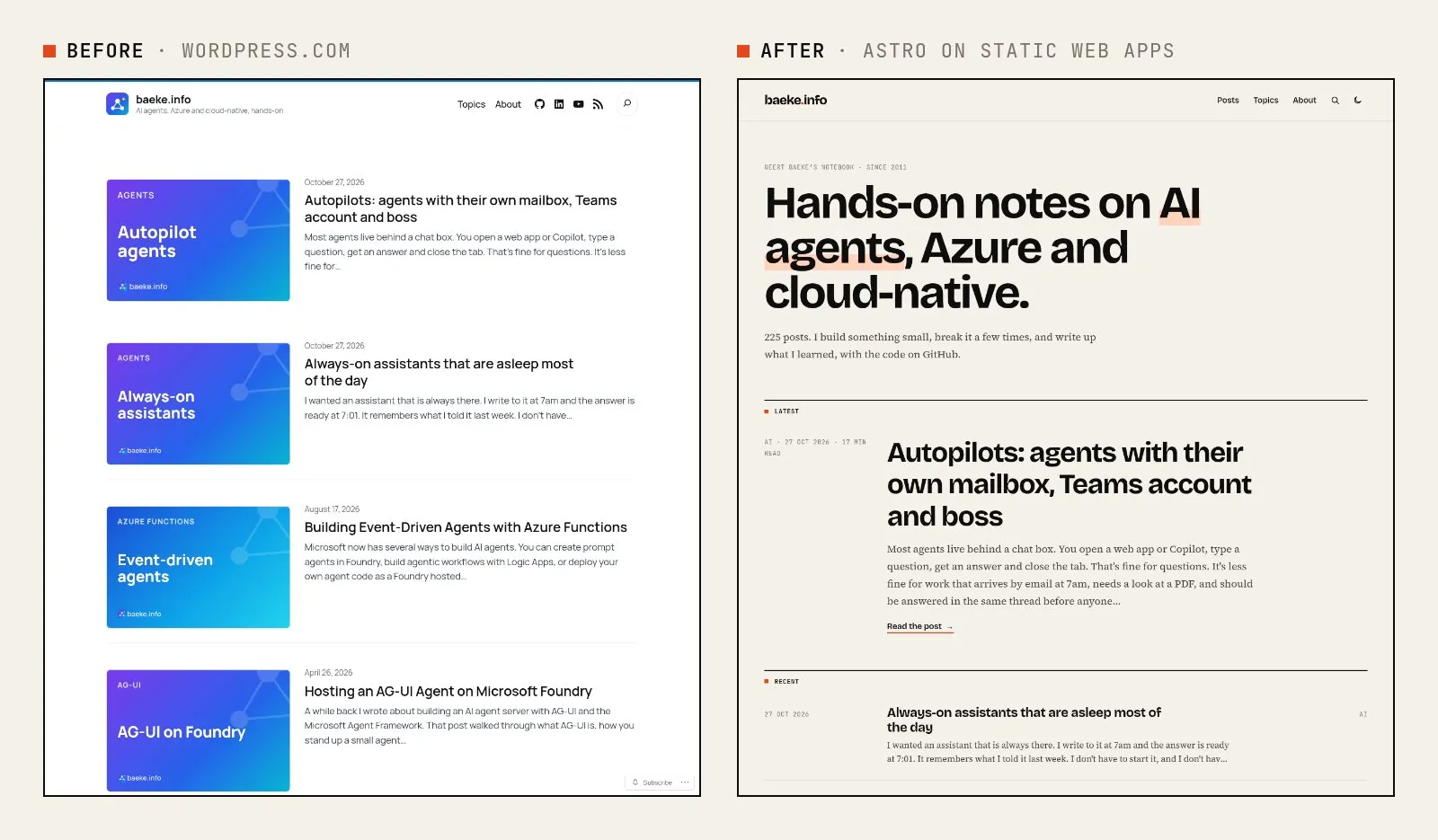
In this post I’ll give an overview of how it fits together and the key points: getting the content out of WordPress, keeping the old URLs working, hosting on the Free plan, switching DNS without (much) drama, and the new design. The repo is private for now because it also holds my drafts, but the snippets below are the parts that matter.
Why move at all?
A few reasons, in order of importance:
- The writing workflow. Markdown in git is the source of truth. No conversion to blocks, no media library, no “this block contains unexpected or invalid content”.
- Speed. Plain HTML from a CDN is fast. Cloudflare Web Analytics reports a median Largest Contentful Paint of about 250 ms.
- Control. The whole site, design included, is code I can change, review and roll back.
- Cost. The site runs on the Free plan of Static Web Apps.
The big picture
The setup has four parts and one step that ran only once:
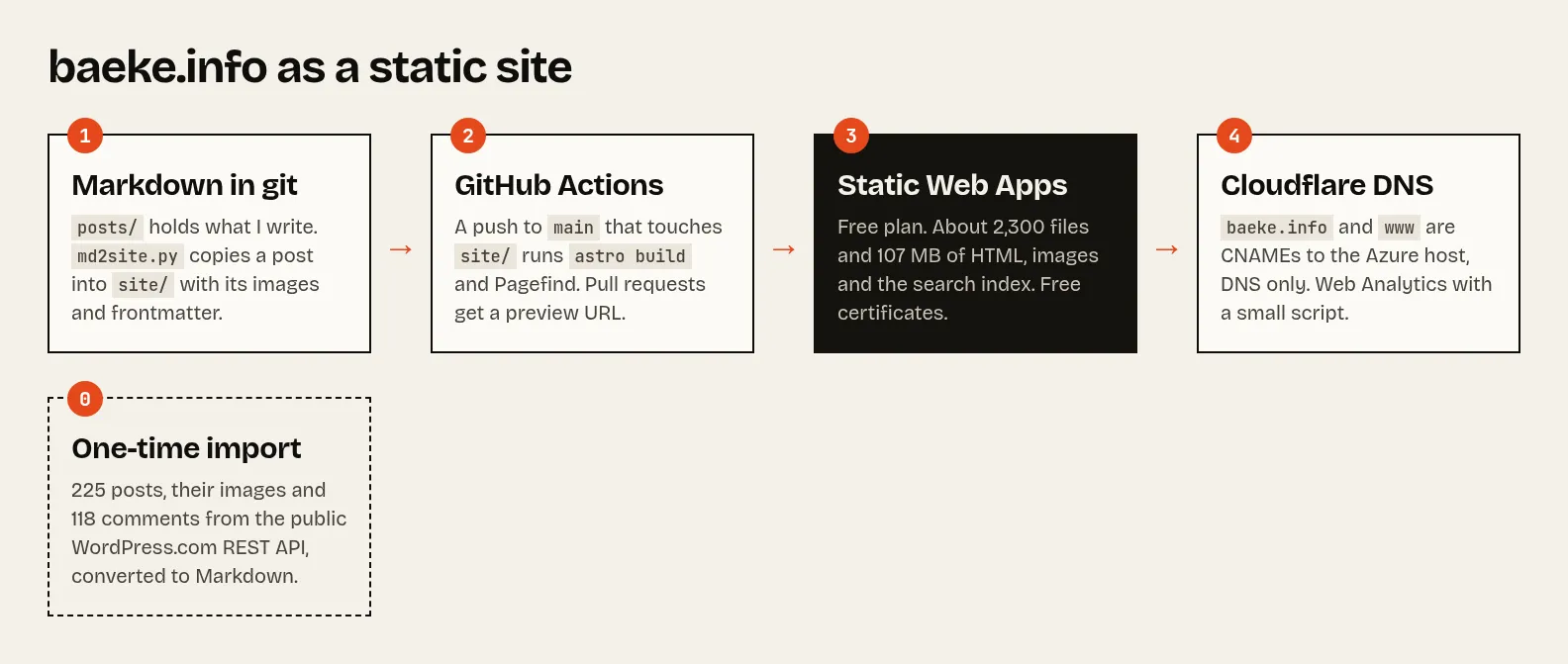
- Markdown in git. I write posts in
posts/<folder>/post.md. A small script,md2site.py, copies a post into the Astro project with its images and frontmatter. - GitHub Actions builds the site on every push to
mainthat touches the site, and deploys it. Pull requests get their own preview URL. - Azure Static Web Apps serves the HTML, images and search index, with free certificates for
baeke.infoandwww.baeke.info. - Cloudflare keeps doing DNS, plus a small analytics script.
The site itself is Astro with content collections. Search is Pagefind, which builds a search index at build time, so there is no search server. Code highlighting is Shiki, and there is a full-text RSS feed and a sitemap.
Getting the content out of WordPress
WordPress.com has a public REST API. For a public blog it needs no login and no export file:
curl "https://public-api.wordpress.com/wp/v2/sites/baeke.info/posts?per_page=100&page=1"A one-time import script walked through all 225 posts. For each post it converted the HTML to Markdown with turndown, downloaded the images next to the post and wrote the metadata as frontmatter. Each post now looks like this:
---
title: "End-to-end authorization with Entra ID and MCP"
date: "2025-07-29T15:14:48Z"
permalink: "/2025/07/29/end-to-end-authorization-with-entra-id-and-mcp/"
categories: ["ai","api"]
tags: ["agents","azure","entra","mcp"]
cover: "./2026-10-card-end-to-end-authorization-with-entra-id-and-mcp.png"
wpId: 6144
---
Fifteen years of posts means fifteen years of different editors, so the conversion had a few gotchas:
- Old code blocks from the SyntaxHighlighter plugin use
<br>inside<pre>. Converted naively, all the code ends up on one line. - Text like
<your-key>in a sentence is an unknown HTML tag to a converter, so it silently disappears. Those have to be escaped. - Tables need the GitHub-flavored Markdown plugin, and a few links still pointed to an old WordPress staging host.
The 118 comments on 35 posts are archived as JSON and shown read-only under their posts. The wpId links a post to its comments. Once the import was done, I deleted the import script. WordPress won’t be used anymore, so there is nothing to keep in sync.
Keeping the old URLs working
This was my main requirement: links to the blog from other sites and from search engines should keep working. The static site uses the same URL structure as WordPress:
- Posts:
/2025/07/29/end-to-end-authorization-with-entra-id-and-mcp/ - Lists and archives:
/page/2/,/category/azure/,/tag/mcp/,/2025/and/2025/07/ - The feed at
/feed/, and old shortlinks like/?p=6144
Most of that is just generating pages at the same paths. The rest is in staticwebapp.config.json:
{
  "routes": [
    { "route": "/feed/", "rewrite": "/feed.xml" },
    { "route": "/author/*", "redirect": "/about/", "statusCode": 301 },
    { "route": "/_astro/*", "headers": { "Cache-Control": "public, max-age=31536000, immutable" } }
  ],
  "globalHeaders": { "Referrer-Policy": "strict-origin-when-cross-origin" }
  # ...
}
Static Web Apps routes can’t match on query strings, so /?p=6144 is handled on the home page itself: a few lines of JavaScript look up the id in a generated wp-ids.json and redirect to the post. /?s=term searches forward to the search page the same way.
⚠️ Important: that Referrer-Policy header matters. Static Web Apps sends same-origin by default, and with that policy embedded YouTube videos refuse to play (error 153). strict-origin-when-cross-origin fixes it.
Hosting on the Free plan
The Free plan of Static Web Apps is generous for a blog, but it has limits:
- 250 MB of storage per environment and 15,000 files
- 100 GB of bandwidth per month
- 2 custom domains and 3 preview environments
- no SLA
With 225 posts and all their images, the site is about 107 MB in 2,269 files. The Standard plan is about $9 per month if I ever outgrow it.
⚠️ Important: watch the size of what you generate. My first build used Astro’s responsive image layout, which writes several sizes of every image. That build was 472 MB, far over the 250 MB limit. Without it the build is back to 107 MB.
Switching DNS at Cloudflare
My DNS lives at Cloudflare, and both baeke.info and www now point to the Static Web App. The root domain uses a CNAME, which Cloudflare allows at the apex thanks to CNAME flattening. Both records are set to DNS only, so Static Web Apps handles the certificates. baeke.info is the default domain of the app, so www redirects to it.
⚠️ Important: to validate a root domain, Static Web Apps wants the TXT record on @ itself. I first added it as _dnsauth, which is what you use for subdomains, and that gave about 15 minutes of certificate errors before the right record was in place. On a busier site, add the TXT record first and only then switch the CNAME.
For analytics I use Cloudflare Web Analytics. Its automatic setup needs proxied records, so instead the site includes the small analytics script. It uses no cookies.
A new design, from the train
The first version of the static site copied the WordPress theme, so nobody would notice the move. Once it was live, I asked for a radically new design: fresh, clear and modern, and not the usual violet AI gradients. 😊
The result is an editorial look: warm paper, near-black ink and one red-orange accent. Headings are in Bricolage Grotesque, the text in Source Serif 4, and dates and labels in JetBrains Mono. The fonts are hosted by the site itself, so nothing loads from Google. The home page lists posts as text without thumbnails, and posts show their date and reading time in a column on the left. There is a dark mode too, with light as the default.
I reviewed every step on my phone. The dev server was reachable over my Tailscale network, and a preview environment on Static Web Apps gave a real URL before anything went to production. When I was happy, it was one message to ship it.
The title cards I use as social images got the same treatment:
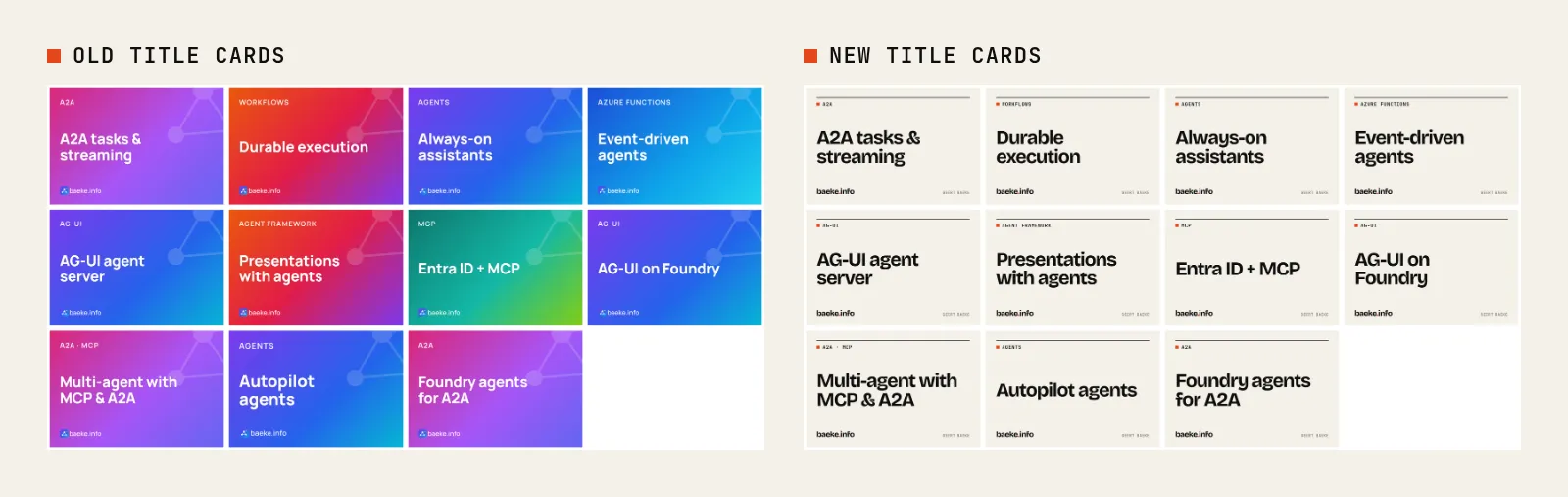
The cards are rendered from a small HTML template with headless Chromium. The favicon and the iOS home screen icon are now the “b” from the logo with the red-orange dot.
Publishing a new post
Publishing is now a few commands and a push:
python3 tools/md2site.py posts/2026-10-static-site --categories azure   # copy in as a draft
cd site && npm run dev                                                  # preview, drafts included
python3 tools/md2site.py posts/2026-10-static-site --publish            # when it's ready
git commit -am "New post" && git push                                   # GitHub Actions deploys
The workflow builds the site and uploads the result with the Static Web Apps action:
on:
  push:
    branches: [main]
    paths: ['site/**']
  pull_request:
    paths: ['site/**']
jobs:
  deploy:
    steps:
      # ... checkout, setup-node, npm ci
      - run: npm run build
        working-directory: site
      - uses: Azure/static-web-apps-deploy@v1
        with:
          azure_static_web_apps_api_token: ${{ secrets.AZURE_STATIC_WEB_APPS_API_TOKEN }}
          action: upload
          app_location: site/dist
          skip_app_build: true
Drafts are left out of the build, so pushing a draft is safe.
What you don’t get
A few honest caveats:
- No new comments. Old comments are shown read-only. New posts have none for now; I might add giscus later.
- WordPress followers don’t come along. People who followed the blog in the WordPress Reader or by email need to switch to the RSS feed.
- Hotlinked images break. Other sites that embed images from
/wp-content/uploads/get a 404, and WordPress attachment pages are gone. - No SLA on the Free plan. For a personal blog I can live with that.
Wrapping up
A blog is text and images, and a static site treats it that way: Markdown in git, a build that turns it into HTML, and a CDN that serves it. The move kept every post, comment and URL that matters, the site is much faster, and it costs nothing to run.
The best part is the workflow. The whole thing, from the import to the redesign, was done with Claude Code, some of it from my phone. Writing, previewing and publishing are now just files and a push.
If you spot any errors or have questions, feel free to reach out!
#azure#static-web-apps#astro#wordpress#cloudflare#claude-code