One agent, three protocols on Foundry Hosted Agents
Contents 8 sections
Agents today are used in several ways. Colleagues want them in Teams, an application wants to call them over an API, and other agents want to delegate work over A2A. Those are three protocols: Teams speaks the Activity protocol, many applications use the OpenAI Responses API or something similar, and A2A is JSON-RPC with tasks and agent cards. You don’t want to write all that code yourself, so look for a platform that handles those entry points for you.
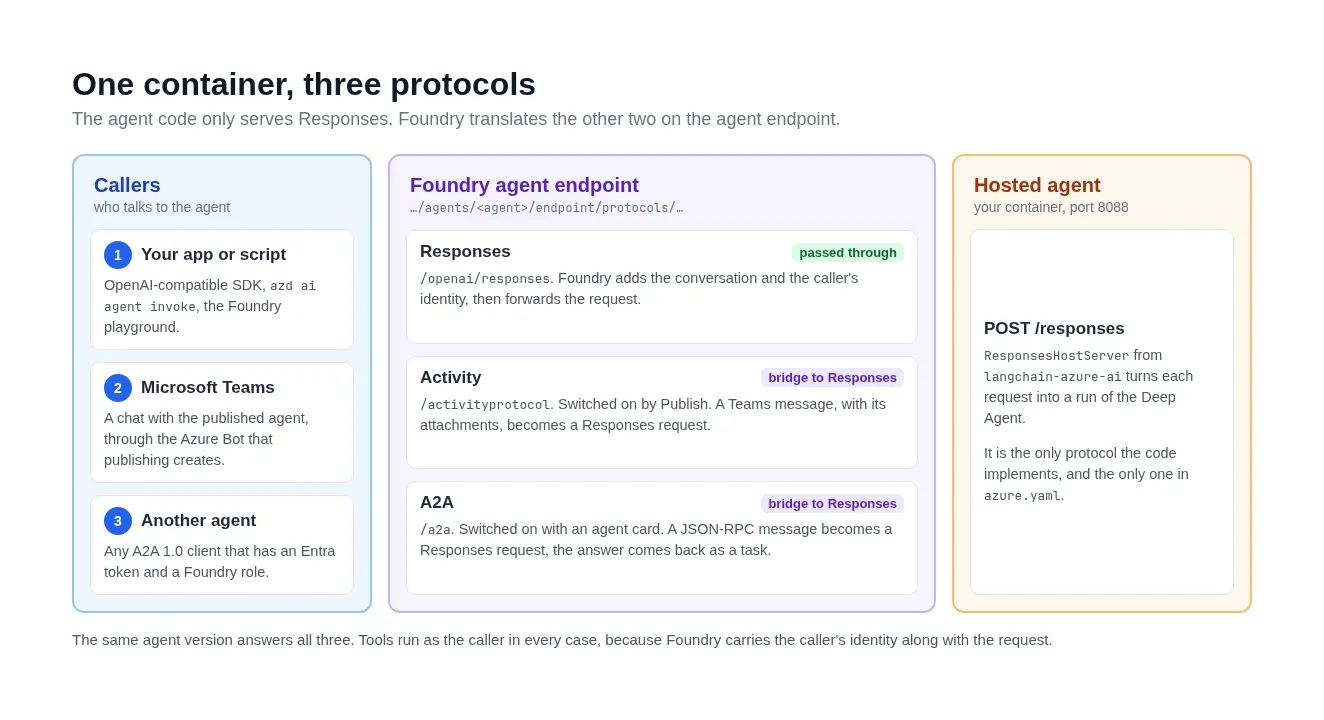
On Microsoft Foundry you don’t have to. To demonstrate that, I built an agent with LangChain’s Deep Agents and deployed it as a Foundry hosted agent. The container implements one protocol, Responses. Foundry fronts it with an endpoint and translates Activity and A2A into Responses for you.
The diagram shows the three ways in and the one thing the container serves:
Prompt agents and hosted agents
Foundry Agent Service has a few agent types, and the choice decides how much you build yourself.
A prompt agent is configuration: a model, instructions and tools. Foundry runs it, and there is no code or container to look after. If the agent needs longer multi-step work with tools, skills, files and commands, you can create it with the Microsoft Copilot harness (preview). Foundry then runs that harness for you, and the agent is still a prompt agent that you call through the Responses API.
A hosted agent is your own code in a container. You pick the framework and the dependencies, and Foundry gives the container an endpoint, an Entra identity, scaling to zero and a VM-isolated sandbox per session. There are hosting integrations for Microsoft Agent Framework and for LangChain, LangGraph and Deep Agents, and you can also write the protocol handlers yourself.
I use a hosted agent here because I wanted Deep Agents, with its planning, subagents and middleware. The protocols don’t need a toolbox, a packaged set of tools that the agent can call. I added one to give the agent meaningful tools and to exercise identity when it reaches them: the toolbox has the Work IQ servers for mail, calendar, SharePoint and OneDrive, and the agent calls them as the person who is chatting. That part deserves its own post, so here it only shows up where the protocols touch it.
The container speaks Responses
A hosted agent container implements at least one protocol. This post focuses on Responses, the protocol for a chat agent: Foundry sends POST /responses to port 8088 and expects a JSON response or a stream of events. Hosted agents can serve other protocols too, such as Invocations, which could be a topic for another post.
The langchain-azure-ai[hosting] package provides a ResponsesHostServer that wraps a LangGraph agent (a Deep Agent is one) and serves the Responses protocol. The basic wiring in main.py builds the agent, loads the options from the environment and runs the host:
from langchain_azure_ai.agents.hosting import ResponsesHostServer, ResponsesServerOptions
from langchain_azure_ai.callbacks.tracers import enable_auto_tracing

from agent import build_agent, build_model, toolbox_tools


def main() -> None:
    enable_auto_tracing()  # LangGraph spans -> Application Insights
    # No checkpointer: Foundry stores the conversation and the host replays it each turn.
    agent = build_agent(build_model(), toolbox_tools())
    options = ResponsesServerOptions.from_env()
    ResponsesHostServer(agent, options=options).run(port=int(os.environ.get("PORT", "8088")))
For every request, the host loads the conversation history from Foundry, turns it into LangGraph messages, runs the agent and writes the result back as Responses events. build_agent is a plain create_deep_agent call with a system prompt and some middleware.
In azure.yaml (used by the azd tool), the agent declares that one protocol:
  work-agent:
    host: azure.ai.agent
    kind: hosted
    project: src/agent
    language: python
    codeConfiguration:
      runtime: python_3_13
      entryPoint: main.py
    protocols:
      - protocol: responses
        version: 2.0.0
    # ... env, resources
azd deploy uploads the code, Foundry builds the container and creates a new agent version. After that, any OpenAI-compatible client can talk to it. In the example below, I use the Foundry SDK to bind a client to the agent by name:
project = AIProjectClient(
    endpoint=os.environ["FOUNDRY_PROJECT_ENDPOINT"], credential=DefaultAzureCredential()
)
client = project.get_openai_client(agent_name="work-agent")
conversation = client.conversations.create()
response = client.responses.create(input="What's on my agenda tomorrow?", conversation=conversation.id)
print(response.output_text)
ℹ️ Note: Responses shows up twice in this agent. The container serves the Responses protocol to Foundry, and inside it the Deep Agent calls the model through the Responses API as well (use_responses_api=True on ChatOpenAI). Those are two separate hops.
The endpoint in front of the container
Callers never reach the container directly. Every agent gets its own endpoint, and that endpoint has a list of protocols that is separate from what the container implements. This is what Foundry returns for my agent today, shortened:
{
  "agent_endpoint": {
    "protocols": ["a2a", "activity", "responses"],
    "authorization_schemes": [
      { "type": "Entra" },
      { "type": "BotServiceRbac" }
    ]
  }
}
The agent version behind it still lists only responses 2.0.0. Each protocol has its own path under the agent:
| Protocol | Path under …/agents/<agent>/endpoint/protocols/ |
|---|---|
| Responses | openai/responses |
| Activity | activityprotocol |
| A2A | a2a |
The larger picture of the project looks like this. It includes the toolbox, the identities and the monitoring that I skip in this post; the part that matters here is the agent endpoint in the middle, with Teams coming in over Activity from the left:
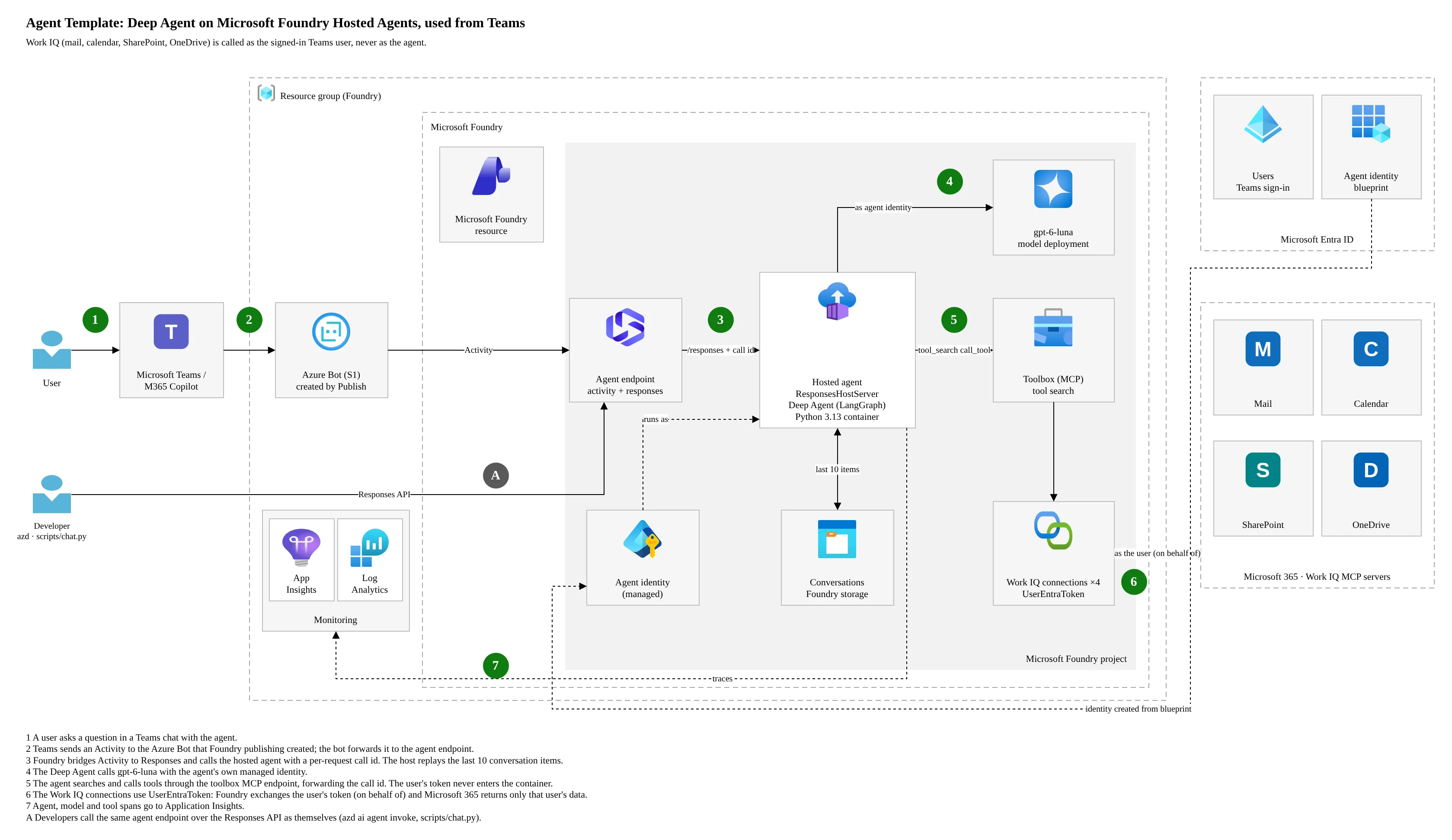
Teams: Activity to Responses
Teams talks the Activity protocol of the Bot Framework. To get the agent into Teams, you publish it from the Foundry portal: open the agent, choose Publish, then Teams and Microsoft 365 Copilot, and pick a scope. “Just you” needs no admin approval, and “People in your organization” goes to a Microsoft 365 admin first.
Publishing does three things, none of them in your code:
- It turns on the
activityprotocol on the agent endpoint. - It adds a Bot Service authorization scheme to the endpoint (
BotServiceRbacin the JSON above). - It creates an Azure Bot resource in the resource group of the Foundry project, with a messaging endpoint that points at
…/endpoint/protocols/activityprotocol.
From then on, a message in Teams goes to the Azure Bot, the bot forwards the Activity to the agent endpoint, and Foundry converts it to a Responses request for the container. The Microsoft docs describe it like this: “the platform automatically bridges Responses to the Activity protocol for channel delivery”. The Teams chat maps to one Foundry conversation, so the agent has the history of that chat.
⚠️ Important: the bridge gives you text in and text out. You get no streaming or citations, and the agent can’t send its own Adaptive Cards or files back. The only cards in the chat are the ones the platform adds for sign-in and MCP tool approvals. If you need more, implement the Activity protocol in the container yourself with the azure-ai-agentserver-activity package. A hosted agent can serve several protocols at once.
Attach a PDF and ask about it
One thing works through the bridge that I didn’t expect. Attach a Word file or a PDF to your message in Teams, and the agent answers questions about it. It can even describe the screenshots in a PDF. My code does nothing for this, and no tool is called.
The traces in Application Insights show what happens:
- The bridge turns the Teams attachment into a file input on the user’s message.
ResponsesHostServerand LangChain pass that input on to the model unchanged.- The Responses API of the model expands the file before the model sees it. For a PDF, it adds the parsed text per page and the page images as an extra user message.
It costs tokens. A 10-page PDF with screenshots added about 17,000 input tokens to the turn. The file is part of the conversation, so it goes along on later turns too, until it falls out of the history that the host replays (I set that to the last 10 items with DEFAULT_FETCH_HISTORY_ITEM_COUNT).
⚠️ Important: this works in Teams only. According to the publishing limitations, file uploads don’t work for agents in Microsoft 365 Copilot. Also, the text of messages and files ends up in spans in Application Insights, even with content recording switched off in the container. Treat access to those traces as access to the conversations.
A2A: another bridge to Responses
Other agents can call the same agent over A2A. You enable the a2a protocol on the agent endpoint and give the agent a card with a description and skills. I did that in the Foundry portal; the REST API and the SDKs do it with one PATCH on the agent. The container doesn’t change, because incoming A2A needs an agent that speaks Responses and Foundry bridges the two.
Foundry then publishes the agent card. This is mine, with a few fields left out:
{
  "name": "work-agent",
  "description": "Access WorkIQ demo agent",
  "supportedInterfaces": [
    {
      "url": "https://<account>.services.ai.azure.com/api/projects/<project>/agents/work-agent/endpoint/protocols/a2a",
      "protocolBinding": "JSONRPC",
      "protocolVersion": "1.0"
    }
  ],
  "capabilities": { "streaming": false, "pushNotifications": false },
  "skills": [
    { "id": "check-calendar", "name": "Check calendar", "description": "Check your calendar with WorkIQ" }
  ],
  "defaultInputModes": ["text"],
  "defaultOutputModes": ["text"]
}
A client built with the A2A Python SDK needs two things that differ from a plain A2A server: a bearer token, and the versioned path of the card.
A2A_BASE_URL = "https://<account>.services.ai.azure.com/api/projects/<project>/agents/work-agent/endpoint/protocols/a2a"

token = DefaultAzureCredential().get_token("https://ai.azure.com/.default").token
async with httpx.AsyncClient(headers={"Authorization": f"Bearer {token}"}, timeout=120) as http:
    card = await A2ACardResolver(
        httpx_client=http, base_url=A2A_BASE_URL, agent_card_path="agentCard/v1.0"
    ).get_agent_card()
    client = await create_client(
        agent=card, client_config=ClientConfig(streaming=False, httpx_client=http)
    )
    request = SendMessageRequest(message=new_text_message("In one sentence: what can you do?", role=Role.ROLE_USER))
    async for response in client.send_message(request):
        print(response)
The answer of the Deep Agent comes back as a completed A2A task with the text as an artifact:
task {
  id: "task_0194302b..."
  context_id: "ctxt_1f6eca7f..."
  status {
    state: TASK_STATE_COMPLETED
  }
  artifacts {
    parts {
      text: "I can help with your work by finding and summarizing emails, meetings, and files, and by drafting messages or managing calendar events and Microsoft 365 content."
    }
  }
}
A few things I ran into:
- Everything needs an Entra token, the agent card included. The caller needs the Foundry Agent Consumer role, or another Foundry role with access to the endpoint.
- My agent only offers A2A 1.0. The
agentCard/v0.3path returns a 400 withsupportedVersions: ["1.0"], and the usual.well-known/agent-card.jsonreturns a 404 that points to the v1.0 URL. - It is text only, over JSON-RPC, without streaming.
What you don’t get
The bridges are convenient, and they are lowest-common-denominator translations to a chat request. Teams loses its rich features, as described above. A2A loses streaming and files. If one of those matters, you add that protocol to the container and handle it yourself, next to Responses.
Wrapping up
With a hosted agent you write the agent once against the Responses protocol, and Foundry makes it reachable from Teams and from other agents without extra code. I would start there and only implement Activity or A2A in the container when the bridge leaves out something you need.
If you spot any errors or have questions, feel free to reach out!
foundryagentsa2ateamsdeep-agents
If this post helped you, you can buy me a coffee ☕
Comments
Comments are stored as GitHub Discussions: sign in with GitHub to join in.