An AI agent on Kubernetes from one YAML file
Contents 10 sections
Most of the agents I build differ in a few places: the prompt, the model, the tools and maybe a few skills. The work around them is the same every time. You build a container image, write a Deployment, hand out model keys, connect the tools and put a chat UI in front of it.
If you think about it, most prompt-based agents work this way. Take prompt agents in Microsoft Foundry: you define the instructions, the model, the tools and the skills in the portal or in a YAML file, and bam, Foundry runs the agent for you.
I wanted to build a system like that myself, this time on Kubernetes, where creating an agent is as simple as submitting a YAML file. This is a complete agent:
apiVersion: agents.baeke.info/v1alpha1
kind: Agent
metadata:
  name: haiku-poet
  namespace: agents
spec:
  model: openai/azure-gpt-6-luna
  instructions: Answer every question with a single haiku.
Run kubectl apply on that file and a couple of seconds later you chat with the agent in a web console. I built that as a Kubernetes operator, with a few parts around it. The code is on GitHub: https://github.com/gbaeke/agent-operator
The diagram below shows what happens between the YAML file and the chat:
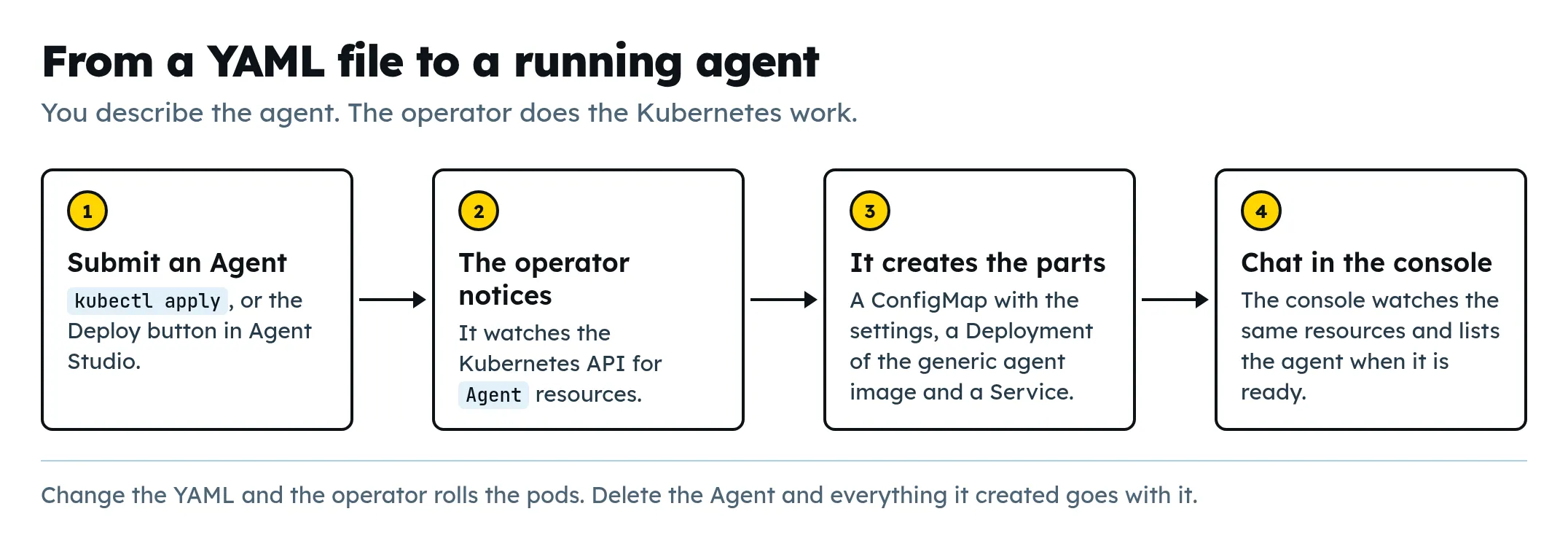
ℹ️ Note: I built this to learn how an operator for agents works, and it runs on a local kind cluster. The section “What you don’t get” has the limits.
What is a Kubernetes operator?
Kubernetes works with desired state. You submit a Deployment that asks for three pods, and a controller inside Kubernetes keeps comparing that wish with what runs in the cluster. When a pod dies, the controller starts a new one.
An operator applies the same idea to a kind of object you define yourself. It has two parts:
- A custom resource definition (CRD) teaches the Kubernetes API a new kind, here
Agent, with its fields and their validation. From then onkubectl get agentsworks likekubectl get pods. - A controller watches the resources of that kind. For every Agent it creates the standard Kubernetes objects the agent needs and keeps them in line with the YAML. That loop is called reconciling.
That split fits our goal. The person who wants an agent writes down what the agent is, and the operator knows how to run one. You also get the Kubernetes tooling for free: RBAC and GitOps work with an Agent like they work with any other resource.
How the system fits together
The operator is one of five pieces in the cluster. The diagram below shows them, with the sample agents from the repo:
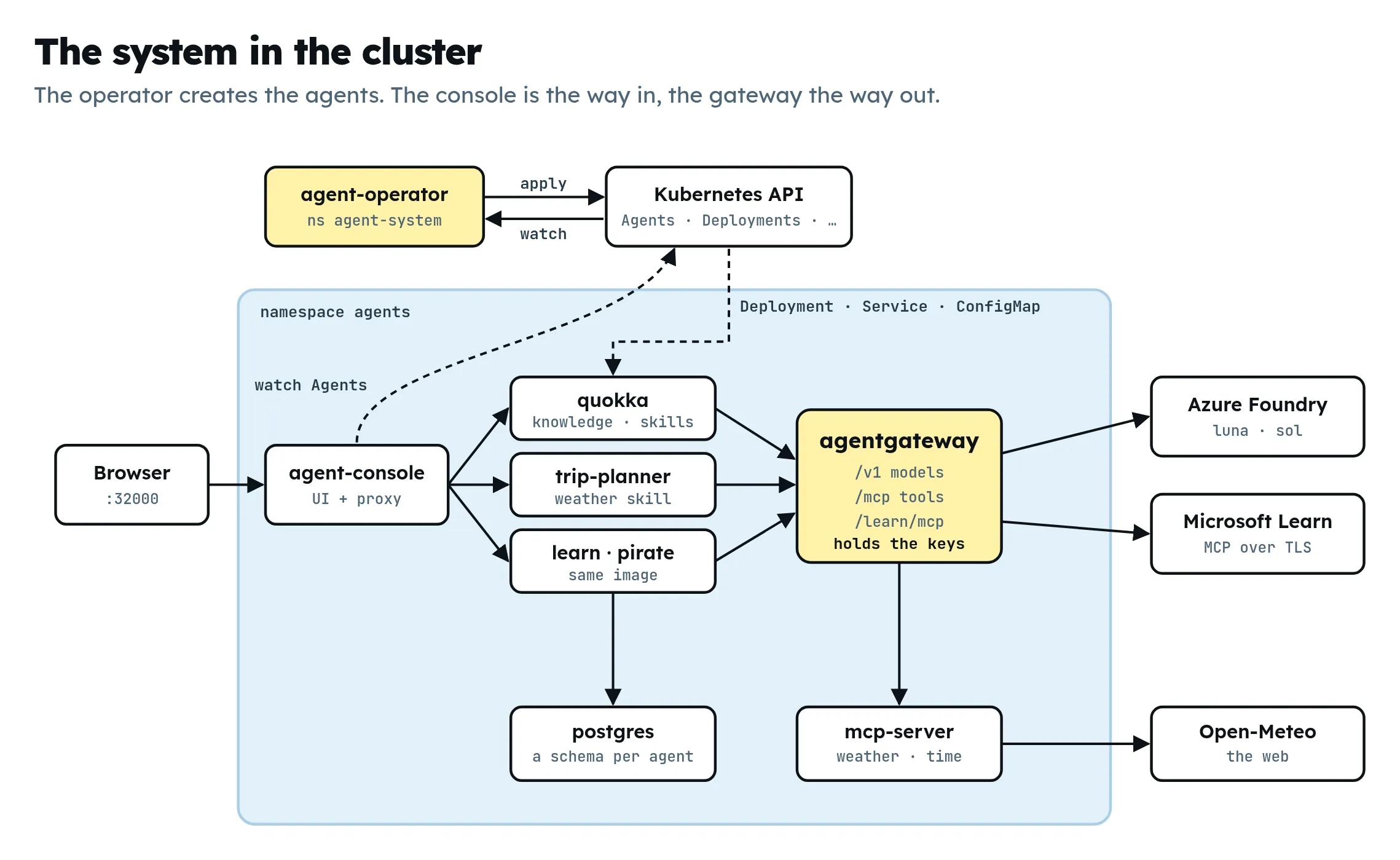
- The agent image is one generic image that every agent runs.
- The operator turns each
Agentresource into a running agent. - agentgateway holds the models and the MCP servers, with their keys.
- Postgres keeps the chat sessions.
- The console is the web UI where you chat with the agents.
One image for every agent
An operator can only turn YAML into an agent if no agent needs its own code. So the first piece is a generic agent image. It contains an agent loop and a set of built-in tools, and no agent. At startup it reads a folder, and that folder makes it a specific agent:
agent.yaml        model, instructions, tools, MCP servers, subagents
skills/<name>/    optional: skills in the Agent Skills format
knowledge/        optional: markdown documents the agent can search
agent.yaml holds the settings:
modelandinstructions, the two fields from the example above.toolsswitches the built-in tool groups on or off: a plan (a todo list the agent keeps), a scratch filesystem, search over the knowledge documents, skills and subagents.mcpServerslists the MCP servers the agent may use, with an optional allowlist of tools.subagentsdefines named specialists the agent can hand a job to, each with its own instructions.
Skills use the Agent Skills format: a SKILL.md with a name, a description and instructions. Only the name and description go into the system prompt. The agent loads the rest when a request matches, so a long skill costs no tokens until the agent needs it.
Sessions are the last part. Every chat has a session with its history, its plan and its files. The agent stores them in Postgres, in a schema of its own, so a chat survives a restart and an agent can run several replicas.
Here is the agent pod with what goes in and out:
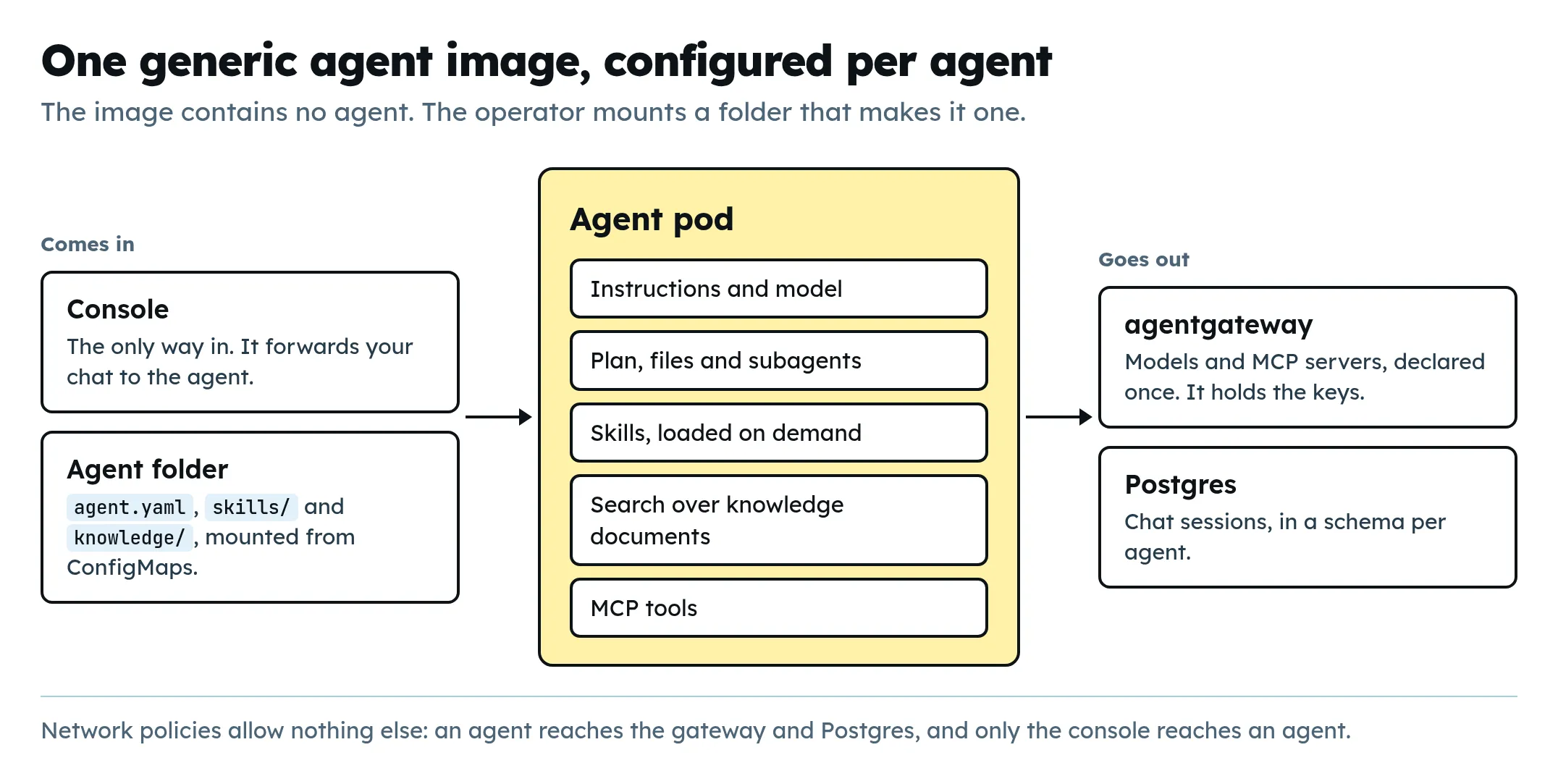
The folder also works without Kubernetes. The same image runs an agent from a folder on my laptop or in Docker, which is how I develop one before it goes to the cluster.
What the operator does with an Agent
The spec of an Agent resource has the fields of agent.yaml, plus a few that only make sense in a cluster. Here is a larger example:
apiVersion: agents.baeke.info/v1alpha1
kind: Agent
metadata:
  name: trip-planner
  namespace: agents
spec:
  name: Trip Planner
  model: openai/azure-gpt-6-luna
  instructions: |
    You are a cheerful, practical trip planner...
  tools: [planning, skills]
  mcpServers:
    - url: http://agentgateway.agents:8080/mcp
      tools: [get_weather, current_time]
  skills:
    - configMap: skill-packing-list
  replicas: 1
A skill is a ConfigMap that holds the skill’s files, and so is the knowledge base. When we apply this Agent, the operator creates three objects:
- a ConfigMap with the generated
agent.yaml - a Deployment that runs the generic image and mounts that ConfigMap, the skills and the knowledge as the folder from the previous section
- a Service, so the console can reach the agent inside the cluster
The operator then reports back in the Agent’s status:
$ kubectl -n agents get agents
NAME           MODEL                     READY   AGE
learn          openai/azure-gpt-6-luna   true    114m
pirate         openai/azure-gpt-6-luna   true    119m
quokka         openai/azure-gpt-6-luna   true    119m
trip-planner   openai/azure-gpt-6-luna   true    119m
When something is missing, the status says what. An agent that asks for a model the platform doesn’t offer stays not ready, with a message like model gpt-4o is not offered by the gateway; it offers: azure-gpt-6-luna, azure-gpt-6.1-sol. The same goes for a skill ConfigMap that doesn’t exist yet: the agent starts once it appears.
Reconciling covers the rest of the agent’s life. Edit the instructions or a skill and the operator rolls the pods. Delete the Agent and Kubernetes removes the three objects with it, because the Agent owns them.
Models and tools live on a gateway
The Agent above names a model, but it has no key and no endpoint. Those belong to the platform. An agentgateway in the cluster holds the models with their keys and the MCP servers, each declared once and shared by all agents.
That keeps the YAML small and the secrets in one place. An agent pod has no model key to leak, and network policies only let it talk to the gateway and Postgres. The gateway makes the calls to the model and to MCP servers on the internet, such as the one from Microsoft Learn.
The console
Agents have no public address, so the last piece for users is a console. It is one web UI for every agent: it watches the Agent resources like the operator does, lists the agents and passes your chat on to the agent you pick. An agent you apply shows up in the list within a second or two, without a reload.
Below, the Quokka Assistant has worked out an SLA credit. Look at the row of tool calls above the answer and the finished plan on the right:
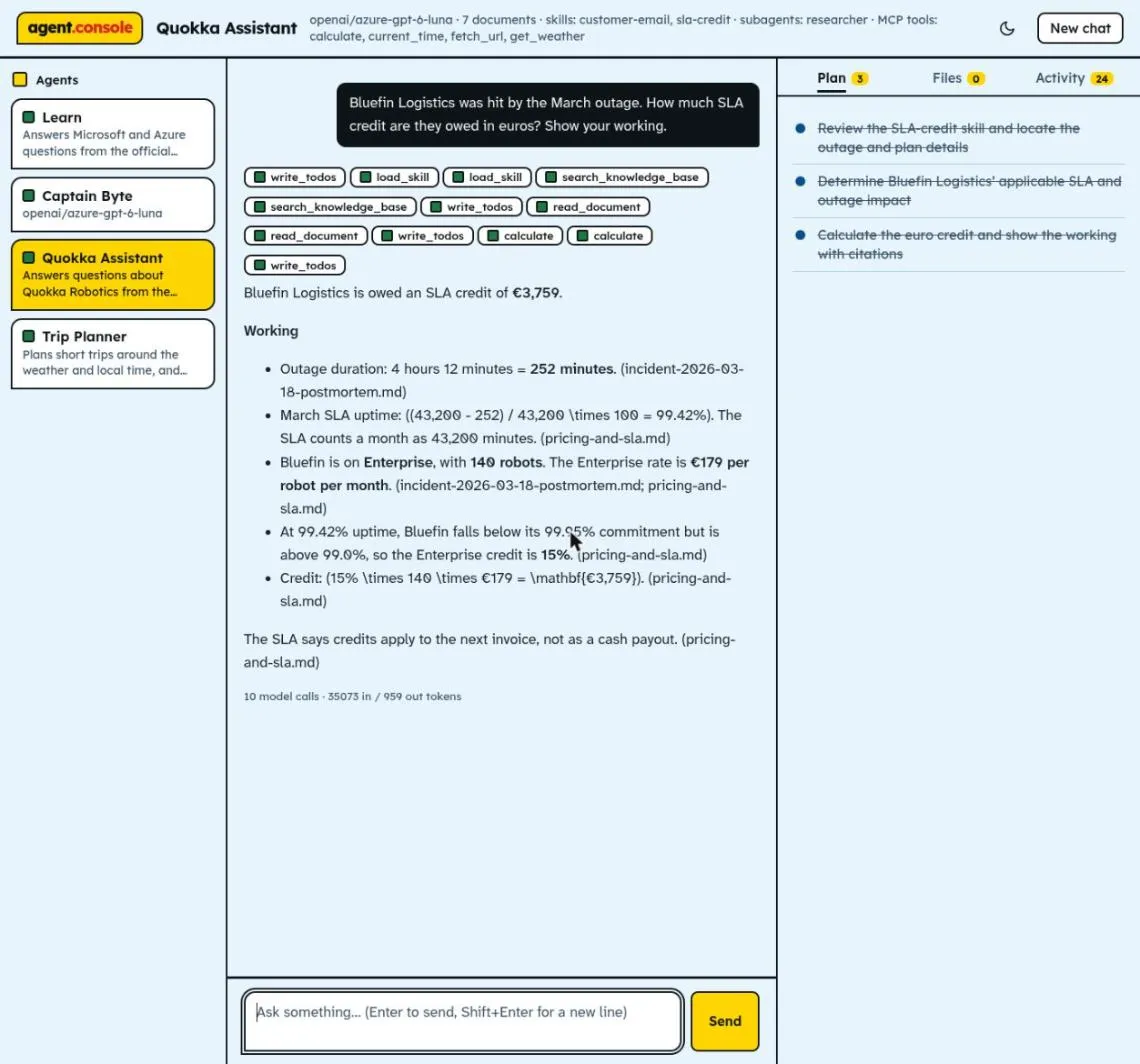
The Files tab shows what the agent wrote to its scratch filesystem, and Activity lists every tool call with its result.
Agent Studio
YAML is fine for me, but a form is friendlier. Agent Studio is a small local app that turns a form into the same Agent resource. You fill in a name, the instructions and a description, and you tick the tool groups. The model list and the MCP servers come from the gateway, so you pick from what the platform offers.
In the screenshot below, the YAML on the right follows the form as you type:
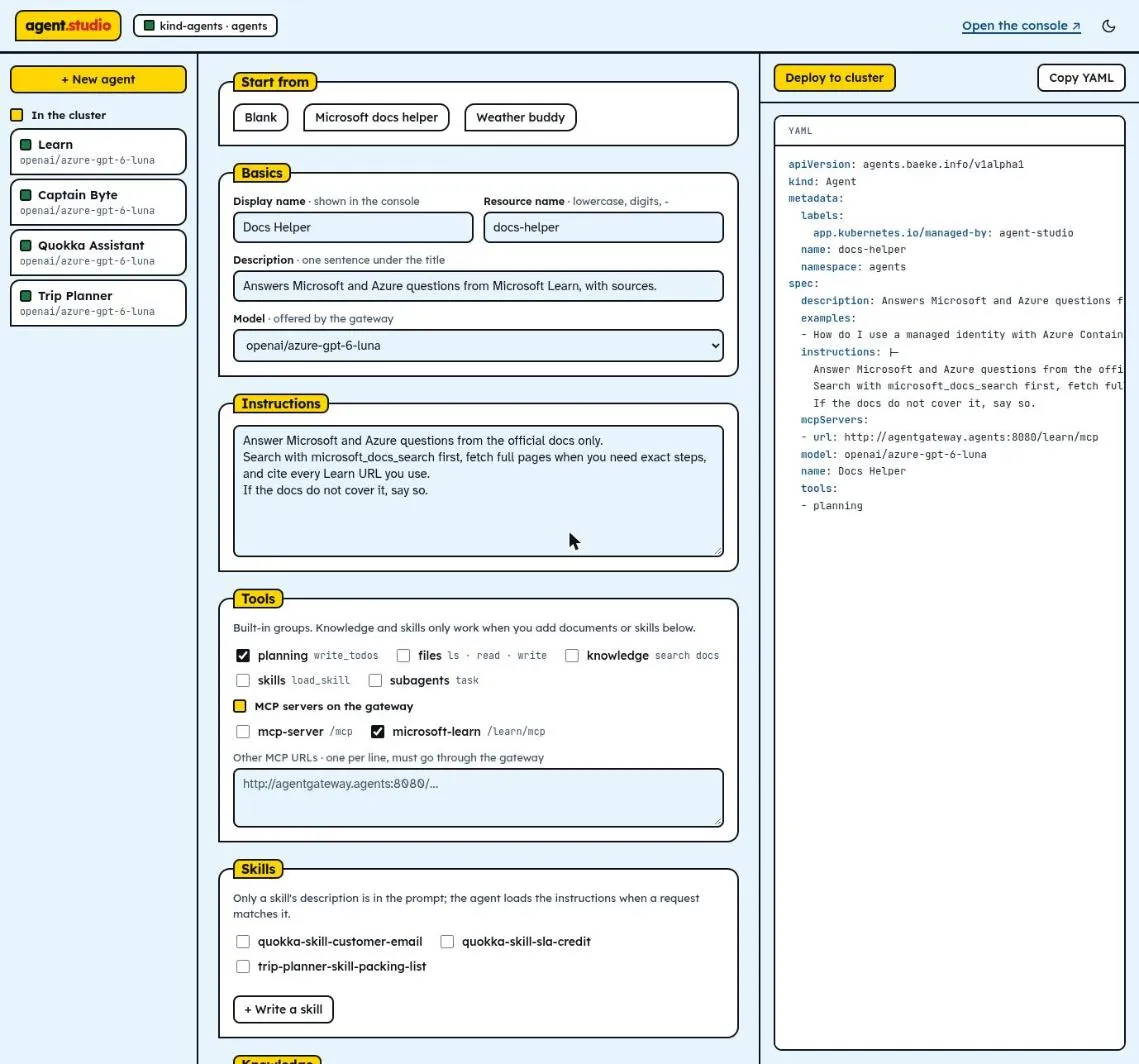
Deploy to cluster applies the Agent with your kubeconfig, plus a ConfigMap for every skill you wrote in the form and one for uploaded knowledge files. Studio then follows the status until the agent is ready and links to it in the console. From that point the operator treats it like any other Agent, and you can edit or delete it from the same form.
What you don’t get
- This version has no authentication or authorization. Anyone who reaches the console can chat with every agent, and tools don’t know who the user is. That is always the harder part, and I’ll do it later. Maybe. 😊
- Every agent is a Deployment with pods that run all day, even when nobody chats. kagent on Agent Substrate suspends idle conversations instead.
- The agents speak their own small API. A2A support would be a nice addition, so that other agents can call them.
- The image has no shell, and that is deliberate. The agent runtime is written in Rust and I wanted to keep the image as small as possible (about 47 MB). That has an impact on skills with scripts: an agent can read a script but can’t run it.
Wrapping up
An operator is a good fit when many things differ only in their configuration. Put everything that is the same in a generic image and a shared platform, describe the difference in a custom resource, and let a controller do the wiring. An agent is then a YAML file, or a form that writes one.
I built this mainly to learn, and I don’t recommend writing something like it yourself for production. Existing projects already do this work. kagent, which runs on Agent Substrate, is a good fit.
The README at https://github.com/gbaeke/agent-operator has a quick start that goes from nothing to four running agents on a kind cluster, and the source is small enough to explore with your favourite coding agent. If you spot any errors or have questions, feel free to reach out!
agentsoperatorsagentgatewaymcp
If this post helped you, you can buy me a coffee ☕
Comments
Comments are stored as GitHub Discussions: sign in with GitHub to join in.