Agent-driven UI with A2UI 1.0
Most agents answer in text, sometimes with Markdown formatting. That is fine for short answers, but users often want a screen they can scan and interact with when the task is more than a sentence. There are several ways to get there. You can let the model decide the UI, interpret what it returns and render it, or have it produce HTML and JavaScript. A2UI is one option in that set.
With A2UI, the agent sends a description of the screen as data, and the client draws it with components it already has. To see how that works in practice, I built a project-hours assistant with A2UI 1.0: a single agent built with Deep Agents that talks the A2A protocol, plus a web client and a text client for the terminal.
Here is the web client after “Show my week”. The grid on the left is a React component in the client, rendered by the A2UI renderer based on the agent message. The wire log on the right shows the message that put it on screen:
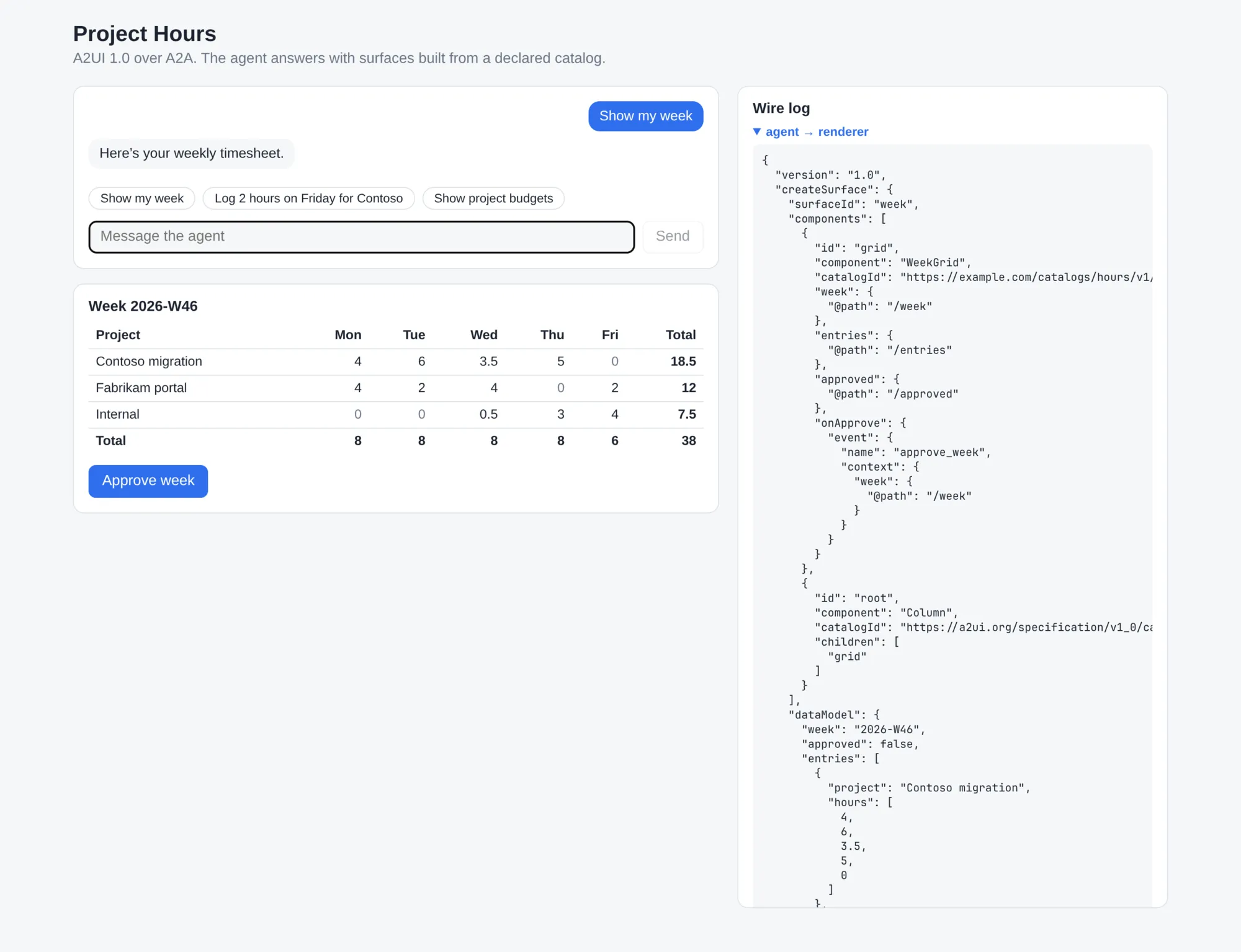
⚠️ Important: With A2UI, the model returns a data structure that describes how the UI is composed and what data it contains. Another approach is to keep a fixed component in the client and render the tool result directly. The difference is that A2UI lets the agent define the UI structure, while a fixed component only displays data in a predefined layout.
What is A2UI?
A2UI (Agent-to-User Interface) is an open-source protocol, Apache 2.0 licensed, for agents that answer with user interfaces. The agent streams JSON messages that describe what to show, and a renderer in your app turns them into native widgets. The README sums it up as “A2UI expresses UI using data, not code”.
A few terms come back in every message:
- A surface is a piece of UI with an id, such as
weekorbudgets. The agent creates, updates and deletes surfaces. - A surface holds a flat list of components. Each one has an id, a type (
Column,Text,WeekGrid) and properties, and it refers to its children by id. - Every surface has a data model, a JSON document. A property is a literal value or a binding such as
{"@path": "/entries"}that points into it. - An action is what the renderer sends back when the user clicks something.
The agent has four messages for surfaces: createSurface, updateComponents, updateDataModel and deleteSurface. Version 1.0 adds function calls in both directions, which my sample doesn’t use. This is the createSurface from the screenshot above, shortened:
{
  "version": "1.0",
  "createSurface": {
    "surfaceId": "week",
    "components": [
      {
        "id": "grid",
        "component": "WeekGrid",
        "catalogId": "https://example.com/catalogs/hours/v1/catalog.json",
        "week": { "@path": "/week" },
        "entries": { "@path": "/entries" },
        "approved": { "@path": "/approved" },
        "onApprove": {
          "event": { "name": "approve_week", "context": { "week": { "@path": "/week" } } }
        }
      },
      { "id": "root", "component": "Column", "children": ["grid"] }
    ],
    "dataModel": {
      "week": "2026-W46",
      "approved": false,
      "entries": [
        { "project": "Contoso migration", "hours": [4, 6, 3.5, 5, 0] }
      ]
    }
  }
}
Because the grid is bound to paths, the agent can change the hours later with a small updateDataModel message and leave the components alone.
Catalogs
The agent can only use components the renderer knows. A catalog lists them: a JSON document with an id and a JSON Schema per component. A2UI ships a basic catalog with 18 components for layout (Row, Column, Card, Tabs), display (Text, Image, Icon) and input (Button, TextField, DateTimeInput). The renderers implement these for you, so with the basic catalog alone you write no UI components: the agent composes every screen from those building blocks. You can also add your own catalog with domain components next to it. I did that for most of this post, and further down I switch it off to see what the agent makes of the basic catalog on its own.
ℹ️ Note: The catalog has to be part of the context the agent sees, so it costs tokens on every turn. The caveats further down have the numbers for this sample.
With every message, the renderer tells the agent which catalogs it supports (supportedCatalogIds). The agent builds its surfaces from that list, and sends no UI when nothing matches.
Renderers and transports
There are renderers for React, Lit, Angular, Flutter and SwiftUI that support version 1.0. Jetpack Compose is listed with 0.9.1 for now.
A2UI leaves the transport to you: the messages travel over AG-UI, A2A, MCP or plain WebSockets. The 1.0 specification calls AG-UI the standard transport binding. I used A2A, where A2UI is an extension: the messages ride along as data parts with the MIME type application/a2ui+json.
Why would you use it?
The A2UI homepage puts it between two other options. With pre-built widgets, every tool result maps to a fixed component in your app and you control how it looks. With generated HTML in a sandbox, the model can show anything, but it sits in an iframe apart from your design system and only works where a WebView does. A2UI lets the agent compose the screen from components the client already has: the generic ones that come with the renderer, your own, or both.
I see these reasons to pick it:
- Nothing from the model executes in the client. The renderer reads data and decides what to draw, so a model that misbehaves can only pick from the components in your catalogs.
- The UI looks like your app, because your client draws every component, with your styling.
- One agent serves several clients. The same messages drive a web app, a mobile app or, as you’ll see below, a terminal.
- The agent can be someone else’s. The catalog is the contract, so a remote agent you reach over A2A can drive your UI without knowing your front end.
- The model decides what goes on the screen. It can put a grid and two budget cards on one surface if the question calls for it.
If none of that applies to you, there are cheaper ways to get a grid on screen. More on that in the caveats.
The sample
The repository has four parts: the catalog, the agent and two renderers.
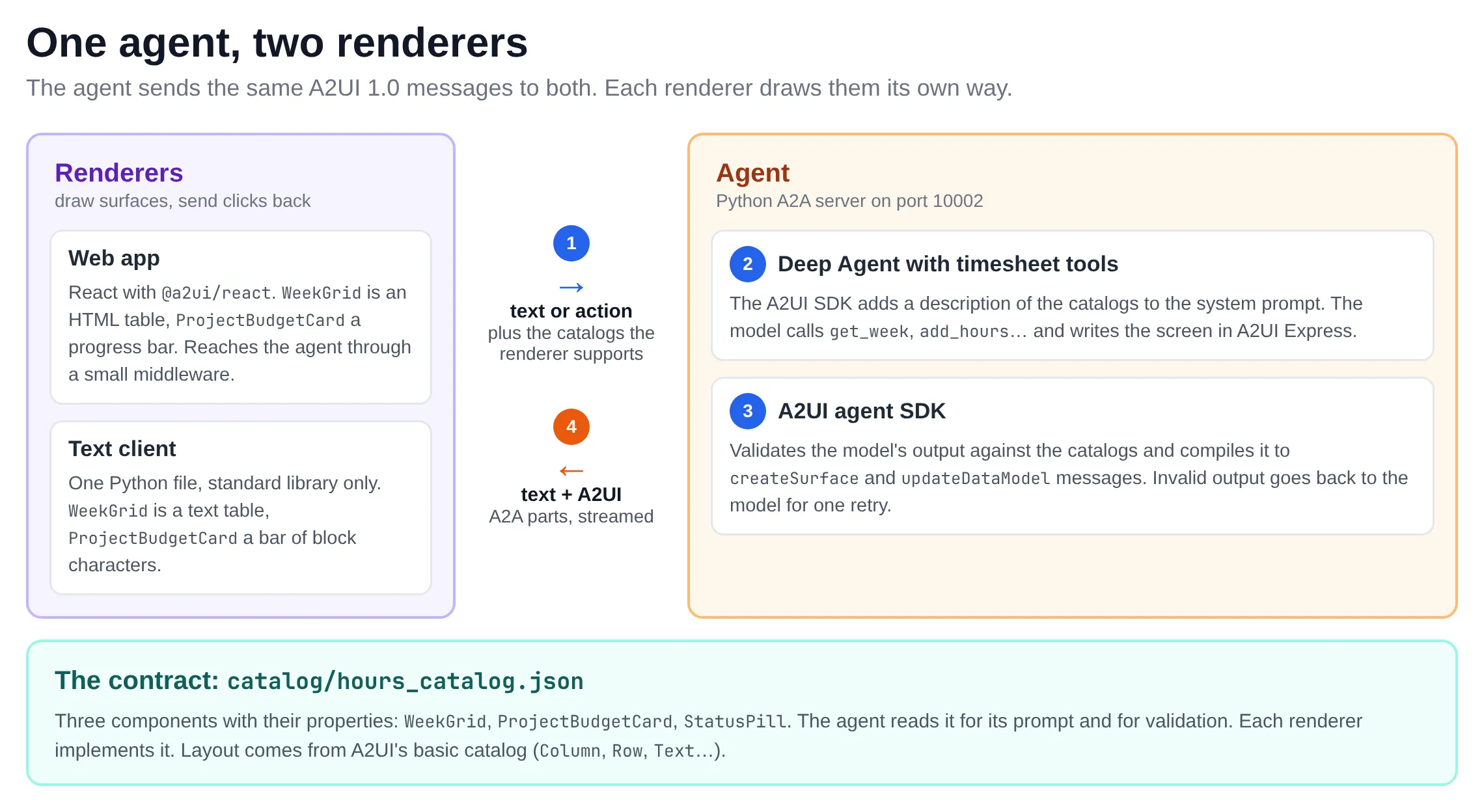
The catalog
catalog/hours_catalog.json declares three components: WeekGrid, ProjectBudgetCard and StatusPill. This is the budget card, with a few properties left out:
"ProjectBudgetCard": {
  "type": "object",
  "description": "Shows one project's logged hours against its budget as a progress bar. The card works out the percentage and colour itself.",
  "properties": {
    "component": { "const": "ProjectBudgetCard" },
    "project": { "$ref": "common_types.json#/$defs/DynamicString", "description": "Project name." },
    "hoursUsed": { "$ref": "common_types.json#/$defs/DynamicNumber", "description": "Hours logged on the project so far." },
    "budgetHours": { "$ref": "common_types.json#/$defs/DynamicNumber", "description": "Total budgeted hours for the project." },
    "onSelect": { "$ref": "common_types.json#/$defs/Action", "description": "Fired when the user clicks the card." }
  },
  "required": ["component", "project", "hoursUsed", "budgetHours"]
}
The descriptions matter, because the model reads them. DynamicString and DynamicNumber mean the property takes a literal or a binding. Keep the components high-level: the card works out its own percentage and colour, so the model only passes two numbers.
The agent
The agent is a Python A2A server. Inside it, a Deep Agent with four tools (get_week, add_hours, approve_week, get_project_budgets) works on fake timesheet data. The A2UI agent SDK (a2ui-agent-sdk) does two jobs around the model call. Before the call, it generates a prompt snippet that describes the catalogs. During the call, it reads the model’s text stream, validates the UI in it and compiles it to A2UI messages.
Here’s the part of agent/hours_agent/llm.py that does this:
_generator = A2uiGenerator(
    catalogs=[CatalogConfig(catalog=c) for c in CATALOGS],
    inference_format_factory=ExpressFormatFactory(),
)

# ... per turn, for the catalogs this renderer supports
processor = _generator.create_processor({"1.0": capabilities}, state=conv.renderer_state)
system_prompt = ROLE + "\n" + processor.prompt_snippet

stream = processor.open_stream()
async for chunk, _ in agent.astream(...):
    for part in stream.feed(chunk_text):
        # TextPart goes to the chat, A2uiPart holds A2UI 1.0 messages
        ...
The model writes A2UI Express, a compact notation between <a2ui> tags, and the SDK compiles that to the wire JSON you saw earlier. Express is the SDK’s default. According to the A2UI docs, it cut the UI tokens the model writes by 63% in their evaluation suite, compared to writing the JSON directly. This is what the model answered to “Show my week”:
Here's your weekly timesheet.

<a2ui>
surface("week")
$/week = "2026-W46"
$/approved = false
$/entries = [{project: "Contoso migration", hours: [4, 6, 3.5, 5, 0]}, ...]
grid = WeekGrid($/week, $/entries, $/approved, Event("approve_week", {week: $/week}))
root = Column([grid])
</a2ui>
When I then asked to log two hours on Friday, it only sent data, and the SDK turned that into updateDataModel messages:
<a2ui>
surface("week", update=true)
$/week = "2026-W46"
$/approved = false
$/entries = [{project: "Contoso migration", hours: [4, 6, 3.5, 5, 2]}, ...]
</a2ui>
If the model writes something that doesn’t fit the catalogs, the SDK raises an error. The agent passes that error to the model and lets it try once more.
To run the agent you need an OpenAI-compatible endpoint that supports the Responses API. Mine is a local agentgateway on port 4000; set LLM_BASE_URL, LLM_MODEL and LLM_API_KEY for something else.
cd agent
uv run hours-agent            # A2A server on http://localhost:10002
uv run hours-agent --canned   # the same with canned replies, no LLM needed
The web client
The web client is a React and Vite app that uses @a2ui/react. Start it in a second terminal:
cd web
npm install
npm run dev                   # http://localhost:5173
A renderer has to implement the catalog. In web/src/catalog/hoursCatalog.tsx every component from the JSON file gets a React component with a schema for its properties. By the time your component runs, the bindings are resolved: props.hoursUsed is a number and props.onSelect is a function you call.
const ProjectBudgetCard = createComponentImplementation(
  {
    name: 'ProjectBudgetCard',
    schema: z.object({
      project: DynamicStringSchema,
      hoursUsed: DynamicNumberSchema,
      budgetHours: DynamicNumberSchema,
      onSelect: ActionSchema.optional(),
      // ...
    }),
  },
  ({props}) => {
    const ratio = num(props.hoursUsed) / num(props.budgetHours);
    const onSelect = props.onSelect;
    return (
      <article onClick={onSelect ? () => void onSelect() : undefined}>
        {/* ... name, progress bar, percentage */}
      </article>
    );
  },
);

export const hoursCatalog = new Catalog(HOURS_CATALOG_ID, '1.0', [
  StatusPill, ProjectBudgetCard, WeekGrid,
]);
The rest is plumbing. A MessageProcessor from @a2ui/web_core takes the catalogs and a callback for actions. You feed it the A2UI messages that come in, and it keeps the surfaces up to date. <A2uiSurface> draws one surface.
readonly processor = new MessageProcessor<ReactCatalogComponent>(
  [basicCatalog, hoursCatalog],
  (action: ActionPayload) => void this.post({a2ui: {version: '1.0', action}}),
);

// for every A2UI data part in the agent's reply
this.processor.processMessagesWithErrors(part.data);
The browser posts to /a2a on the Vite dev server. A small middleware there (web/middleware/a2a.ts) speaks A2A: it calls the agent with the A2UI extension activated and relays the reply as server-sent events. That keeps the agent URL, and in a real app the credentials, out of the browser.
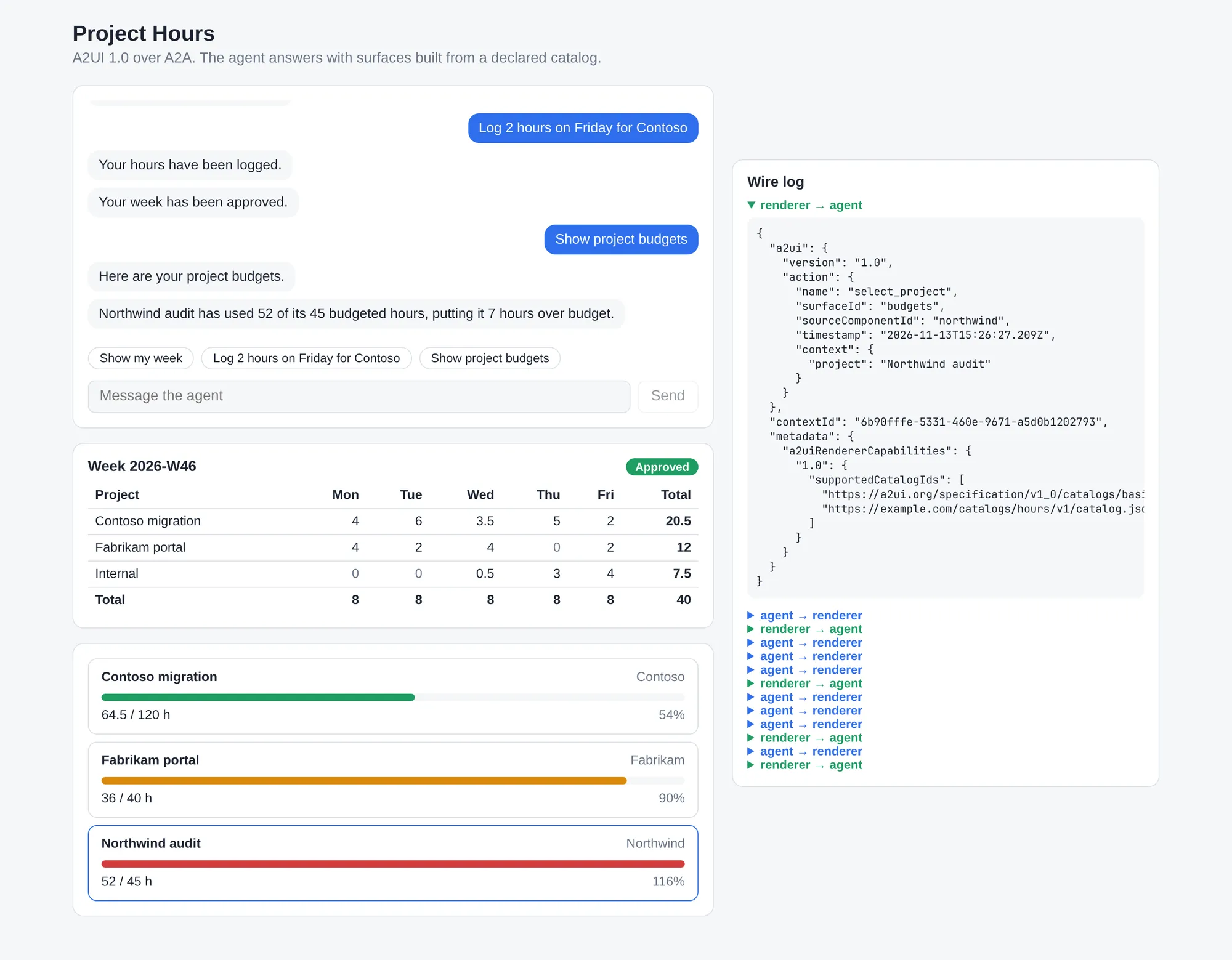
Clicks travel the same road in the other direction. Below, I logged hours, approved the week, asked for the budgets and clicked the Northwind card. The wire log shows the action that went to the agent, with the event name and context the agent put on the card itself. The agent answered in text and left the surfaces alone:
The text client
The second renderer is cli/hours_cli.py, one Python file with only the standard library. I wrote it to check the claim that the agent doesn’t need to know its client. With the agent running:
python3 cli/hours_cli.pyIt talks A2A to the agent directly and announces the same two catalogs as the web app. The agent sends the same messages, and the client draws WeekGrid as a text table and ProjectBudgetCard as a bar of block characters. Actions get a number you can type:
> Show project budgets
Here are your project budgets.

── surface: week ──────────────────────────────────────────
Week 2026-W46   APPROVED
Project             Mon   Tue   Wed   Thu   Fri   Total
Contoso migration     4     6   3.5     5     2    20.5
Fabrikam portal       4     2     4     0     2      12
Internal              0     0   0.5     3     4     7.5
Total                 8     8     8     8     8      40

── surface: budgets ───────────────────────────────────────
Contoso migration  Contoso   [1]
  █████████████░░░░░░░░░░░  64.5 / 120 h  54%  on track
Fabrikam portal  Fabrikam   [2]
  ██████████████████████░░  36 / 40 h  90%  close to budget
Northwind audit  Northwind   [3]
  ████████████████████████  52 / 45 h  116%  over budget
────────────────────────────────────────────────────────────

> 3
(action: Details: Northwind audit)
Northwind audit has used 52 of its 45 budgeted hours, putting it 7 hours over budget.
Writing this client taught me more about the protocol than the React one, because nothing is hidden behind an SDK. A renderer keeps a dictionary of surfaces, each with its components by id and a data model, and applies the messages to it:
def apply_message(message):
  if "createSurface" in message:
    body = message["createSurface"]
    surfaces[body["surfaceId"]] = {
        "components": {c["id"]: c for c in body.get("components", [])},
        "data": body.get("dataModel", {}),
    }
  elif "updateDataModel" in message:
    body = message["updateDataModel"]
    set_pointer(surfaces[body["surfaceId"]], body.get("path", "/"), body["value"])
  # ... updateComponents, deleteSurface


def resolve(value, data):
  """A property value: a literal, or a binding into the surface's data model."""
  if isinstance(value, dict) and "@path" in value:
    return get_pointer(data, value["@path"])
  return value
Drawing starts at the component with id root and calls one function per component type. It’s a minimal renderer that covers what the sample uses. For function calls, list templates and input components you want the real SDKs. 😊
Do I have to write the components myself?
No. WeekGrid and ProjectBudgetCard were my choice. If you had to define every component up front, A2UI would be close to tool rendering with extra steps, so I added a switch to the sample: with ?basic in the URL of the web app, or --basic on the text client, the renderer announces only the basic catalog.
python3 cli/hours_cli.py --basic     # text client
# web: http://localhost:5173/?basic
The agent sees that the hours catalog is missing and gets a different instruction: compose the timesheet and the budgets yourself from Card, Column, Row, Text, Divider and Button. My React components are out of the picture. This is the result in the web app, drawn entirely by the basic catalog that ships with @a2ui/web_core:
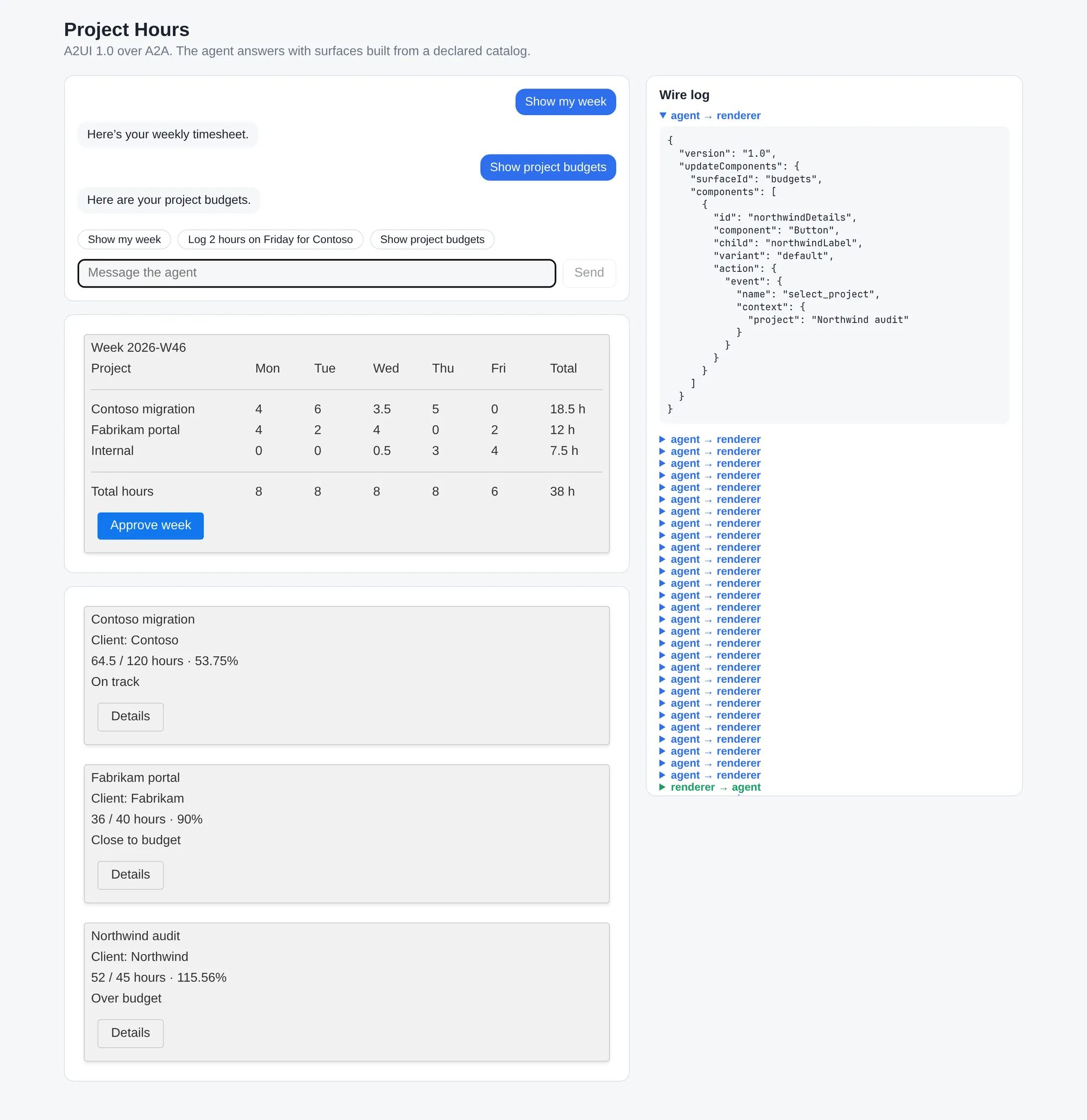
I wrote no grid or budget card for this screen. The model laid out the rows, worked out the totals and percentages, and put the approve_week and select_project events on plain buttons. The clicks work as before. The basic catalog also has input components such as TextField and ChoicePicker for forms, which I didn’t try in this sample.
The text client’s renderer needed no change, since it already knew how to draw those six components:
── surface: budgets ───────────────────────────────────────
Project budgets
Contoso migration
Client: Contoso
64.5 of 120 hours used
53.75% · On track
[1] Details
Fabrikam portal
Client: Fabrikam
36 of 40 hours used
90% · Close to budget
[2] Details
You pay for that freedom in a few ways:
- The screen looks generic. There is no coloured progress bar, and “53.75%” is what the model happened to type.
- The model writes every cell. The week alone took 45 messages (one
createSurfaceand 44updateComponents), whereWeekGridneeded one. That costs output tokens and time. - Totals and percentages are now the model’s arithmetic.
WeekGridcomputes its own totals in code. - The agent can only arrange what the renderer has. It can’t send a new kind of widget, because that would be code. For free-form UI, the A2UI docs point to generated HTML in a sandbox, such as an MCP App, which can sit inside an A2UI surface.
In practice you mix the two: the basic catalog for screens nobody foresaw, and a handful of domain components where you want polish or logic you trust.
What you don’t get
⚠️ Important: nothing checks the numbers on screen. The tools return the real data to the model, and the model types it again into the A2UI block. The SDK validates that the block fits the catalogs and leaves the values unchecked. A grid can show a wrong number, or an Approved badge for a week the model never approved.
A2UI has an answer for this in macros: Python functions on the agent that look like a component to the model and expand to catalog components before anything goes to the renderer. A Timesheet() macro could read the week itself, so the model only picks what to show. Macros are Python-only for now and I haven’t added them to the sample yet; docs/macros.md in the repository has a sketch.
The catalog also costs tokens. The prompt snippet for my two catalogs is about 26,000 characters, and it goes along on every turn.
Do you need it?
For this sample, with its own catalog: no. 🤷 Every screen maps one-to-one to a tool. “Show my week” calls get_week and shows a WeekGrid. For that case, streaming tool calls from the model to a front end and mapping those calls to React components is cheaper and faster, and the values on screen come straight from the tool result. CopilotKit over the AG-UI protocol works that way.
A2UI makes sense when the agent is a separate service with several clients, when agents you do not control drive your UI, or when you want the model to compose the screen. You can mix approaches: a front end can render most tool results with fixed components, and use A2UI for the screens that need composing.
Wrapping up
A2UI gives you a clear boundary between an agent and whatever renders its UI. The text client shows the point: the same agent served both clients without a change. You still pay in prompt tokens, and you rely on a model that copies your data by hand. Use it when you need several clients, or when the agent composes its own screens.
If you fully control the client and only need to render tool results in fixed components, you may not need A2UI. In that case, a simpler setup can be to use AG-UI with tools and map the results directly to your own UI, for example with a client that uses something like CopilotKit.
The code is on GitHub: gbaeke/a2ui-sample. If you spot any errors or have questions, feel free to reach out!
If this post helped you, you can buy me a coffee ☕
Comments
Comments are stored as GitHub Discussions: sign in with GitHub to join in.