Agents that sleep on your own Kubernetes cluster with Agent Substrate
Most agents spend their day waiting. They work for a few seconds, then sit idle until the next message, schedule or event comes in. For many agents that’s fine, because one container serves many sessions and the state lives in a database. It gets expensive when an agent needs a machine of its own, for example to run code or keep files between runs. Then every user or task gets its own sandbox, and most of those sandboxes do nothing most of the time.
A few weeks ago I wrote about Dottie, a small platform for personal agents that are asleep most of the day. I built it mainly to try Azure Container Apps Sandboxes: microVMs you suspend when the agent is idle and resume, with their disk, when the next message comes in. Agent Substrate follows the same idea with different tech. Container Apps Sandboxes are a managed service in Azure. Agent Substrate is open source and runs on your own Kubernetes cluster.
To try it, I ran a small LangGraph agent that calls Claude on Agent Substrate, on a local kind cluster.
ℹ️ Note: I’m just getting started with Agent Substrate, so this post is about what I learned from a first hands-on run. We don’t use it in production. I think it’s a bit early for most of our customers, and most of them would rather use a managed service in Azure anyway.
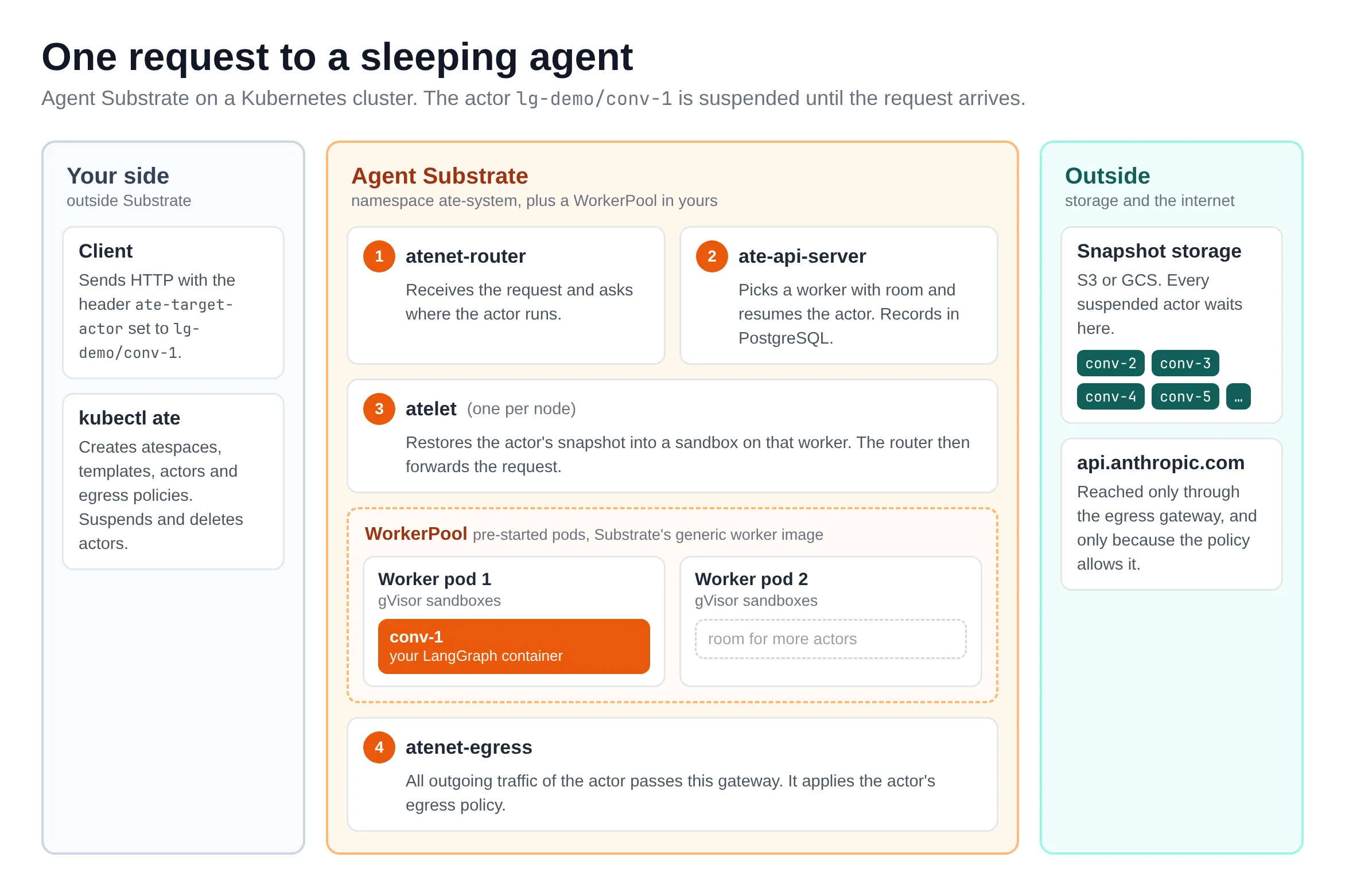
The diagram below shows the setup I tested: Agent Substrate on a Kubernetes cluster, with my LangGraph agent as the actor conv-1. The numbers follow one request to that agent while it’s asleep, from the router to the worker that wakes it up.
What is Agent Substrate?
Agent Substrate is a runtime for agents on Kubernetes, maintained by Google and Solo.io and at version 1.0. It runs each agent in its own sandbox (gVisor or a microVM), saves the whole sandbox to object storage when you suspend it, and restores it on any free worker when the next request arrives. The docs put the resume time under 500 ms.
ℹ️ Which object storage? Substrate reads and writes snapshots through a small object-store plugin that runs next to its components. The plugin that ships with Substrate works with Google Cloud Storage and with anything that speaks the S3 API, such as an Amazon S3 bucket. On kind, the quickstart installs RustFS, an S3-compatible store inside the cluster, and that’s where my snapshots went. Azure Blob Storage isn’t in that plugin, but there is a community plugin for Azure Storage accounts. I haven’t tried it.
gVisor or microVM?
A normal container shares the node’s Linux kernel with every other container on it. A bug in that kernel can let code escape the container, and that matters when an agent runs code an LLM wrote. Substrate puts an extra wall around each agent, and you pick one of two kinds per WorkerPool:
- gVisor is an open-source project from Google that puts a small kernel of its own between the agent and the host. The agent’s system calls go to gVisor instead of the node’s kernel. It runs on any ordinary Linux node, and my demo uses it.
- A microVM is a tiny virtual machine with its own kernel. Substrate uses Kata Containers on Cloud Hypervisor for this. The isolation is stronger, but the node needs hardware virtualization (
/dev/kvm), and not every cloud VM size offers that. Container Apps Sandboxes are microVMs too.
It’s important to understand the following five concepts:
- An actor is one running instance of your agent, for example one conversation. This is what gets suspended and resumed. It is addressed as
atespace/name. - An ActorTemplate is the recipe for an actor: image, size, volumes and how much a snapshot holds. When you create one, Substrate starts the container once and saves a golden snapshot. Every new actor starts from that.
- An atespace is the boundary that templates and actors live in, a bit like a namespace for actors.
- A WorkerPool is a set of pre-started worker pods. They run Substrate’s own worker image and host actors in sandboxes until their CPU and memory are used up.
- A snapshot is the saved state of an actor: only the volumes, the volumes plus the file system, or all of that plus the process memory.
Only the WorkerPool is a Kubernetes object. Atespaces, templates and actors live in Substrate’s PostgreSQL database, so kubectl get doesn’t show them. You use the kubectl ate plugin instead.
Here’s how the five fit together in my demo. On the left are the records in Substrate’s database, on the right the Kubernetes side, and at the bottom the snapshots:
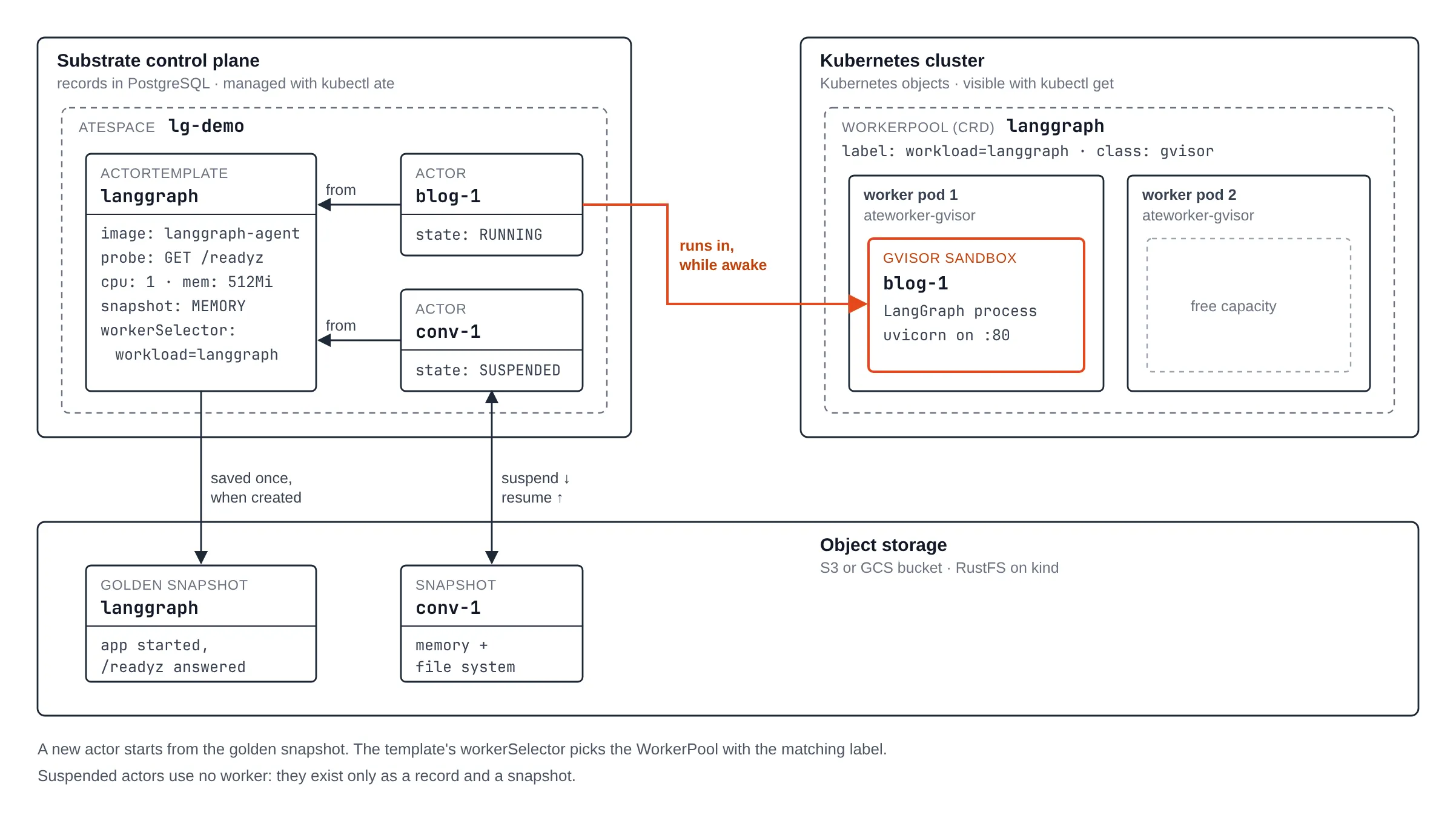
In the diagram, blog-1 is awake and runs in a sandbox on worker pod 1. conv-1 is asleep: it takes no room on a worker and exists only as a record and a snapshot. When a request for conv-1 comes in, Substrate restores that snapshot on a worker with free capacity, such as pod 2.
A LangGraph agent as an actor
Substrate has no LangGraph integration, and it doesn’t need one. An actor is any container that answers HTTP. My agent is a one-node LangGraph graph behind FastAPI, listening on port 80. It answers /readyz, which Substrate calls to know the actor is up, and /invoke for a message.
The conversation lives only in Python memory (MemorySaver). I did that on purpose: if the agent still remembers after a suspend, the snapshot really holds the process. Here’s the core of app.py:
CA_FILE = "/run/ate/egress-trust-bundle/trust-bundle.pem"

# The egress gateway replaces this placeholder key with the real one.
# It also terminates TLS, so the client must trust the gateway CA.
client = anthropic.Anthropic(
    api_key="placeholder",
    http_client=anthropic.DefaultHttpxClient(verify=ssl.create_default_context(cafile=CA_FILE)),
)

def call_model(state: State):
    resp = client.messages.create(model=MODEL, max_tokens=1024, messages=state["messages"])
    text = "".join(b.text for b in resp.content if b.type == "text")
    return {"messages": [{"role": "assistant", "content": text}]}

# ... one node, START -> model -> END ...
graph = builder.compile(checkpointer=MemorySaver())

@api.post("/invoke")
def invoke(body: dict):
    cfg = {"configurable": {"thread_id": body.get("thread_id", "default")}}
    out = graph.invoke({"messages": [{"role": "user", "content": body["message"]}]}, cfg)
    return {"reply": out["messages"][-1]["content"], "turns": len(out["messages"])}
Yes, the API key is the string placeholder. More on that below. 😊
Substrate doesn’t ship a template for LangGraph, so we built our own ActorTemplate, langgraph, around the agent’s image. Every actor for this agent starts from it. The parts that matter are the wakeup probe, the trust bundle volume and SNAPSHOT_FIDELITY_MEMORY, so the snapshot includes process memory:
metadata:
  atespace: lg-demo
  name: langgraph
workerSelector:
  matchLabels:
    workload: langgraph        # runs on the langgraph WorkerPool
containers:
- name: agent
  image: localhost:5001/langgraph-agent@sha256:2f81...
  wakeupProbe:
    httpGet: {path: /readyz, port: 80}
  volumeMounts:
  - name: system-info
    mountPath: /run/ate/egress-trust-bundle
volumes:
- name: system-info            # the egress gateway's CA plus public roots
  systemInfo:
    dataSources:
    - trustBundle:
        names: [egress-mitm.ate.dev, system-roots.ate.dev]
        path: trust-bundle.pem
# ...
snapshotConfig:
  preferredFidelity: SNAPSHOT_FIDELITY_MEMORY
With Substrate installed (the quickstart sets up a kind cluster with everything in it), we created the objects in this order:
-
A WorkerPool. This one is a normal Kubernetes resource, so you create it with
kubectl applyand choose the namespace, the number of workers and the sandbox class. Ours has two gVisor workers in the namespacelg-demo. Its label is what the template’sworkerSelectormatches:apiVersion: ate.dev/v1 kind: WorkerPool metadata: name: langgraph namespace: lg-demo labels: workload: langgraph spec: replicas: 2 workerImage: localhost:5001/ateworker-gvisor@sha256:774d... sandboxClasses: - name: gvisor # ... CPU and memory per worker pod -
An atespace with
kubectl ate create atespace lg-demo. Remember that an atespace is a Substrate object, not a Kubernetes namespace. Ours just happens to have the same name. -
The ActorTemplate inside that atespace, from the YAML above, with
kubectl ate create actor-template -f <file>. Substrate starts the app once and saves the golden snapshot. -
An actor from that template:
kubectl ate create actor blog-1 -a lg-demo --template langgraph. It starts suspended, as a record that points at the golden snapshot. -
An egress policy for the actor with
kubectl ate create egress-policy blog-1 -a lg-demo -f <file>, so it can reachapi.anthropic.comand nothing else. You’ll find the policy in the section on the API key below. -
A way in:
kubectl ate proxy actor blog-1 -a lg-demo 8123:80forwards a local port to the actor through the router.
Does it remember after a nap?
Time to test it. I told the agent my name, suspended the actor and asked again. The output is trimmed a bit:
$ curl -X POST localhost:8123/invoke -H 'content-type: application/json' -d '{"thread_id":"blog","message":"Hi, my name is Geert. Answer in one short sentence."}'
{"reply":"Hello Geert, it's nice to meet you!","turns":2}

$ kubectl ate suspend actor blog-1 -a lg-demo
$ kubectl ate get actor blog-1 -a lg-demo
NAME     STATE                   WORKER POD
blog-1   ACTOR_STATE_SUSPENDED   <none>

$ curl -X POST localhost:8123/invoke -H 'content-type: application/json' -d '{"thread_id":"blog","message":"What is my name? One short sentence."}'
{"reply":"Your name is Geert.","turns":4}        # 0.93 s, resume and model call included

$ kubectl ate get actor blog-1 -a lg-demo
NAME     STATE                 WORKER POD
blog-1   ACTOR_STATE_RUNNING   lg-demo/langgraph-cdfd6b954-sgqwg
The second request found the actor suspended, with no worker pod. The router woke it up, the snapshot was restored and the agent still knew my name. The history only ever existed in process memory, so it came back from the snapshot. The whole round trip took 0.93 seconds on my laptop, the call to Claude included. 😎
The agent never holds the API key
An agent that holds an API key can leak it. A prompt injection can make it print the key, and with memory snapshots the key would sit in object storage too. Substrate keeps the key out of the actor. The agent sends a placeholder, and the egress gateway puts the real key in the request on its way out:
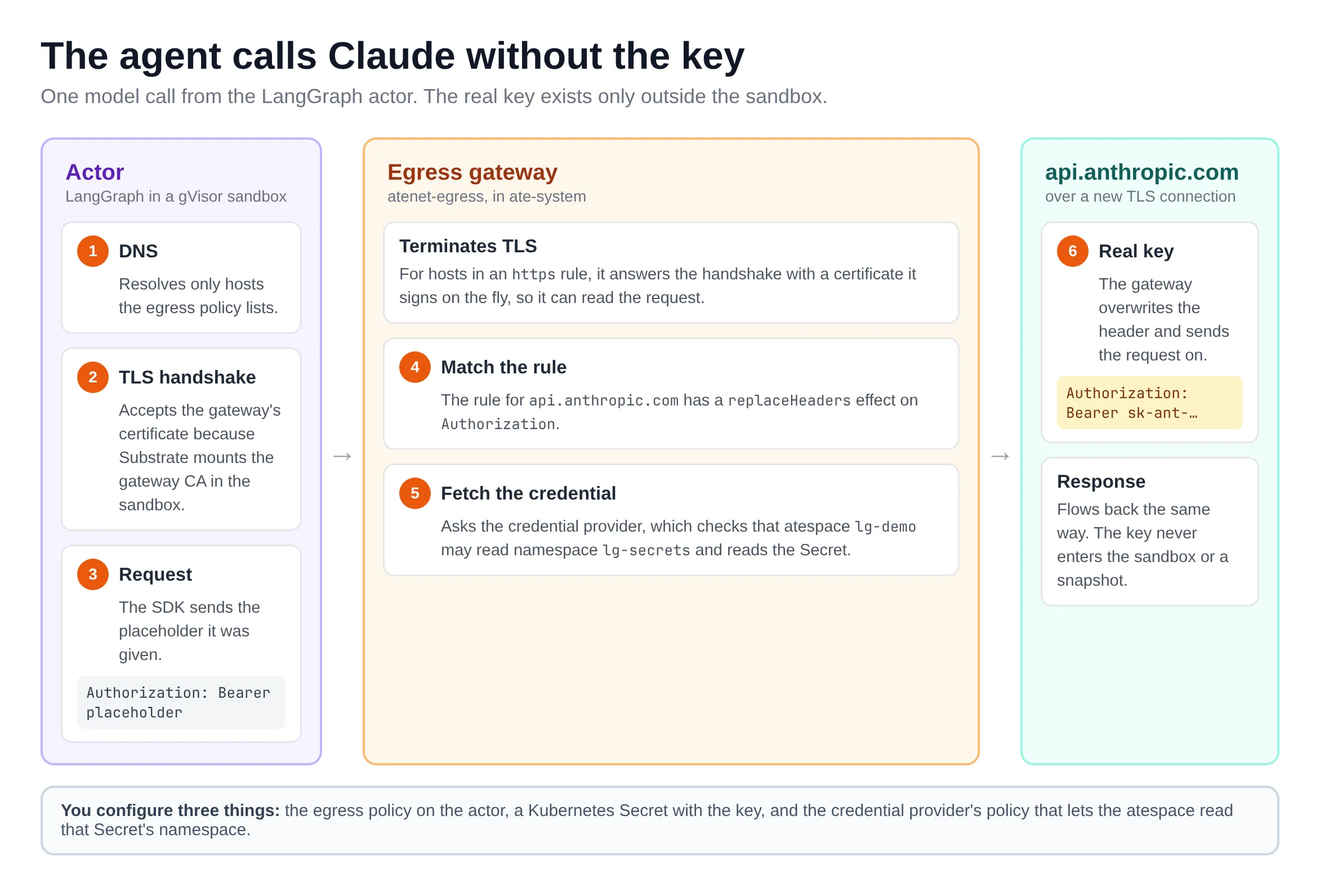
The gateway can only swap a header it can read, and the request is HTTPS. So for hosts in an https rule, the gateway terminates TLS itself with a certificate it signs on the fly. That’s why the template mounts the trust bundle and why app.py passes it to the Anthropic client.
This is the egress policy:
rules:
- https:
    hostnames: ["api.anthropic.com"]
    effects:
      replaceHeaders:
      # Anthropic SDK 2.x sends the key as "Authorization: Bearer <key>".
      - header: Authorization
        prefix: "Bearer "
        credentialUri: ate-secret://k8s.io/default/lg-secrets/anthropic/api-key
The key itself is an ordinary Kubernetes Secret named anthropic in the lg-secrets namespace. The credential provider denies everything by default, so you add the atespace to its namespace policy (the ConfigMap k8s-credential-provider-namespace-policy in ate-system) and restart the provider, which reads that policy only at startup:
policies:
- atespace: lg-demo
  allowedNamespaces: [lg-secrets]
How does this compare to what Azure offers?
The idea is the same as in Container Apps Sandboxes: a sandbox per agent that you suspend when it’s idle and resume with its state. The differences are in who runs it and what you get.
- Container Apps Sandboxes are an Azure service in preview. You call an API and Azure runs the machines. Agent Substrate needs a Kubernetes cluster, and you operate it yourself: PostgreSQL, a snapshot bucket, upgrades.
- Container Apps Sandboxes have an SDK to run commands in the sandbox, upload files and stop it. Substrate reaches an actor only over HTTP and has no exec API, so the agent runs inside the actor and you send it requests.
- Both control what a sandbox can reach, and both can add credentials to outgoing requests, so the agent never holds the key. Substrate reads them from Kubernetes Secrets. Container Apps Sandboxes take a secret from the sandbox group’s secret store or a token from a managed identity (see egress policies for Container Apps Sandboxes).
Container Apps Sandboxes and Substrate both give you sandboxes, and the platform work is up to you. Your own code decides when a sandbox wakes up and goes to sleep, which user gets which sandbox, and where the conversation lives.
Want it more managed? Foundry hosted agents
If you want something more managed for your agents, look at Microsoft Foundry hosted agents. They combine the sandbox approach with an agent runtime on top. Every session runs in its own VM-isolated sandbox, of the same type as Container Apps Sandboxes, and the runtime does the platform work for you:
- You deploy your agent as a container image, built with any framework (LangGraph is fine), and the platform scales it per session. There’s no replica count to set and no warm pool to size.
- A session goes to sleep after an idle timeout (15 minutes by default, up to 4 hours) and wakes up on the next request with its
$HOMEand uploaded files. After 30 days without activity, the platform deletes it. - With the Responses protocol, an OpenAI-compatible
/responsesendpoint, Foundry stores the conversation history for you under a conversation ID. For longer-term memory there are memory stores (in preview), and a key-value state store holds your own state, such as LangGraph checkpoints. - Responses isn’t the only protocol. Invocations takes any JSON you define, for webhooks, batch work or a custom streaming protocol such as AG-UI, and then you manage the state yourself. Invocations over WebSocket keeps a two-way connection open for real-time voice agents. One agent can expose several protocols at once, and there are also Activity for Teams and Microsoft 365, and A2A for agent-to-agent calls.
- Every agent gets its own Entra identity, so it calls Foundry models and Azure services without keys.
What you don’t get
- ⚠️ Important: Substrate resumes actors by itself, but in my tests it never suspended one on its own. The quickstart says that idle actors get checkpointed, yet my first actor stayed running for more than 8 hours without a single request. Deciding when an actor sleeps, and when it gets deleted, is up to you or a framework on top.
- Substrate knows nothing about users or conversations. Something has to create an actor per conversation, send each request to the right one and check that the user may talk to it. For my demo that something was me with
kubectl ate. 🤷 Two projects fill that gap. kagent, the Kubernetes agent framework, runs its agents on Substrate from version 1.0, released on November 9. Every conversation becomes its own actor, suspended after each reply and resumed on the next message. Google’s AX does this for agent tasks: you declare a Task with a Workspace and a Model, and AX creates the Substrate actor for you. AX is still early and in heavy development. - It only pays off when sessions need their own machine: agents that run code, use a shell or keep files. A plain chatbot that calls a model and keeps its state in a database is better off as a normal Deployment with a few replicas.
- Substrate needs the Kubernetes features ClusterTrustBundle and PodCertificateRequest. The docs cover GKE and kind. I haven’t tried AKS yet.
Wrapping up
Agent Substrate brings the “agents sleep most of the time” model to your own Kubernetes cluster, and it took only a small FastAPI wrapper to run a LangGraph agent on it. The snapshot holds the whole process, and the agent can call Claude without ever seeing the key.
The Substrate docs are at https://ate.dev/docs/. If you spot any errors or have questions, feel free to reach out!
#agent-substrate#langgraph#agents#sandboxes
If this post helped you, you can buy me a coffee ☕
Comments
Comments are stored as GitHub Discussions: sign in with GitHub to join in.