agentgateway: an open source AI gateway on Kubernetes
A few days ago I wrote about using Azure API Management as an AI gateway for your agents. API Management is a good fit when your agents run on Azure and you already use it for your other APIs. But plenty of teams run their agents on Kubernetes, sometimes outside Azure, and might rather have a gateway that runs in the cluster next to them, configured with the same YAML and the same GitOps flow as everything else.
agentgateway is such a gateway, an open source project for AI traffic hosted by the Linux Foundation. I set it up on a Kubernetes cluster as a central gateway that several agents share, installed and configured from git with Argo CD. agentgateway handles A2A traffic too, but in this example we’ll stick to model calls and MCP tool calls.
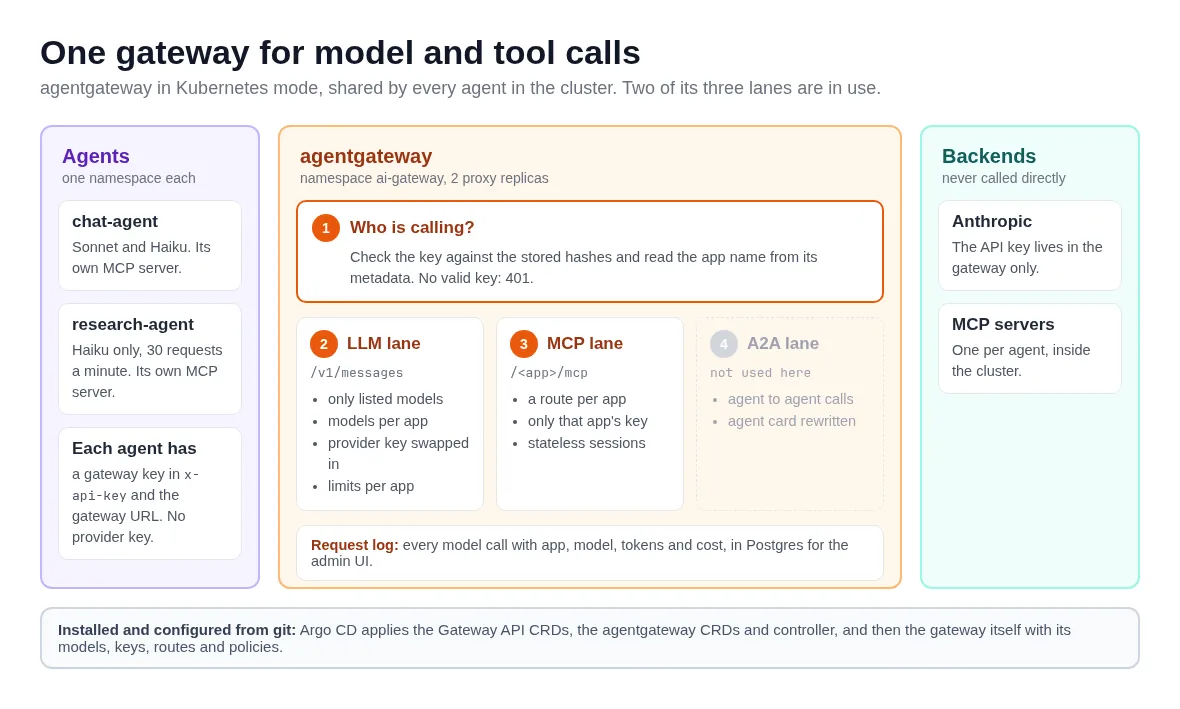
The setup looks like this, with numbers that match the sections further down:
What does an AI gateway do?
If you haven’t read the API Management post, a short recap. An agent is a program that calls a language model in a loop, and the model can ask it to call tools. Along the way it talks to three kinds of things:
- language models, from providers such as Anthropic, OpenAI or Microsoft Foundry
- tools, more and more often exposed by MCP servers (MCP is the Model Context Protocol, a standard way for agents to discover and call tools)
- other agents, over the A2A (agent-to-agent) protocol
Without a gateway, each agent calls all of these directly. Each one needs the provider’s API key, and you have no single place to see which models your agents use or what the calls cost. An AI gateway sits in the middle. The agents send their calls to the gateway, which checks who may do what and adds the real credentials before it forwards a call. It also applies limits and logs each request. I like to think of these as three lanes, one for each kind of traffic: LLM, MCP and A2A.
A regular API gateway can forward these HTTP requests too. An AI gateway also understands them: it knows which model a request asks for and how many tokens the answer used, and it knows the difference between an MCP request that lists tools and one that calls a tool. With that understand, the gateway can apply policies to the traffic. Controlling the amount of tokens an agent can consume per minute is an example of such a policy.
What is agentgateway?
agentgateway is an open source proxy for this kind of traffic. Solo.io started it and donated it to the Linux Foundation, and it’s written in Rust. That seems to be a necessity these days! 😀 The project describes itself as “a high-performance gateway for service, LLM, and MCP traffic”, and the docs name the three lanes as the LLM gateway, the MCP gateway and the A2A gateway:
- The LLM gateway serves models from OpenAI, Anthropic, Bedrock, Gemini, Vertex, Azure OpenAI, Ollama and more, with API keys per consumer, rate limits, token and cost budgets, and a request log with token counts and cost.
- The MCP gateway puts MCP servers behind the gateway, on one endpoint or on separate paths, with authorization rules that can go down to single tools.
- The A2A gateway proxies calls between agents and rewrites an agent’s card so other agents reach it through the gateway.
That covers much of what the AI gateway features of API Management do, and you can run it on your laptop as well as in any Kubernetes cluster. That’s what I like about tools like this: simple enough to run on your computer but powerful enough to run in full Kubernetes mode!
Standalone or Kubernetes?
agentgateway runs in two modes:
- Standalone: a single binary (or a Docker container) that reads a YAML config file with listeners, routes and backends. Handy on a laptop or a VM, and the quickest way to try it. I run it on my own machines: an agent I’m developing locally just points at the local gateway, so I don’t have to give each one its own provider credentials.
- Kubernetes: a controller watches the cluster for Kubernetes resources and turns them into configuration for the proxies it runs. You don’t write the proxy’s config file yourself.
I used Kubernetes mode here. It builds on the Gateway API, the newer Kubernetes standard for routing traffic into and inside a cluster (the successor of Ingress). You create a Gateway resource with the class agentgateway, and the controller starts a proxy for it. Routes and policies are Kubernetes resources too, so they live in git like the rest of your manifests. On top of the standard Gateway API kinds, agentgateway adds its own custom resources:
AgentgatewayModel: a model the gateway serves, its provider and the credentials to useAgentgatewayBackend: a backend such as an MCP serverAgentgatewayPolicy: authentication, authorization, rate limits and logging, attached to a Gateway or a routeAgentgatewayParameters: how the controller runs the proxy (replicas, service type, extra config)
⚠️ Important: I used agentgateway v1.7.0. The custom resources are v1alpha1, so expect changes between versions. Check the docs for the version you install.
Installing it with GitOps
Installing agentgateway in Kubernetes mode takes three steps, and the order matters:
- the Gateway API CRDs, because agentgateway builds on them
- the
agentgateway-crdsHelm chart with agentgateway’s own resource types - the
agentgatewayHelm chart with the controller
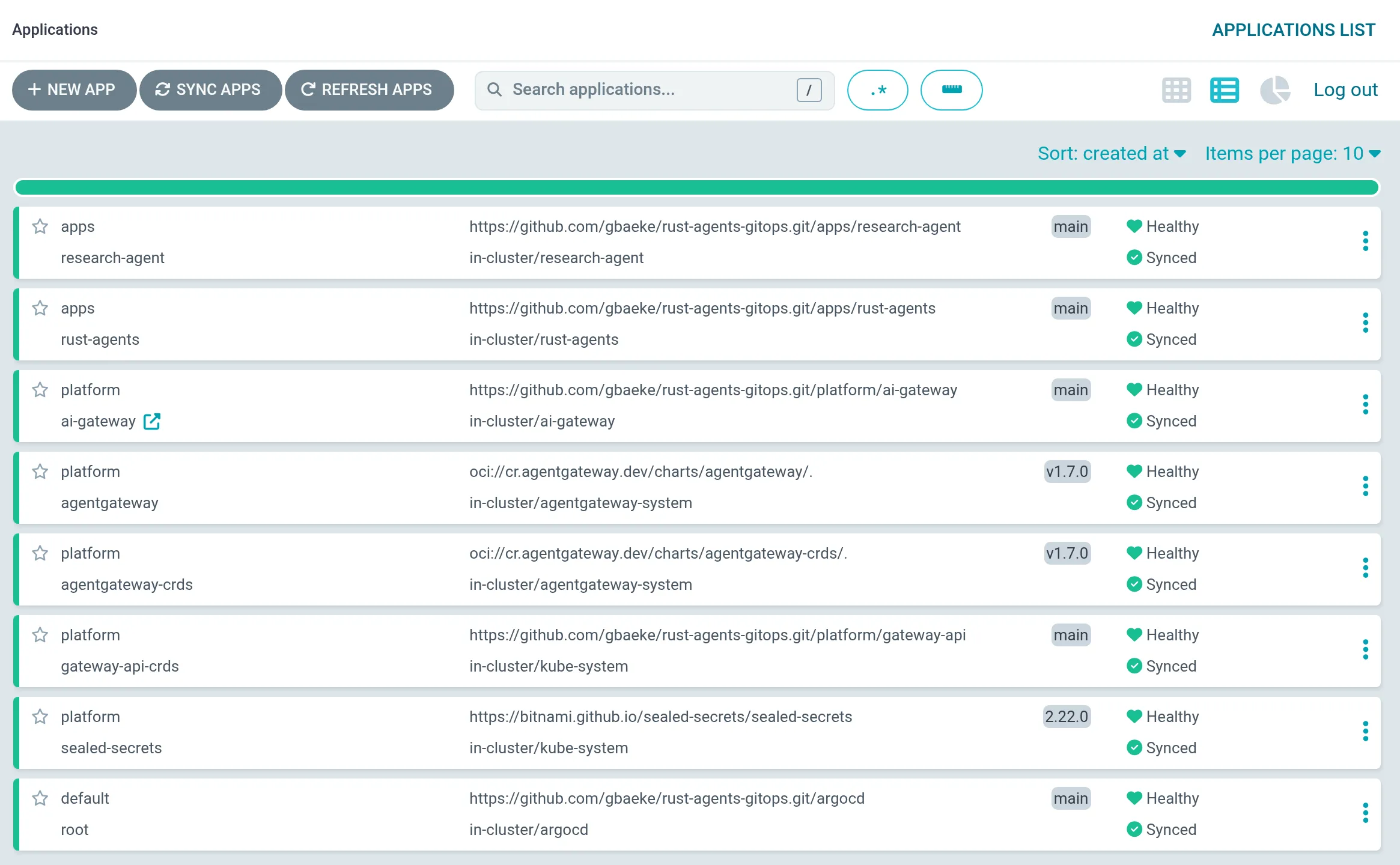
The docs show helm upgrade -i commands for the charts. I use Argo CD instead, so the cluster gets everything from git, agentgateway included. Each step is an Argo CD Application, and sync waves keep the order: Argo CD gives each Application a wave number and only starts the next wave when the previous one is healthy. The gateway itself, with its models, keys, routes and policies, comes last, from a folder in the same repository. Everything in the rest of this post lives in that folder. How to set up Argo CD this way deserves a post of its own, so I’ll leave it at that.
Here are the Applications in Argo CD, sorted by creation date with the newest on top, so read the list from the bottom up. root comes first and creates all the others. Then Sealed Secrets and the Gateway API CRDs (wave -3), agentgateway-crds (wave -2), the agentgateway chart (wave -1) and ai-gateway, the folder with the gateway’s configuration (wave 0). The two agents in the apps project have no wave set, which puts them in wave 0 as well, and they arrived later.
The part I like most is how a change works. Say you want to cap the number of tokens an agent may use. That’s a few lines of YAML in a policy, and it goes through the same process as any other change: a pull request, a review, checks, a merge. Argo CD then applies it to the cluster. Nobody changes the gateway by hand, and git shows who changed what and when.
One gateway for every agent
I wanted one central gateway, owned by a platform team and shared by all agents, the way you would share an API Management instance. It lives in its own namespace, ai-gateway. The agents run in their own namespaces and only reach the gateway over the network.
The Gateway has a single HTTP listener on port 8080:
apiVersion: gateway.networking.k8s.io/v1
kind: Gateway
metadata:
  name: ai-gateway
spec:
  gatewayClassName: agentgateway
  infrastructure:
    parametersRef: { group: agentgateway.dev, kind: AgentgatewayParameters, name: ai-gateway }
  listeners:
    - name: http
      protocol: HTTP
      port: 8080
      allowedRoutes:
        namespaces: { from: Same }
        kinds:
          - { group: gateway.networking.k8s.io, kind: HTTPRoute }
          - { group: agentgateway.dev, kind: AgentgatewayModel }
Two details matter here. from: Same means only routes in the gateway’s own namespace can attach to it, so an agent team can’t add its own routes from its namespace. And a listener only accepts the standard route kinds unless you list others, so AgentgatewayModel has to be in kinds.
The AgentgatewayParameters it points to tell the controller to run two proxy replicas (every agent depends on the gateway) behind a ClusterIP service. The agents call http://ai-gateway.ai-gateway.svc.cluster.local:8080. NetworkPolicies make sure only namespaces with a client label can reach it.
1. Who is calling?
Every rule further down depends on knowing which agent sent a request, so that comes first. agentgateway supports several ways to authenticate callers. The simplest is an API key per app, which is what I used.
One policy on the Gateway requires a key in the x-api-key header on every request, model calls and tool calls alike:
apiVersion: agentgateway.dev/v1alpha1
kind: AgentgatewayPolicy
metadata:
  name: api-keys
spec:
  targetRefs:
    - { group: gateway.networking.k8s.io, kind: Gateway, name: ai-gateway }
  traffic:
    apiKeyAuthentication:
      mode: Strict
      location:
        header: { name: x-api-key }
      configMapSelector:
        matchLabels: { ai-gateway.platform/api-key: "true" }
The keys come from ConfigMaps with that label, one per agent. A ConfigMap only holds a SHA-256 hash of the key, plus metadata:
apiVersion: v1
kind: ConfigMap
metadata:
  name: api-key-research-agent
  labels:
    ai-gateway.platform/api-key: "true"
data:
  research-agent: '{"keyHash": "sha256:de62ac...", "metadata": {"app": "research-agent"}}'
A hash of a random 32-byte key can’t be turned back into the key, so this file can sit in git as it is. The key itself goes to the agent as a Kubernetes Secret (in my case a Sealed Secret, encrypted in git). I picked x-api-key because Anthropic’s clients send their key in that header, so an agent built with any Anthropic SDK only needs a different base URL and the gateway key in place of the Anthropic key.
After authentication, every other policy can use apiKey.app, the app name from the key’s metadata, in its rules. One more policy writes that name into the request log, so you can split usage per agent:
  frontend:
    accessLog:
      attributes:
        add:
          - { name: agentgateway.user, expression: apiKey.app }
These expressions are CEL (Common Expression Language), which agentgateway uses throughout its policies.
2. The LLM lane
Before the YAML, here is what happens when the research agent sends a model call, from its key to the request log:
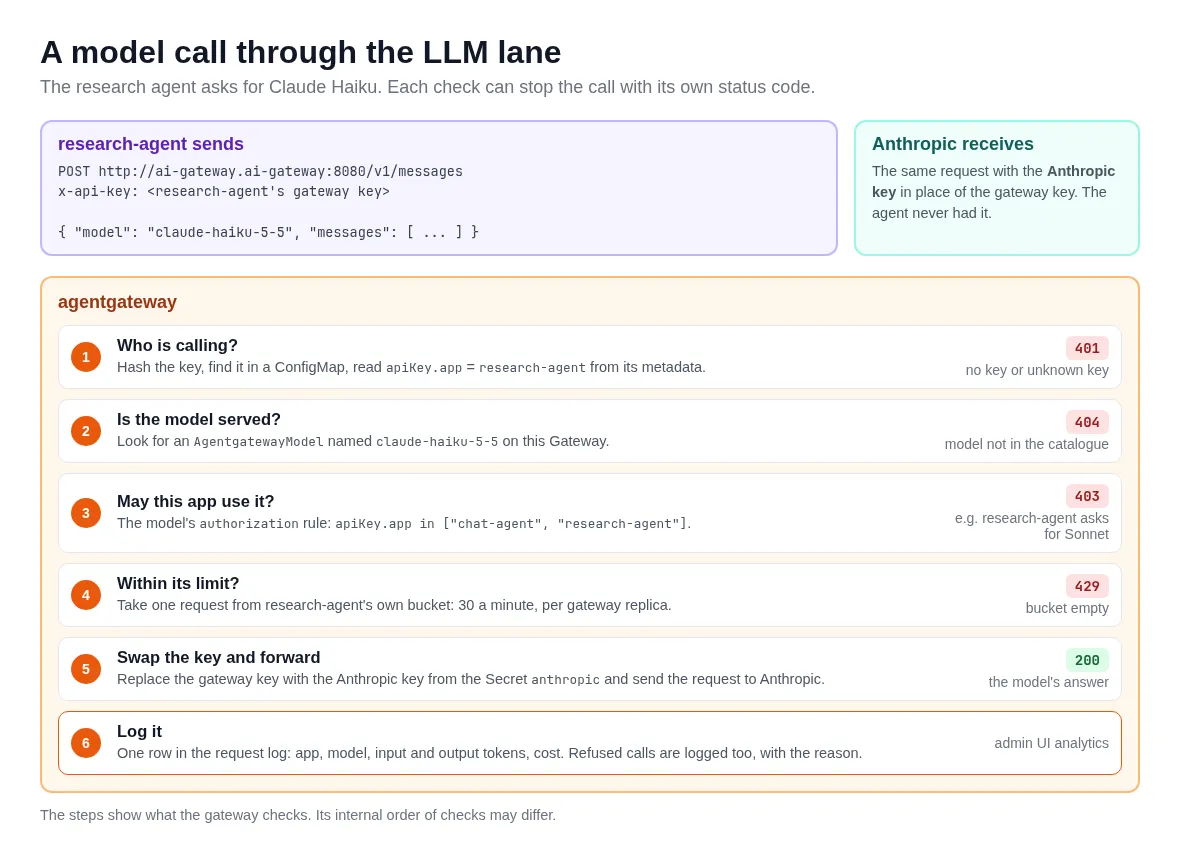
The gateway only serves the models you declare, one AgentgatewayModel per model. A request for any other model gets a 404. Here is Sonnet:
apiVersion: agentgateway.dev/v1alpha1
kind: AgentgatewayModel
metadata:
  name: claude-sonnet-5-5
spec:
  parentRefs:
    - { group: gateway.networking.k8s.io, kind: Gateway, name: ai-gateway, sectionName: http }
  provider: Anthropic
  policies:
    auth:
      secretRef:
        name: anthropic
    authorization:
      action: Allow
      policy:
        matchExpressions:
          - apiKey.app in ["chat-agent"]
A few things happen in this one resource:
- The model attaches to the Gateway’s listener and is served on the gateway’s standard paths, including Anthropic’s own
/v1/messagesin Anthropic’s format. auth.secretRefpoints to a Secret with the Anthropic API key. The gateway replaces the agent’s key with this one before the request leaves the cluster, so the agents don’t need to know it.authorizationlists the apps that may use this model. My chat agent may use Sonnet and Haiku, the research agent only Haiku. When the research agent asks for Sonnet, it gets a 403 “Model authorization denied”.
⚠️ The per-model rules go on the model itself, in policies.authorization. An AgentgatewayPolicy can’t target a model.
Limits are a separate policy on the Gateway. This one gives the research agent 30 requests a minute in its own bucket, so it gets a 429 above that while other agents carry on:
  traffic:
    rateLimit:
      conditional:
        - condition: apiKey.app == "research-agent"
          policy:
            local:
              - { key: apiKey.app, requests: 30, unit: Minutes }
⚠️ Important: local limits are counted per proxy replica, so with two replicas an agent can get up to about twice its limit. A strict limit across the cluster needs a global limit and an external rate limit service that speaks the Envoy rate limit protocol, typically backed by Redis. agentgateway can also limit tokens instead of requests, which fits a cost budget better. It reads the token count from the model’s response, so the request that goes over the budget still completes.
3. The MCP lane
A tool call takes a similar path, with the same key and a route per agent:
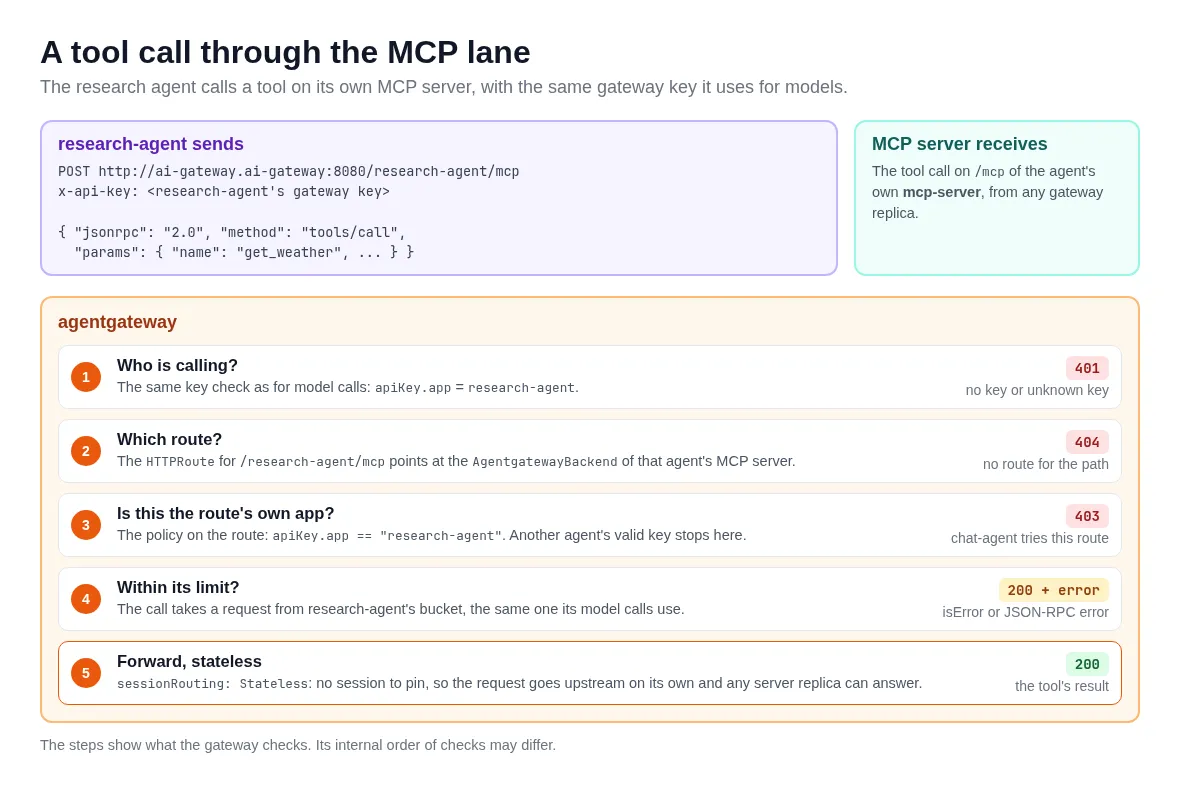
Each agent in my setup has its own MCP server with a few tools. The agents call the gateway on /<app>/mcp, and the gateway forwards the request to the agent’s own server. An MCP route takes three resources. First a backend that points at the MCP server:
apiVersion: agentgateway.dev/v1alpha1
kind: AgentgatewayBackend
metadata:
  name: mcp-research-agent
spec:
  mcp:
    sessionRouting: Stateless
    targets:
      - name: tools
        static:
          host: mcp-server.research-agent.svc.cluster.local
          port: 8081
          path: /mcp
          protocol: StreamableHTTP
An MCP backend can list several targets. The gateway then combines their tools behind one endpoint, which is a handy way to give an agent one MCP server with tools from several places. I use one target per agent.
sessionRouting: Stateless matters when you run more than one replica. My MCP server keeps no session state, so the gateway doesn’t need to either: each request goes upstream on its own and any replica of the gateway or the server can handle it.
Then a plain Gateway API HTTPRoute sends the path to that backend:
apiVersion: gateway.networking.k8s.io/v1
kind: HTTPRoute
metadata:
  name: mcp-research-agent
spec:
  parentRefs:
    - name: ai-gateway
  rules:
    - matches:
        - path: { type: PathPrefix, value: /research-agent/mcp }
      backendRefs:
        - { group: agentgateway.dev, kind: AgentgatewayBackend, name: mcp-research-agent }
And a policy on that route makes sure only the research agent’s key can use it. Another agent with a valid key of its own gets a 403:
spec:
  targetRefs:
    - { group: gateway.networking.k8s.io, kind: HTTPRoute, name: mcp-research-agent }
  traffic:
    authorization:
      action: Allow
      policy:
        matchExpressions:
          - apiKey.app == "research-agent"
The agent sends the same gateway key on its MCP calls as on its model calls, so one key covers both lanes. The rules can go further than this: agentgateway can allow or deny single tools per caller with CEL rules. I kept it at one route per agent.
⚠️ Important: MCP requests count against the same rate limit as model calls, but a refused MCP request doesn’t look like a refused model call. Per the docs, a rate-limited tools/call comes back as a tool result with isError: true, and other MCP methods as a JSON-RPC error, both with HTTP status 200. So check the response body, because the status code alone won’t show it. For limits that understand MCP, the docs attach the policy to the MCP route, and they count HTTP requests, which means a single MCP session uses several.
4. What about A2A?
The third lane handles calls from one agent to another over A2A. agentgateway proxies those requests, rewrites the agent card so its URL points to the gateway instead of the agent, and logs the A2A method and task state of each call. In standalone mode you mark a route as A2A with a2a: {} in its policies.
The agents in this example don’t call each other, so I left this lane out. If you want to see an A2A lane through a gateway, the API Management post has one.
Keeping agent teams out of the gateway
With everything in git, it’s tempting for an agent team to drop an extra AgentgatewayModel or route into their own folder. Two things stop that:
- the Gateway only accepts routes from its own namespace (
from: Same) - the Argo CD project for the apps blocks every
gateway.networking.k8s.ioandagentgateway.devkind
I tested it by adding a model to an agent’s folder. Argo CD refused the sync with ”… is not permitted in project apps”, nothing reached the cluster, and the agent kept running its last good version. The price is that adding an agent or a tool server is also a change to the platform folder: a key hash, an MCP route and an entry on the models it may use.
Seeing what it costs
agentgateway has an admin UI on port 15000 of each proxy. When you give the gateway a database, it logs every model call with the app, model, tokens and cost, and the UI shows that on an analytics page and a logs page. In Kubernetes mode there is no typed field for the database yet, so it goes into AgentgatewayParameters as raw config:
spec:
  # ...
  rawConfig:
    config:
      database:
        url: postgres://agentgateway:${POSTGRES_PASSWORD}@postgres:5432/agentgateway
I run a small Postgres next to the gateway for that. Because both proxy replicas write to the same database, the UI shows the calls of every agent, whichever replica served them.
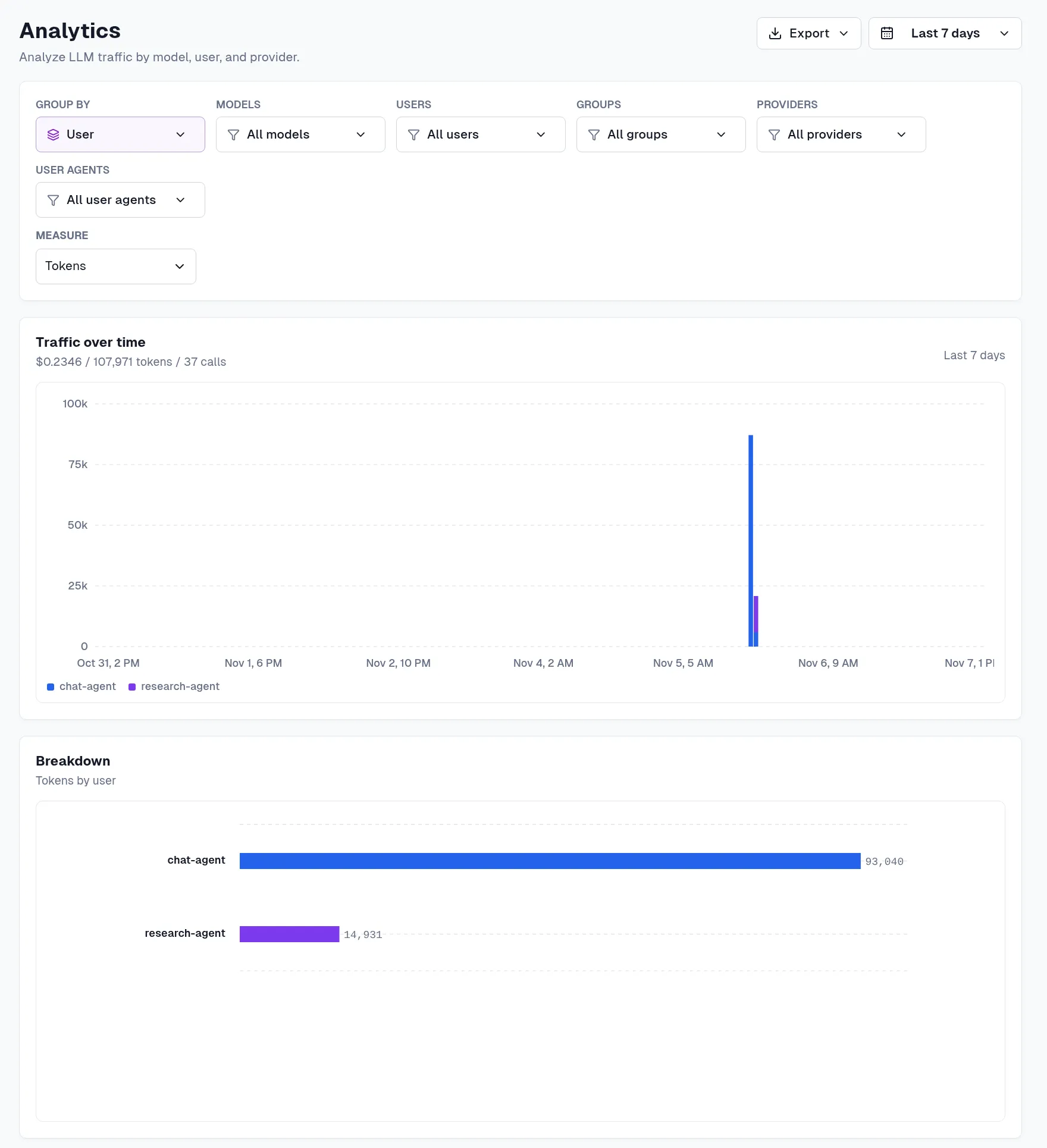
The analytics page, grouped by user, shows what each agent used over the last week. The user column holds the app name from the gateway key, which the logging policy in section 1 writes into each row:
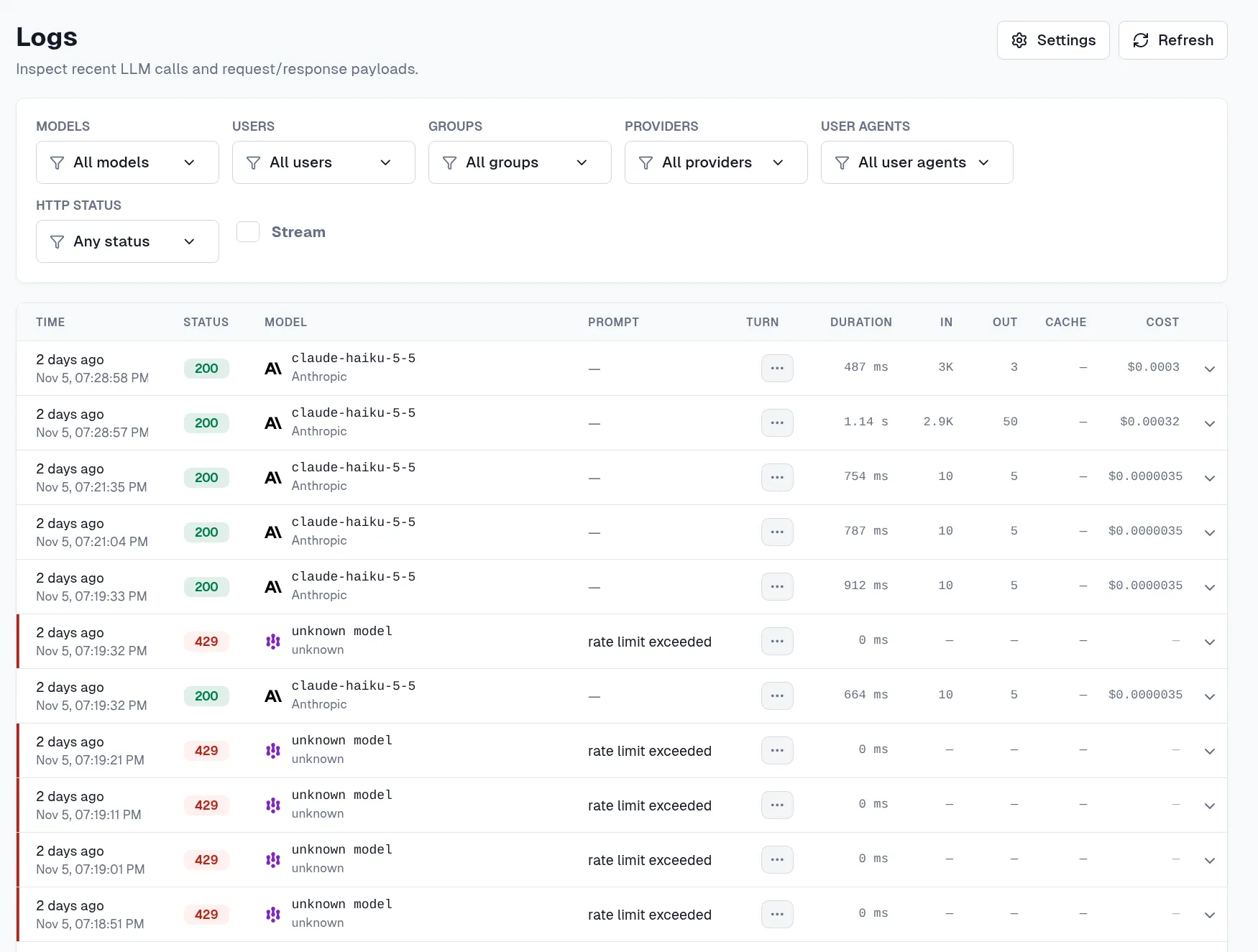
The logs page lists every call with its status, model, duration, tokens and cost. Look for the 429 rows: those are the research agent’s model calls that hit its limit of 30 requests a minute, logged with the reason. They show “unknown model” because the gateway refused them before it read the model from the request body, so those rows have no model, provider or tokens:
⚠️ In Kubernetes mode the UI’s menu only links Models and Client Setup under LLM. The analytics and logs pages still work, but you have to open them directly: /ui/llm/analytics and /ui/llm/logs, after a kubectl port-forward to port 15000 of the gateway’s Deployment.
What you don’t get
- Some parts are still young. The custom resources are
v1alpha1, and in Kubernetes modeAgentgatewayParametershas no typed field for the request-log database, so it goes inrawConfig. - Local rate limits are per replica. Strict limits need an external rate limit service with Redis, which is one more thing to run.
- You run it yourself, upgrades and database included. Solo.io lists agentgateway on the AWS, Azure and Google Cloud marketplaces, but those are the free open source distributions that you deploy and run. With API Management, Microsoft runs the gateway for you.
Wrapping up
agentgateway gives you an AI gateway as plain Kubernetes resources, so the models, keys, MCP routes and limits for all your agents go through the same git workflow as the rest of the cluster. If you’d rather not depend on API Management, or your agents don’t run on Azure, it’s well worth a look. The agentgateway docs have a quickstart for Kubernetes mode.
If you spot any errors or have questions, feel free to reach out!
#agentgateway#mcp#gitops#argocd
If this post helped you, you can buy me a coffee ☕
Comments
Comments are stored as GitHub Discussions: sign in with GitHub to join in.