An AI gateway for your agents with Azure API Management
In my work for Cronos and MbarQ, more and more customers are taking their agents from proof of concept to production. One agent is easy to keep an eye on. Ten agents built by four teams are a different story: which models do they call, which tools can they reach, which other agents do they talk to, and what does all of that cost?
At that point you need an AI platform that gives the customer control and visibility over all of those agents. The agents themselves can be built anywhere, by different teams, with the framework and hosting each team prefers. What they share is the route their traffic takes: every model call, tool call and call to another agent goes through the platform, where it can be seen and governed. A platform has many parts, but I want to keep this practical and look at one of them, the AI gateway. I built a demo with two agents that reach their model, their MCP tools and each other only through Azure API Management. The code is on GitHub: https://github.com/gbaeke/apim-ai-gateway-demo
The setup looks like this, with numbers that match the sections further down:
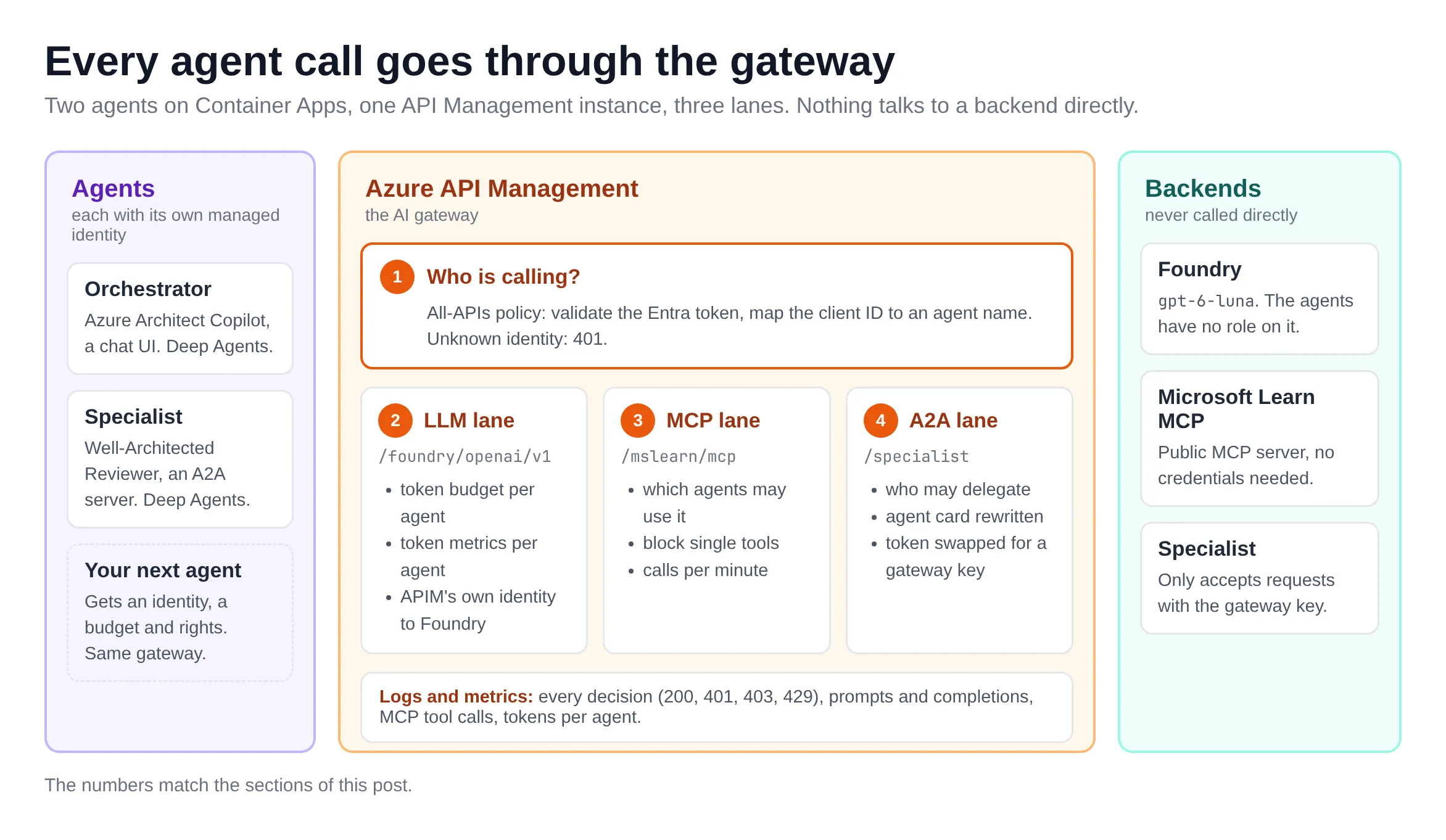
I kept the example simple, especially the MCP route. The Microsoft Learn MCP server is public and needs no credentials, which makes it the easiest case. In a real platform, MCP servers are ones you host yourself or get from third parties, and most of them need some form of authentication, from API keys to OAuth on behalf of the user. The gateway then has to handle those credentials too.
What is an AI gateway?
An AI gateway sits between your agents and everything they call. Agents talk to three kinds of things:
- language models: in Microsoft Foundry, but also any model with an OpenAI-compatible API, whether it runs on-premises or in another cloud, and Anthropic models through the Messages API
- tools, more and more often through MCP servers
- other agents, over the A2A protocol
When every one of those calls goes through a gateway, you get one place to check who is calling, decide what that caller may do, limit how much it uses and log what happened. The agent teams keep building agents. The platform team runs the gateway.
API Management as an AI gateway
Azure API Management has had AI gateway features for a while. They extend the API gateway you already know and work across the API Management tiers, although some depend on the tier. The list has grown a lot:
- Model APIs: OpenAI-compatible APIs (Chat Completions and Responses), the Anthropic Messages API on the v2 tiers and Google Vertex AI, for models in Foundry or elsewhere, such as Amazon Bedrock. The unified model API (preview) puts several providers behind one OpenAI-compatible endpoint.
- MCP: expose an existing REST API as an MCP server, or put an existing MCP server behind the gateway.
- A2A: import an A2A agent API from its agent card.
- Policies for AI traffic: token limits and quotas, token metrics, semantic caching, content safety checks, and load balancing with a circuit breaker across model backends.
- Logging of prompts, completions and MCP calls to Azure Monitor, with a built-in dashboard for token usage.
You can also connect an API Management instance to a Foundry resource as its AI gateway, and set token limits for model deployments from the Foundry portal. The overview on Microsoft Learn is a good starting point: AI gateway in Azure API Management.
And what is the new AI Gateway?
Microsoft now also has a dedicated product called AI Gateway, in public preview since this summer. It shares the API Management foundation, but it is a separate resource type (Microsoft.ApiManagement/aigateways) with its own portal at ai.gateway.azure.com. It’s built around the things a platform team manages:
- model providers, registered models and model aliases, so apps use a stable name while you change the backend behind it
- federated MCP servers that combine tools from remote MCP servers, OpenAPI-described APIs and built-in connectors behind one endpoint
- policies for access, consumption and estimated model spend, configured in the portal instead of in XML
- OpenTelemetry for logs, traces, token metrics and cost metrics
- tool-level control from Microsoft Agent 365, and protection of tool calls with Defender and Purview
Microsoft calls AI Gateway the primary path for its latest AI gateway capabilities. API Management keeps its AI features, and you can use both side by side: business APIs in API Management, model and tool traffic in AI Gateway. Full feature parity isn’t planned. The migration guide names backend-pool load balancing, failover, semantic caching and A2A agent APIs as reasons to keep a workload in API Management. The comparison on Learn explains the split: AI Gateway and Azure API Management service.
⚠️ Important: AI Gateway is a preview, available in East US 2 and Sweden Central only. It recently moved to its own resource type, and the earlier AIGateway SKU of API Management is deprecated (Learn has a migration guide). Expect more changes. 🤷
So why did I build my demo on classic API Management (Basic v2)? Because I wanted all three lanes in one gateway, and A2A agent APIs are only in API Management. With API Management I can also write any policy I want, which helps when you want to show exactly what happens at each step. My deployment script can create an empty AI Gateway instance next to it so you can compare the two (AI_GATEWAY_TIER=1 ./scripts/deploy.sh).
The demo
The demo has two agents, both built with LangChain Deep Agents and running on Azure Container Apps:
- The orchestrator (“Azure Architect Copilot”) has a chat UI. It answers Azure questions with the Microsoft Learn MCP server and hands design reviews to the specialist.
- The specialist (“Well-Architected Reviewer”) is an A2A server without a UI.
API Management publishes three APIs, and the policies treat each agent differently:
| Route on APIM | Backend | Orchestrator | Specialist |
|---|---|---|---|
/foundry/openai/v1 | Foundry with gpt-6-luna | 50K tokens/min | 20K tokens/min |
/mslearn/mcp | Microsoft Learn MCP server | allowed | 403 |
/specialist | Specialist agent (A2A) | allowed | 403 |
Everything deploys with one script (./scripts/deploy.sh) and needs no Entra app registration. The README has the details, including a 15-minute demo script.
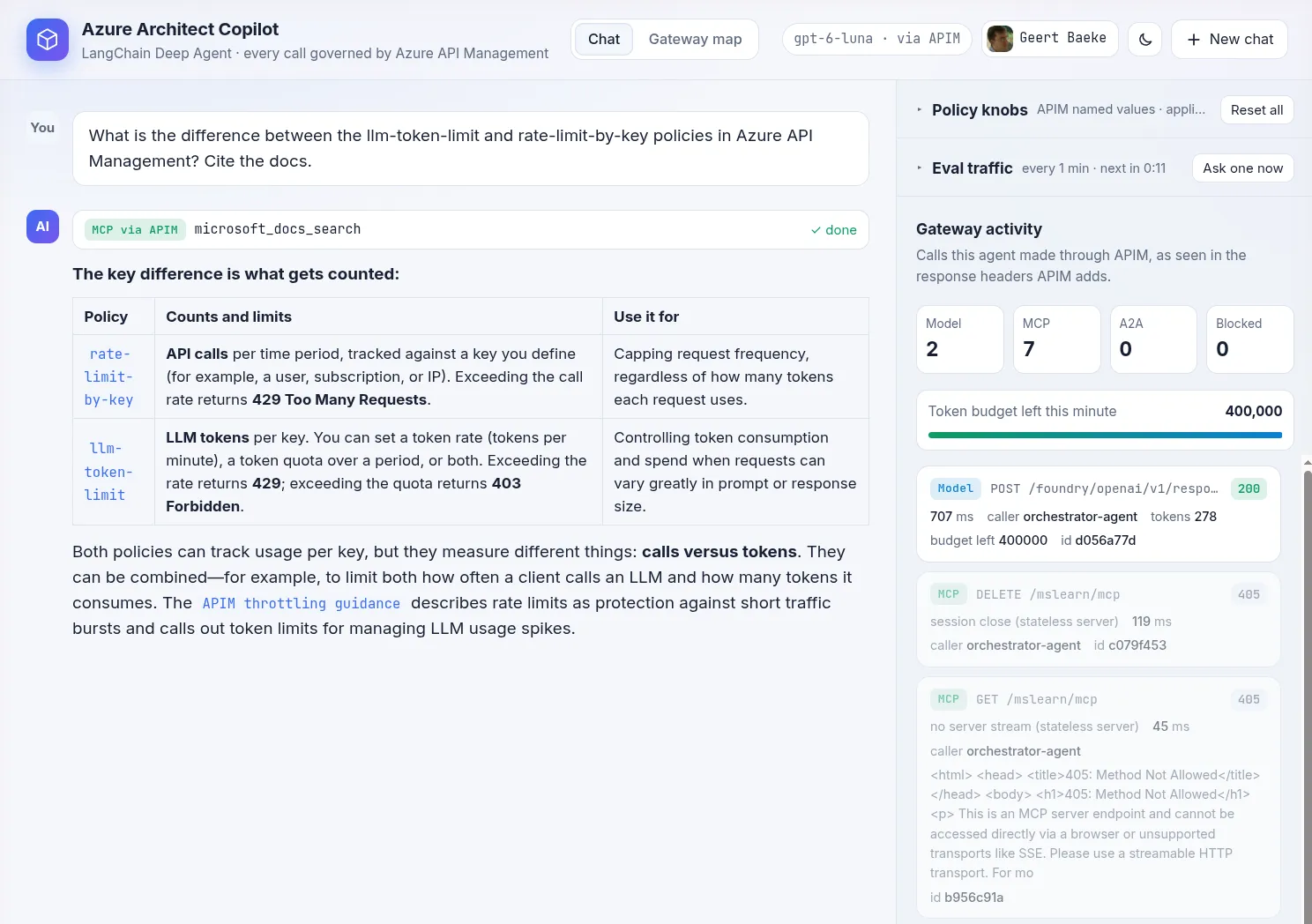
Here’s the orchestrator after a question about llm-token-limit and rate-limit-by-key. Look at the panel on the right: every call the agent made through the gateway, with the caller name that APIM set and the token budget left for this minute. The policy knobs sit above it, collapsed here:
The Gateway map tab reads the policies, APIs, backends and named values live from API Management and draws them from left to right: the callers, the global policy, one lane per API and the backends. Each step shows the value it uses right now, for example the 400,000 tokens per minute I gave the orchestrator:
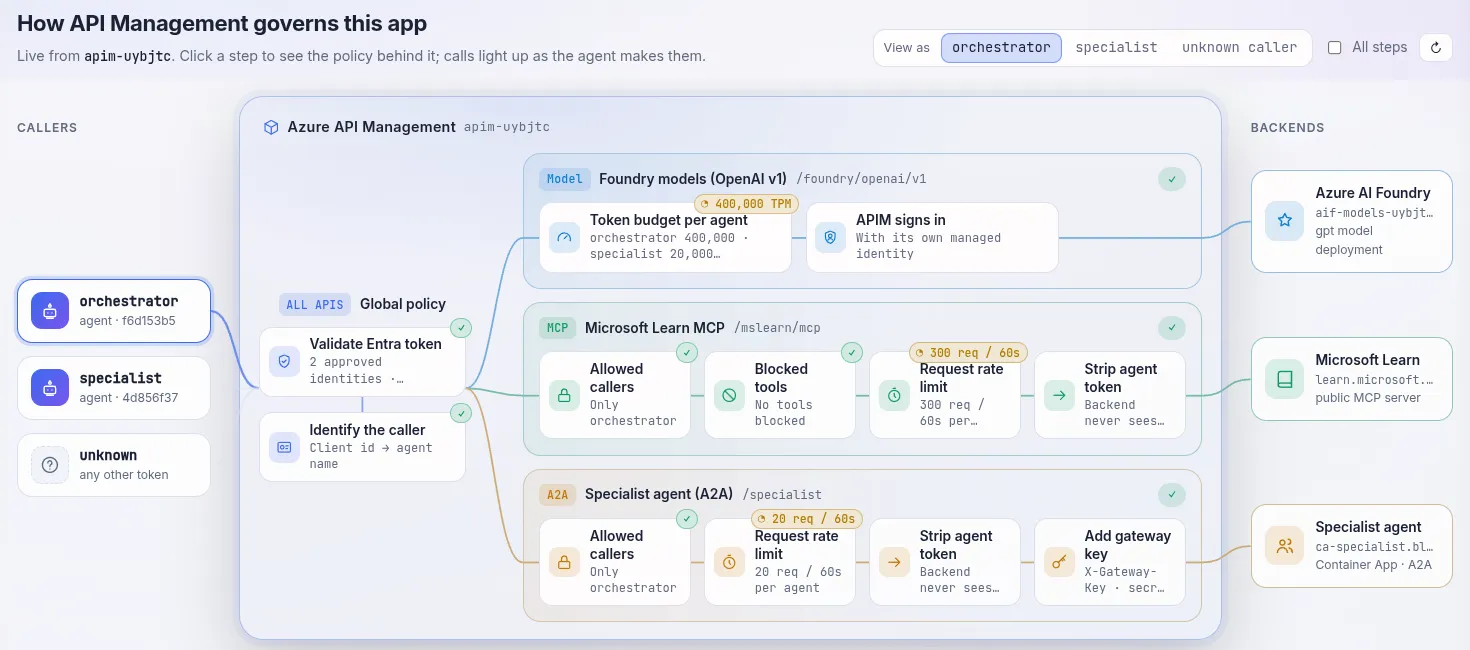
Click a step and the map shows the policy XML behind it. View as specialist or unknown caller shows where that caller gets refused.
The rules live in API Management policies: XML documents with steps that run on the way in (inbound), to the backend (backend) and on the way out (outbound), with C# expressions where you need logic. A policy can sit at several scopes, such as All APIs or a single API, and the scopes run in order. I won’t explain how to work with API Management in detail here. If policies are new to you, start with Policies in Azure API Management on Microsoft Learn.
⚠️ Important: the policies in this demo are written for learning. They are small, easy to follow and show one idea each. A production setup looks different, with app roles instead of client IDs, policy fragments shared between APIs, products and subscriptions, and policies deployed and tested through CI/CD. The principles stay the same: know the caller, then apply that caller’s rules per lane.
1. Who is calling?
Every rule in the gateway depends on knowing the caller, so identity comes first. Each agent has its own user-assigned managed identity and asks Entra for a token with it. In the agents, that’s a token provider from azure-identity:
@lru_cache
def token_provider():
    """Callable returning a (cached, auto-refreshed) access token string."""
    return get_bearer_token_provider(credential(), settings.token_scope)

def chat_model(**kwargs) -> ChatOpenAI:
    return ChatOpenAI(
        model=settings.model,
        base_url=settings.model_base_url,  # the APIM route, never Foundry itself
        api_key=token_provider(),
        # ...
    )
The policy on All APIs runs before every model, MCP and A2A call. It validates the token and turns the caller’s client ID into an agent name:
<validate-azure-ad-token tenant-id="{{tenant-id}}" failed-validation-httpcode="401"
    output-token-variable-name="jwt">
  <client-application-ids>
    <application-id>{{orchestrator-client-id}}</application-id>
    <application-id>{{specialist-client-id}}</application-id>
  </client-application-ids>
  <audiences>
    <audience>https://cognitiveservices.azure.com</audience>
  </audiences>
</validate-azure-ad-token>
<set-variable name="callerName" value="@{
    var id = (string)context.Variables["callerAppId"];
    if (id == "{{orchestrator-client-id}}") { return "orchestrator-agent"; }
    if (id == "{{specialist-client-id}}") { return "specialist-agent"; }
    return "unknown";
}" />
Three checks happen here: the issuer must be my tenant, the audience must match and the client ID must be on the list. Your own Azure CLI token is valid, but it isn’t on the list, so you get a 401. Every policy after this one works with callerName. The GUIDs live in this one policy, and the other policies talk about agents by name.
The agent identities have no role on the Foundry account. Their token only works at the gateway. If someone takes the token from the container, they can’t call the model directly with it.
⚠️ Important: I used the client IDs as an allow-list because I wanted the demo to work without an app registration. In production, a dedicated app registration as the audience, with an app role per capability (checked with required-claims), scales better than a list of client IDs in a policy.
2. The LLM lane
The model lane gives each agent its own token budget with llm-token-limit and emits token metrics with the calling agent as a dimension:
<choose>
  <when condition="@((string)context.Variables["callerName"] == "orchestrator-agent")">
    <llm-token-limit counter-key="orchestrator-agent" tokens-per-minute="{{orchestrator-tpm}}"
        estimate-prompt-tokens="false"
        remaining-tokens-header-name="x-ratelimit-remaining-tokens" />
  </when>
  <!-- ... the same for specialist-agent, and a 403 for anyone else -->
</choose>
<llm-emit-token-metric namespace="ai-gateway">
  <dimension name="Caller" value="@((string)context.Variables["callerName"])" />
</llm-emit-token-metric>
<authentication-managed-identity resource="https://cognitiveservices.azure.com"
    output-token-variable-name="apimToken" />
The last policy is the identity swap: API Management calls Foundry with its own managed identity, and the agent’s token never reaches the backend. When the specialist burns through its budget, it gets a 429 and the orchestrator keeps working, because they have separate counters.
There’s more you can do in this lane that the demo doesn’t use: semantic caching to reuse answers to similar prompts, content safety checks on prompts, and load balancing across several model deployments with a circuit breaker. Spreading load between a provisioned (PTU) deployment and a pay-as-you-go one is a common reason to add a gateway in the first place.
3. The MCP lane
The MCP lane decides which agents can use the Microsoft Learn MCP server, which of its tools they can call and how often. The allowed callers are a named value, so only the orchestrator gets in today.
Blocking a single tool is the interesting part. The policy reads the JSON-RPC body, and when the agent calls a blocked tool, API Management answers in the MCP way: a normal 200 with a tool result that has isError: true.
<set-variable name="mcpTool" value="@{
    if (context.Request.Method != "POST") { return ""; }
    var body = context.Request.Body.As<JObject>(preserveContent: true);
    return (string)body["method"] == "tools/call" ? (string)body["params"]["name"] : "";
}" />
<choose>
  <when condition="@{
      var tool = (string)context.Variables["mcpTool"];
      return ",{{mcp-blocked-tools}},".Replace(" ", "").Contains("," + tool + ",");
  }">
    <return-response>
      <set-status code="200" reason="OK" />
      <!-- a JSON-RPC result with isError: true and a message saying the gateway blocked the tool -->
    </return-response>
  </when>
</choose>
<rate-limit-by-key calls="{{mcp-calls-per-minute}}" renewal-period="60"
    counter-key="@((string)context.Variables["callerName"])" />
<set-header name="Authorization" exists-action="delete" />
Because the refusal comes back as a tool error, the agent sees it and works around it. Block microsoft_docs_search and the orchestrator switches to microsoft_docs_fetch. The agent keeps going with the tools it still has. 😊
Taking the orchestrator off the allowed callers revokes the whole server. The gateway then answers every MCP call with a 403. The orchestrator wraps its MCP tools so that a refusal becomes a failed tool call, and the system prompt tells it to explain refusals. I removed the orchestrator in the policy knobs and asked the same question again. The search shows as failed, the activity panel shows the 403 with the reason from the policy, and the answer says it couldn’t check the docs:
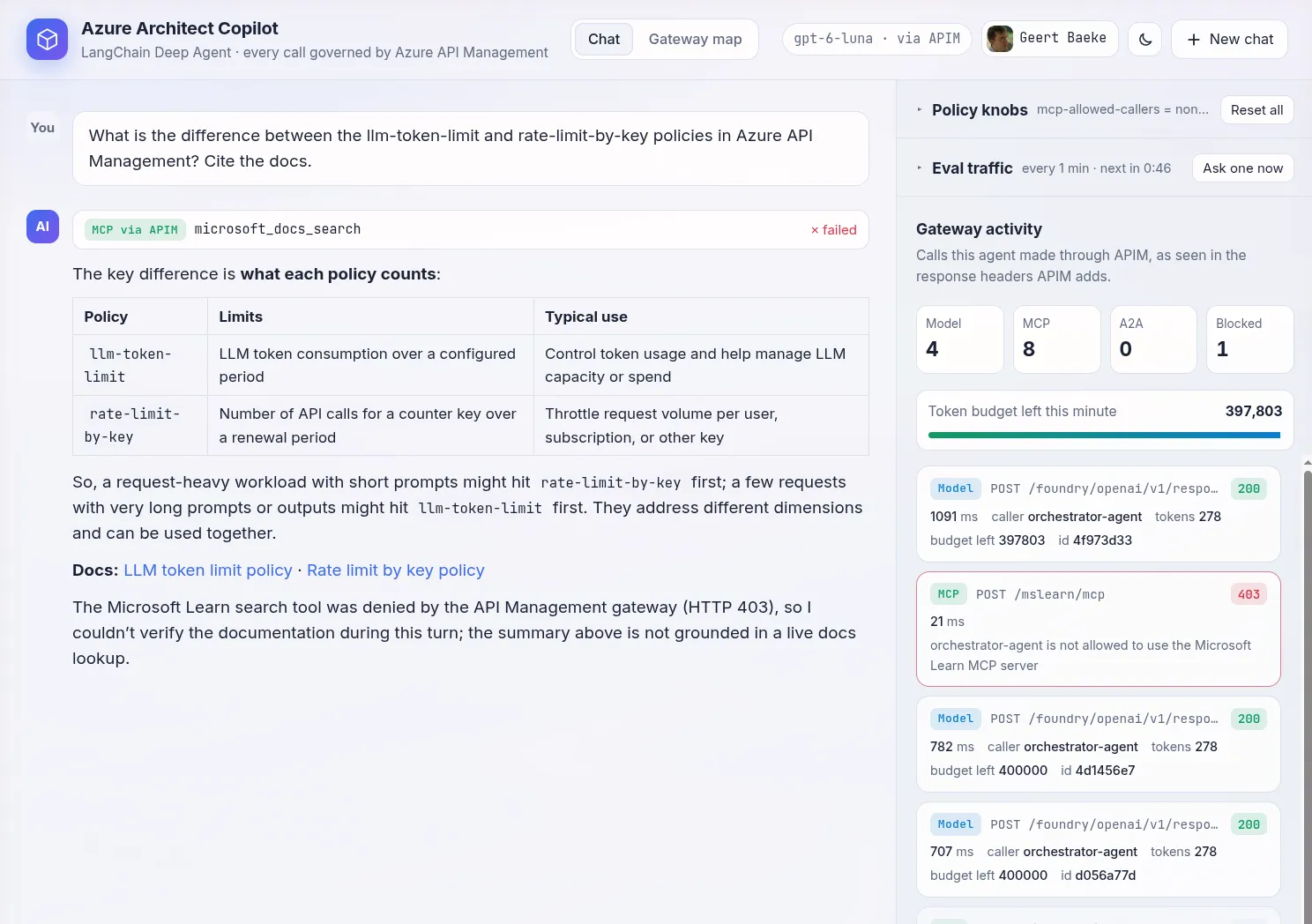
The answer itself comes from the model’s own knowledge. My system prompt allows that: when a tool is refused, the agent answers as well as it can and says what isn’t grounded. If an agent must never answer without a source, put that in its instructions. The gateway decides what the agent can reach. What the agent does when it gets a refusal is up to the agent.
The last line removes the agent’s token before the call goes out. The Learn server is public and needs no credentials, so there’s no reason to send it a token. For MCP servers that do need credentials, API Management’s credential manager can handle OAuth to the backend.
4. The A2A lane
The orchestrator delegates design reviews to the specialist over A2A. In API Management, the specialist is an A2A agent API, imported from its agent card. The gateway serves that card with its own hostname, so the orchestrator fetches the card from API Management and never learns the specialist’s real address.
The policy on this lane does three things:
- only agents in
a2a-allowed-callersmay delegate (just the orchestrator, so the specialist can’t call itself and unknown agents are out) - a rate limit per caller
- the agent’s token is replaced by a gateway key, and the specialist rejects requests without it
That last point closes the back door: someone who finds the Container Apps URL of the specialist gets a 403, even with a valid Entra token.
The A2A API also adds gen_ai.agent.id to its telemetry, and W3C trace context flows through the gateway. In Foundry, a single trace shows the orchestrator’s spans with the specialist’s spans nested inside them.
Changing the rules while it runs
All limits and lists in the policies are named values in API Management: token budgets, calls per minute, allowed callers, blocked tools. Change one and the next request uses the new value, without a deployment:
./scripts/set-policy-knob.sh specialist-tpm 300      # throttle the specialist
./scripts/set-policy-knob.sh specialist-tpm 20000    # restore
./scripts/set-policy-knob.sh a2a-allowed-callers none
Throttle the specialist, ask for a review and watch what happens: its model calls get a 429, the A2A task fails with that reason, and the orchestrator tells you the reviewer was throttled. The system prompt tells the orchestrator to explain gateway refusals instead of retrying, and the tool code turns a 403 or 429 into a tool error the model can read.
The orchestrator UI has the same knobs. It changes them with a separate identity that can only read and write the named values of this one API Management instance. The agent’s own identity has no management rights, and the model has no tool that reaches the knobs, so the agent can’t raise its own limits. 😎
What can you see?
Observability is split in two, on purpose:
- The gateway logs to its own Log Analytics workspace and Application Insights: every request with the caller and the decision (200, 401, 403, 429), prompts and completions in
ApiManagementGatewayLlmLog, MCP tool calls inApiManagementGatewayMCPLog, and token metrics per agent. API Management also has a dashboard for language model usage. - The agents send OpenTelemetry GenAI spans to their own Application Insights. Each agent is registered in Foundry as an external agent, so you can open its traces there.
The gateway logs answer the platform team’s questions: who called what, what was refused, and who used how many tokens. The agent traces answer the agent team’s question: why did my agent do that?
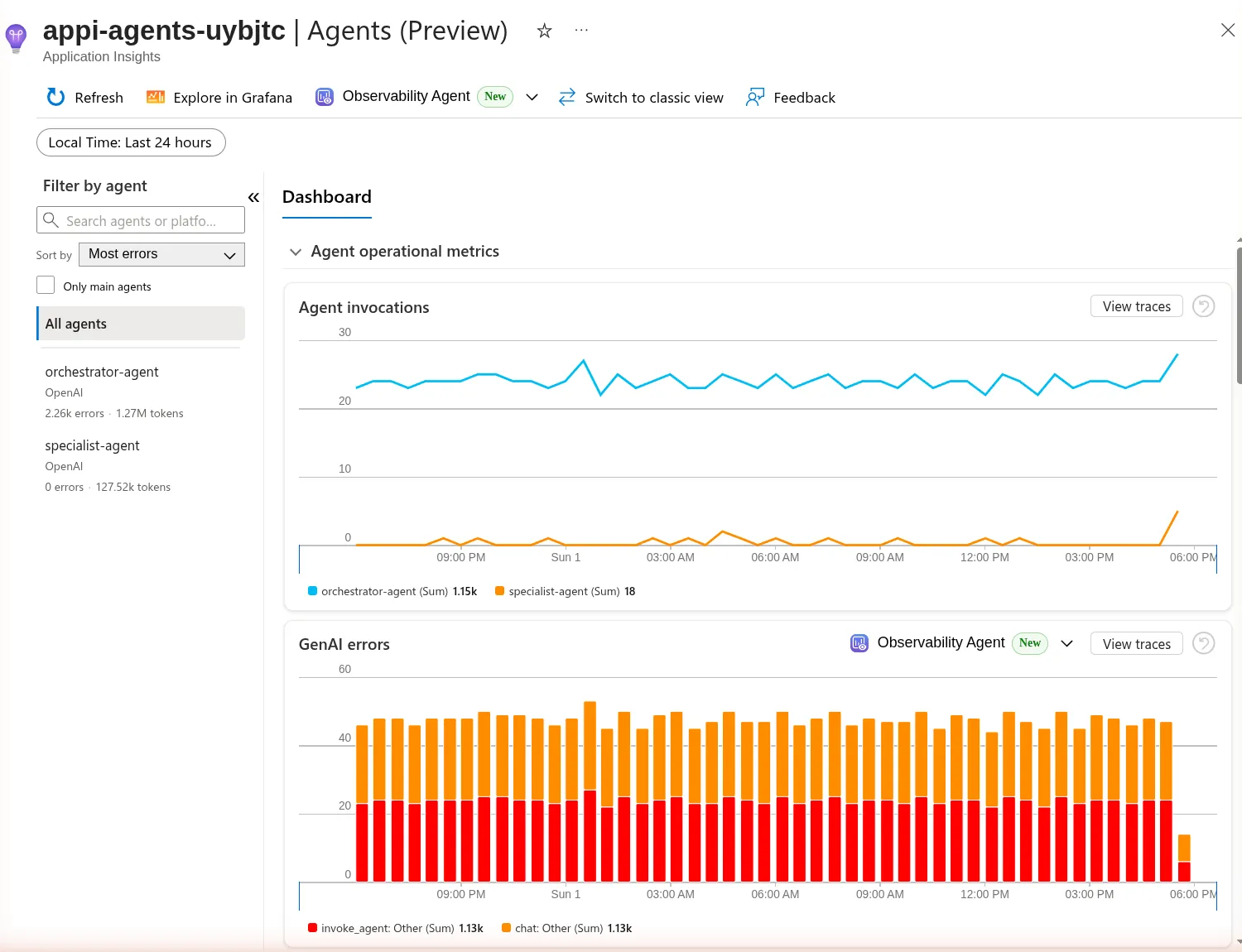
Application Insights has an Agents (Preview) view that builds a dashboard from those GenAI spans: invocations per agent, errors, tokens and tool calls. Here’s the top of that dashboard for the agents’ workspace over the last 24 hours. The errors are my doing: I left the orchestrator’s budget at a measly 300 tokens per minute for hours while the demo sent it a question every minute. Almost every invoke_agent and chat span failed on the gateway’s 429. The specialist got hardly any work during that time and shows no errors. The last bar drops because the budget is back to normal:
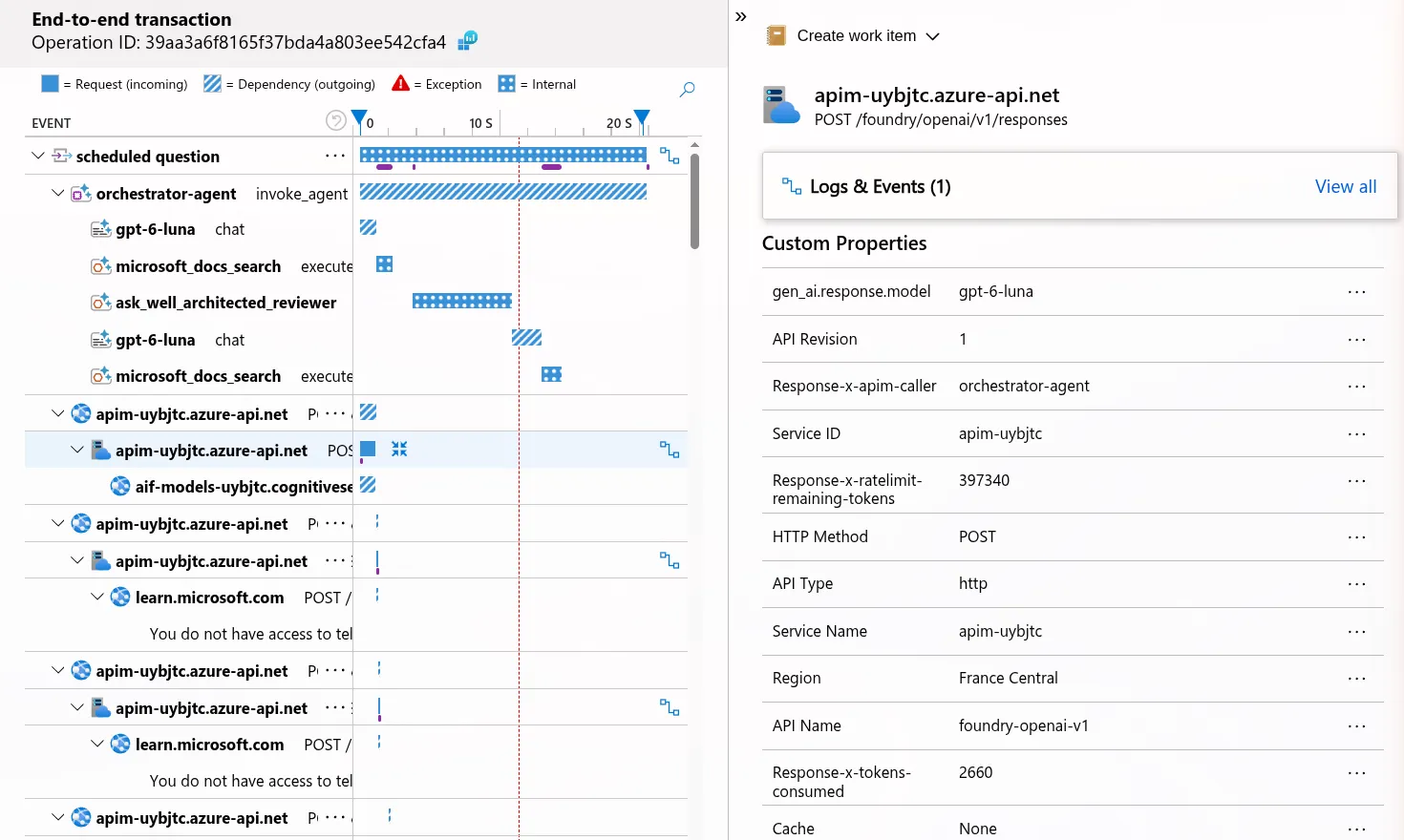
Because W3C trace context flows through API Management, you can also see both sides in one view. Here’s one question from the gateway’s Application Insights. At the top are the orchestrator’s spans: invoke_agent, the model calls (chat) and the tool calls (execute_tool), including the delegation to the reviewer. Under them is every call through the gateway with its backend call. On the right are the properties of one model call: the caller that APIM set (orchestrator-agent), the tokens it consumed and the budget left this minute:
For the refusals, a query like this one lists what the gateway refused and why:
ApiManagementGatewayLogs
| where TimeGenerated > ago(1h) and ResponseCode in (401, 403, 429)
| summarize count() by ApiId, ResponseCode, LastErrorReason
What you don’t get
- Policies are XML with C# expressions. That’s powerful, but someone has to own and test them. A mistake in the All APIs policy breaks every agent at once.
- The allow-list of client IDs grows with every new agent. With fifty agents you want app roles, or at least the list in named values.
- A gateway refusal only ends well when the agent handles it. The MCP client treats a 403 as a transport failure, so my orchestrator catches it and turns it into a tool error. Agents that don’t do this crash on the first refusal.
- A2A agent APIs in API Management support JSON-RPC only. The gateway rewrites the card’s top-level
url, which is an A2A 0.3 field, so my specialist publishes a 0.3 card. - Basic v2 is fine for a demo. For production, look at Standard v2 or Premium v2 for networking and scale.
- Agents can still call a backend directly if the network allows it. The gateway only governs traffic that goes through it, so lock down the backends too: no roles for agent identities, and private endpoints where you can.
Wrapping up
An AI gateway is one of the first things to put in place when agents go from one proof of concept to many production workloads: every agent gets an identity, a budget and a set of rights, and the platform team sees all of it in one place. The code is here: https://github.com/gbaeke/apim-ai-gateway-demo
If you spot any errors or have questions, feel free to reach out!
#api-management#ai-gateway#mcp#a2a
If this post helped you, you can buy me a coffee ☕
Comments
Comments are stored as GitHub Discussions: sign in with GitHub to join in.