How to delete an stubborn Azure Virtual Hub
A while ago, I created an Azure Virtual WAN (Standard) and added a virtual hub. For some reason, the virtual hub ended up in the state below:
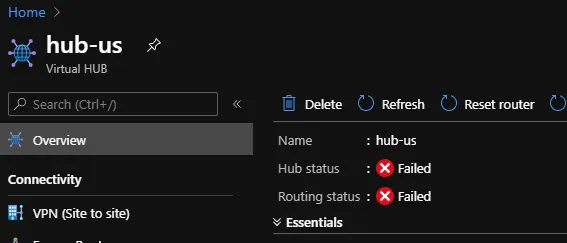
Hub and routing status: Failed (Ouch!)
I tried to reset the router and virtual hub but to no avail. Next, I tried to delete the hub. In the portal, this resulted in a validating state that did not end. In the Azure CLI, an error was thrown.
Because this is a Microsoft Partner Network (MPN) subscription, I also did not have technical support or an easy way to enable it. I ended up buying Developer Support for a month just to open a service request.
The (helpful) support engineer asked me to do the following:
- Open Azure Resource Explorer
- Navigate to subscriptions and the resource group that contains the hub
- Under providers, navigate to Microsoft.Network
- Locate the virtual hub and do GET, EDIT, PUT (set Read/Write mode first)

After clicking GET and EDIT, PUT can be clicked
At first it did not seem to work but in my case, the PUT operation just took a very long time. After the PUT operation finished, I could delete the virtual hub from the portal.
Long story short: if you ever have a resource you cannot delete, give Azure Resource Explorer and the above procedure a try. Your mileage may vary though!
#azure#hub#network#routing#spoke
If this post helped you, you can buy me a coffee ☕
Comments
Comments are stored as GitHub Discussions: sign in with GitHub to join in.