baeke.info, page 19
ResNet50v2 classification in Go with a local container
To quickly go to the code, go here. Otherwise, keep reading… In a previous blog post, I wrote about classifying images with the ResNet50v2 model from the ONNX Model Zoo. In that post, the container ran on a Kubernetes cluster with GPU nodes. The nodes had an NVIDIA v100 GPU. The actual classification was done…
Recognizing images with Azure Machine Learning and the ONNX ResNet50v2 model
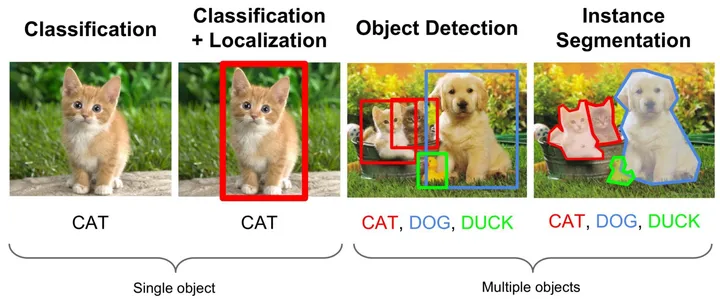
Featured image from: https://medium.com/comet-app/review-of-deep-learning-algorithms-for-object-detection-c1f3d437b852 In a previous post, I discussed the creation of a container image that uses the ResNet50v2 model for image classification. If you want to perform tasks such as localization or segmentation, there are other models that serve that purpose. The image was built with GPU support. Adding GPU support was pretty…
Creating a GPU container image for scoring with Azure Machine Learning
In a previous post, I discussed how you can add an existing Kubernetes cluster to an Azure Machine Learning workspace. Adding an existing cluster is necessary when the workspace does not support auto creation of a cluster. That is the case when you want to use the Standard_NC6s_v3 virtual machine image. I also used a…
Attaching Kubernetes clusters with NVIDIA V100 GPUs to Azure Machine Learning Service
Azure Machine Learning Service allows you to easily deploy compute for training and inference via a machine learning workspace. Although one of the compute types is Kubernetes, the workspace is a bit picky about the node VM sizes. I wanted to use two Standard_NC6s_v3 instances with NVIDIA Tesla V100 GPUs but that was not allowed.…
Deploying Azure Cognitive Services Containers with IoT Edge
Introduction Azure Cognitive Services is a collection of APIs that make your applications smarter. Some of those APIs are listed below: Vision: image classification, face detection (including emotions), OCR Language: text analytics (e.g. key phrase or sentiment analysis), language detection and translation To use one of the APIs you need to provision it in an…
Deploying Azure resources using webhookd
In the previous blog post, I discussed adding SSL to webhookd. In this post, I will briefly show how to use this solution to deploy Azure resources. To run webhookd, I deployed a small Standard_B1s machine (1GB RAM, 1 vCPU) with a system assigned managed identity. After deployment, information about the managed identity is available…
Using certmagic to add SSL to webhookd
A while ago, I stumbled upon https://github.com/ncarlier/webhookd. It is a simple webhook server, written in Go, that can execute shell scripts. To use it, simply install it on a Linux box and execute it. By default, the executable looks at the ./scripts folder and maps each shell script to a URL you can call. It…
Draft: a simpler way to deploy to Kubernetes during development
If you work with containers and work with Kubernetes, Draft makes it easier to deploy your code while you are in the earlier development stages. You use Draft while you are working on your code but before you commit it to version control. The idea is simple: You have some code written in something like…
Adaptable IoT
On May 24, 2017 I gave a short partner session at Techorama, a technology event in Belgium for both developers and IT Pros. You can find the slides on SlideShare: https://www.slideshare.net/gbaeke/adaptable-iot Since it was a short session and a short slide deck, this post provides a bit more background information. First, what do I mean…
IoT Hub Device Twin and MQTT
When you connect to IoT Hub with MQTT directly, you need to connect with a ClientId, username and password. Those three values need to be set according to Azure IoT Hub specificiations: ClientId: use the IoT Hub deviceId Username: use {iothubhostname}/{deviceId}/api-version=2016-11-14 Password: use a SAS token When you connect with MQTT, you will notice it…