How knowledge graphs work in Foundry IQ
Contents 9 sections
Ask a RAG system “How many projects has Amira worked on?” and it will often get the count wrong. The answer is spread over dozens of documents, and vector search hands the model only the five or ten passages closest to the question. At Ignite 2026, Microsoft announced knowledge graphs for Foundry IQ (the new name for Azure AI Search) to handle questions like this one. The feature is in public preview.
To see how it works, I built Kestrel Graph Lab. It has 246 synthetic project documents from the fictional consultancy Kestrel Consulting, a knowledge graph on top of them, and a small app that runs the same question through plain RAG and through the graph.
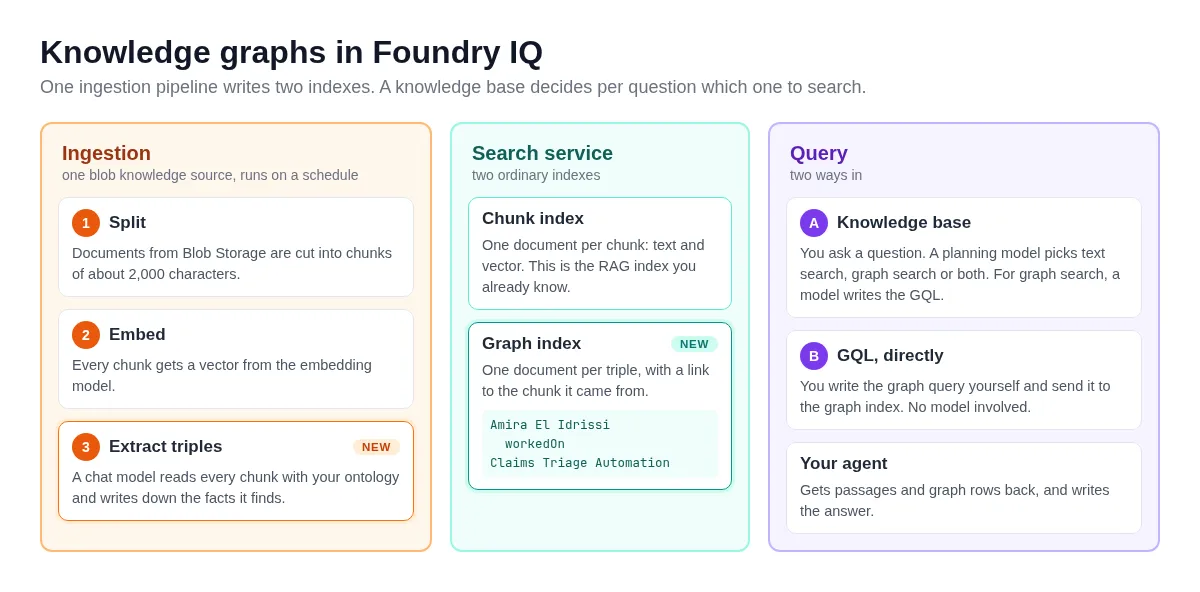
The diagram shows how the pieces fit together. The parts marked NEW are what the preview adds to the RAG pipeline you already have:
What is a knowledge graph?
A knowledge graph stores facts as things and the relationships between them. The things are nodes: a person, a project, a customer. The relationships are edges, and each edge has a name and a direction. One fact is a triple of subject, predicate and object:
Amira El Idrissi --workedOn--> Claims Triage AutomationTriples that mention the same node connect. With enough of them, you answer a question by following edges. Count Amira’s workedOn edges and you have her projects, wherever they were written down. A question such as “Which consultant worked with Kevin Hermans at two different employers?” becomes a path through several nodes.
This is the graph of my test corpus. Foundry IQ has no graph visualization of its own, so the view below is custom code in the lab app that reads the triples and draws them. Green nodes are people, blue ones projects, brown ones organizations and purple ones technologies:
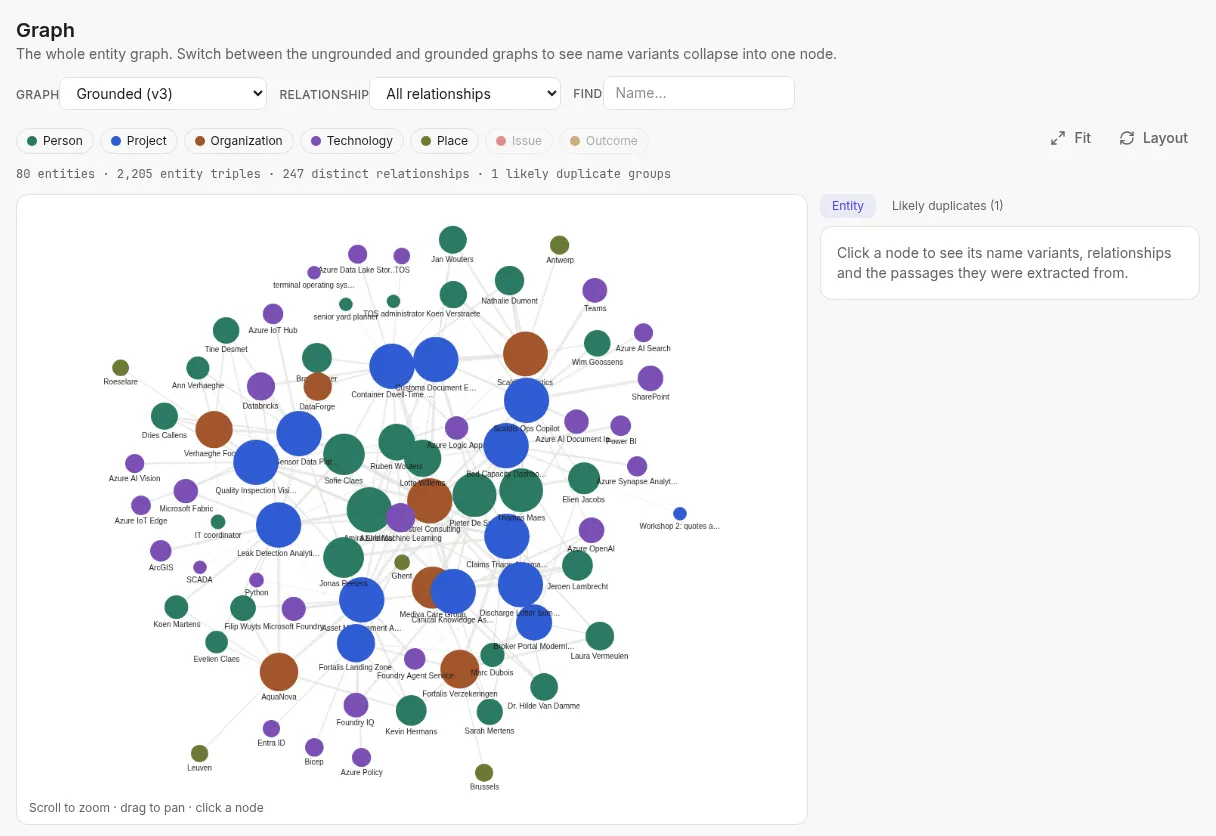
Foundry IQ calls this an entity graph. The preview also has topic graphs, which cluster passages into themes and need no ontology. I leave those out here.
How does the graph get built?
The graph comes out of the same ingestion that builds your RAG index: a knowledge source. This example uses a blob knowledge source. Other indexed knowledge sources, such as SharePoint or OneLake, work the same way: the generated indexer pulls in the content and runs the graph extraction, wherever that content comes from. You add an ontology to the source, and that switches graph extraction on.
The ontology is a JSON-LD document that lists the entity types and relationships to extract. I keep it as a file in the repo. Shortened to one entity type and one relationship, it looks like this:
{
  "@context": {
    "owl": "http://www.w3.org/2002/07/owl#",
    "rdfs": "http://www.w3.org/2000/01/rdf-schema#"
  },
  "@graph": [
    {
      "@id": "https://schema.search.azure.com/entities#Person",
      "@type": "owl:Class",
      "rdfs:comment": "A named individual: a consultant, a customer contact or a partner employee. ..."
    },
    {
      "@id": "https://schema.search.azure.com/entities#workedOn",
      "@type": "owl:ObjectProperty",
      "rdfs:domain": { "@id": "https://schema.search.azure.com/entities#Person" },
      "rdfs:range": { "@id": "https://schema.search.azure.com/entities#Project" },
      "rdfs:comment": "A Kestrel Consulting consultant or a subcontractor employee who is or was on the delivery team of the project, in any role. Customer employees never have workedOn; they use sponsors, productOwnerOf or contactFor."
    }
  ]
}
An owl:Class is an entity type. An owl:ObjectProperty is a relationship, with the type it starts from as its domain and the type it points to as its range. The rdfs:comment is the description, and the extraction model reads it as an instruction.
There is no separate upload for this file and no ontology object in the service. The whole document travels inside the knowledge source definition: you turn it into one string and put that string in graphExtraction.ontology.value. In Python that is two lines:
ontology = json.loads(Path("ontology/ontology.json").read_text())
value = json.dumps(ontology, separators=(",", ":"))  # the whole document as one compact string
The request that creates the knowledge source then carries it, with kind set to inline:
PUT /knowledgesources('kestrel-entities-ks')?api-version=2026-11-01-preview

{
  "name": "kestrel-entities-ks",
  "kind": "azureBlob",
  "azureBlobParameters": {
    "connectionString": "ResourceId=/subscriptions/...",
    "containerName": "kestrel-corpus",
    "ingestionParameters": {
      "embeddingModel": { ... },
      "chatCompletionModel": { ... }
    },
    "graphExtraction": {
      "graphName": "kestrel",
      "ontology": {
        "kind": "inline",
        "name": "kestrel-v2",
        "value": "{\"@context\":{\"owl\":\"http://www.w3.org/2002/07/owl#\", ...},\"@graph\":[ ... ]}"
      }
    }
  }
}
The chatCompletionModel in the same definition is the model that does the extraction.
From that one call, the service generates a data source, an indexer, a skillset and two indexes. The skillset splits each document into chunks and embeds them, as it did before. A third skill is new: it sends every chunk to a chat model together with the ontology and gets triples back. Microsoft recommends gpt-5.6-luna for that. The indexer runs once at creation and then on a schedule (daily for me), and it only processes new or changed blobs.
Extraction is one model call per chunk, so its cost grows with the size of your corpus. My 246 documents became 628 chunks and about 3,100 triples.
Where does the graph live?
In a search index. There is no graph database behind this feature. The knowledge source creates a second index next to the chunk index, and it sits in the service’s list of indexes like any other. The screenshot is from halfway through the first run, so the counts are still going up:
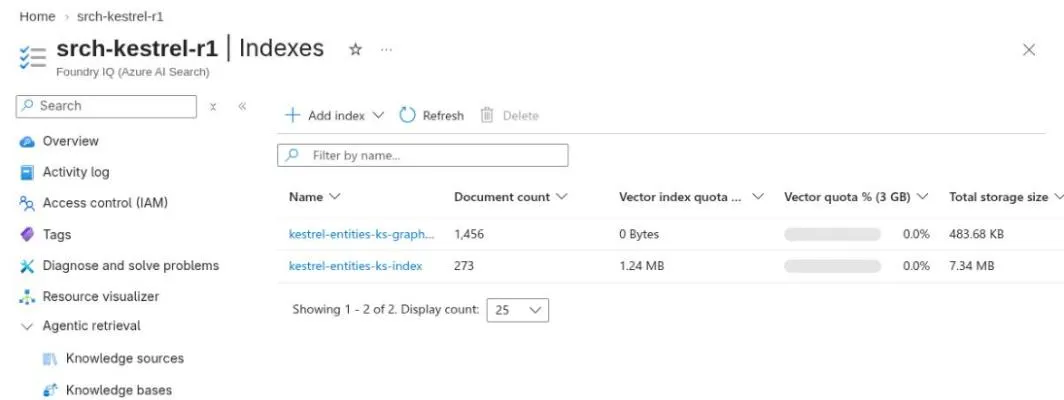
The graph index holds one document per triple. Shortened, such a document looks like this:
{
  "subject": "Amira El Idrissi", "subject_type": "Person", "subject_id": "person:amira",
  "predicate": "workedOn",
  "object": "Leak Detection Analytics", "object_type": "Project", "object_id": "project:P12",
  "edge_confidence": 0.99,
  "chunk_id": "e373f9fe570d_aHR0c..."
}
Two documents with the same subject_id or object_id share a node, and that is how rows become a graph. A graphProfile setting on the index tells the engine which field plays which role. The chunk_id points back to the passage the triple was extracted from, so a graph answer can cite its source. And because it’s an ordinary index, you can open it in the portal’s Search explorer and read the triples.
The ids in this example come from a list of known entities that I gave the service, an option called grounding. Without that list, the service derives ids from the text, and “Amira” and “Amira El Idrissi” end up as two nodes.
Querying the graph with GQL
GQL is the ISO standard query language for graphs. You describe a pattern of nodes and edges, and the engine returns every place where the pattern occurs. You send the query to the search.graph endpoint of the graph index:
POST /indexes('<graph-index>')/docs/search.graph?api-version=2026-11-01-preview

{
  "gql": "MATCH (p:Person)-[e]->(j:Project) WHERE e.predicate = 'workedOn' AND p.id = 'person:amira' RETURN count(DISTINCT j) AS n, COLLECT_LIST(DISTINCT j.name) AS projects"
}
The response has the count and the names:
{
  "@search.graphStats": { "totalMs": 33, ... },
  "value": [
    { "n": 7, "projects": [ "Leak Detection Analytics", "Claims Triage Automation", ... ] }
  ]
}
Seven is the right answer, and it took 33 ms without a single token. 😎 Somebody has to write the query though: you, or an agent of your own.
Querying through a knowledge base
Writing GQL is fine for a developer. Your users ask questions in plain language, and for that Foundry IQ has a second object: the knowledge base.
So far we have a knowledge source. It describes where the content comes from and how it gets indexed, and it built the chunk index and the graph index for us. A knowledge base is what you query. It points at one or more knowledge sources and at a chat model, and that model works out how to answer a question from those sources.
You create the knowledge base once, after the knowledge source:
PUT /knowledgebases('kestrel-entities-kb')?api-version=2026-11-01-preview

{
  "name": "kestrel-entities-kb",
  "knowledgeSources": [ { "name": "kestrel-entities-ks" } ],
  "models": [ { "kind": "azureOpenAI", "azureOpenAIParameters": { "deploymentId": "gpt-5.6-luna", ... } } ],
  "retrievalReasoningEffort": { "kind": "medium" },
  "outputMode": "extractiveData",
  "retrievalInstructions": "Use graph_search for questions about who worked on what, counting, comparisons across customers ..."
}
Look at these parts of the definition:
knowledgeSourceslists the knowledge source from the previous section, the one with the ontologymodelsnames a chat model deployment of your own,gpt-5.6-lunain my case. This is the planning modelretrievalInstructionsis free text that tells the planning model when a graph search makes sense
From then on, you ask questions by calling the retrieve action of the knowledge base. The question goes in as a normal chat message:
POST /knowledgebases('kestrel-entities-kb')/retrieve?api-version=2026-11-01-preview

{
  "messages": [
    { "role": "user", "content": [ { "type": "text", "text": "How many projects did Amira work on?" } ] }
  ],
  "includeActivity": true,
  ...
}
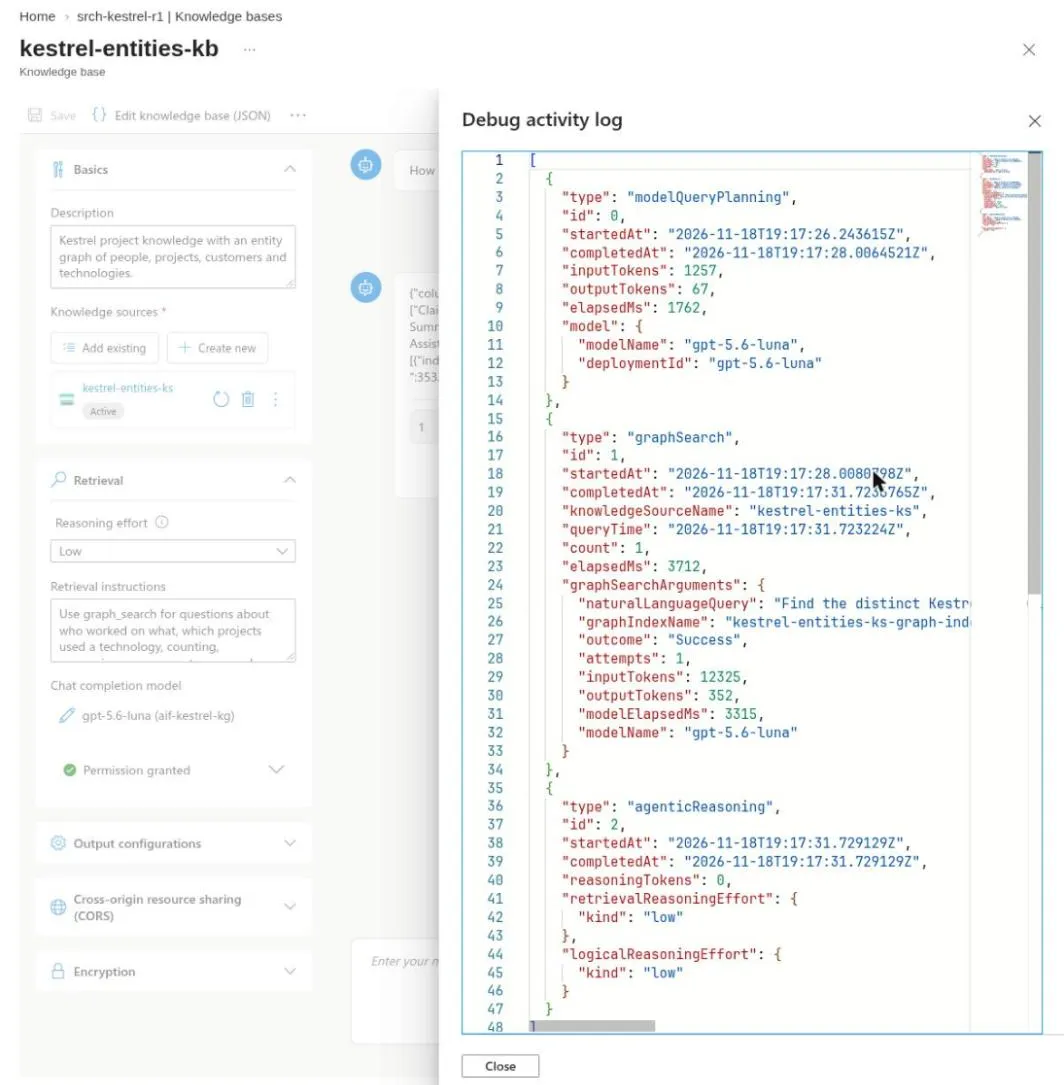
The planning model reads the question and decides which searches to run: a hybrid text search on the chunk index, a graph search on the graph index, or both. For a graph search it writes the GQL itself, based on your ontology, and the service runs it. Nobody has to write a query by hand anymore.
The response contains the passages and the graph rows that were found. With extractiveData as the output mode, the knowledge base stops there: your agent or app takes those results and writes the final answer. Every knowledge base is also an MCP endpoint, so an agent can use it as a tool.
The reasoning effort changes what the planner does. At low it plans once, and in my tests it then picked either graph or text. At medium it checks the results and can go around a second time. In my tests, 11 of 15 graph questions then used graph and text search together.
Because of includeActivity in the request, the response also lists every step the knowledge base took. In this one the planner took 1.8 seconds and chose a graph search, and writing the GQL cost 12,325 input tokens:
Ignite also brought Microsoft Retriever 1, a small planning model that runs inside Foundry IQ itself. A knowledge base with only Retriever 1 supports neither low nor medium effort, and the entity graph docs configure a chat model for graph questions. So the model that chooses between text and graph search here is my own gpt-5.6-luna deployment. I used Retriever 1 for agentic search over passages only.
Does a graph give you better answers?
For some questions, and only after some work. Microsoft’s own evaluation on SEC filings is impressive: 93.5% correct answers with an entity graph against 26.1% with RAG, with 64% fewer tokens (Ignite session BRK297, details at aka.ms/FoundryIQ-KG-evals). Those numbers come from their corpus, with an ontology and questions made for it. Nothing guarantees that they carry over to your documents.
On my corpus the picture was mixed. Counting questions went from 1 of 5 correct with RAG to 4 of 5 with the graph. Over all 24 questions, the knowledge base at medium scored 57% and plain RAG with 10 passages 62%, which is within the noise of a single run. The graph route took 8 to 17 seconds per question, where RAG needed about one.
The ontology decides most of this. My first version described the domain well: people, projects, customers, technologies. The knowledge base still answered 0 of 5 counting questions correctly. The planner rewrote “Amira’s projects” as “Kestrel Consulting projects that Amira worked on”, and the generated GQL then looked for a relationship between a project and Kestrel that my ontology didn’t have. Every query returned 0 rows, reported as a success. 🤷 Hand-written GQL on the same graph gave the right answers. After I added a deliveredBy relationship and sharpened a few descriptions, the score went to 4 of 5.
What I would do on a real project:
- Start from the questions your users will ask. Every relationship such a question depends on has to be in the ontology, even one that seems obvious.
- Begin with a small ontology for one use case, with a handful of entity types and relationships. Microsoft’s best practices say the same.
- Test on a sample of your documents, with questions that have known answers. Check the graph itself first with GQL (count the nodes per type), then the answers through the knowledge base.
- Run the same questions through plain RAG. Going from 5 to 10 passages lifted my RAG baseline from 42% to 62%, in about a second per question.
- Expand the ontology in small steps and rerun the questions after each one.
Writing one big ontology for all your documents, switching it on and hoping for the best is the approach to avoid. It’s also expensive to correct: the ontology of an existing knowledge source is fixed unless you set up a reprocessing cache at creation, so each of my changes meant a new source and a full extraction.
What you don’t get
⚠️ Important: entity graphs are in public preview and need the 2026-11-01-preview API.
- The feature is API-only. The portal shows the generated objects but none of the graph settings. Microsoft’s Foundry IQ skills plugin for coding agents adds a guided setup.
- The entity graph docs cover Blob Storage. ADLS Gen2, document-level permissions and sensitivity labels aren’t supported there.
- You need a new knowledge base. Graph retrieval can’t be enabled on an existing one.
- A graph query that returns nothing looks the same for a wrong query and for a true “no”.
The entity graph how-to on Learn has the full list of prerequisites.
Wrapping up
A knowledge graph in Foundry IQ is an extra index of triples, filled by your existing ingestion and queried with GQL by you or by a planning model. It pays off for counting and connection questions when you design the ontology around those questions and test it in small steps. The lab, the corpus and the ontologies are in the foundry-iq-ignite repo.
If you spot any errors or have questions, feel free to reach out!
#foundry-iq#knowledge-graph#rag
If this post helped you, you can buy me a coffee ☕
Comments
Comments are stored as GitHub Discussions: sign in with GitHub to join in.