Web search for your agents with Microsoft Web IQ
I wasn’t keen on Microsoft retiring the Bing Search APIs. We used them to ground our agents in current information from the web, and they worked from any code you liked. What replaced them in Foundry, Grounding with Bing and the web search tool in Foundry Agent Service, never felt right to me. Both are tied to Foundry agents, and that leaves little room when your agent runs somewhere else or on another framework.
Microsoft Web IQ looks like it will make a real difference here. It’s a standalone API that you call from any stack, with any model. It has a lot of options, and it’s super fast. To try it out, I built Web IQ Explorer, a small local app with a page for each endpoint and an assistant that uses Web IQ through its MCP server.
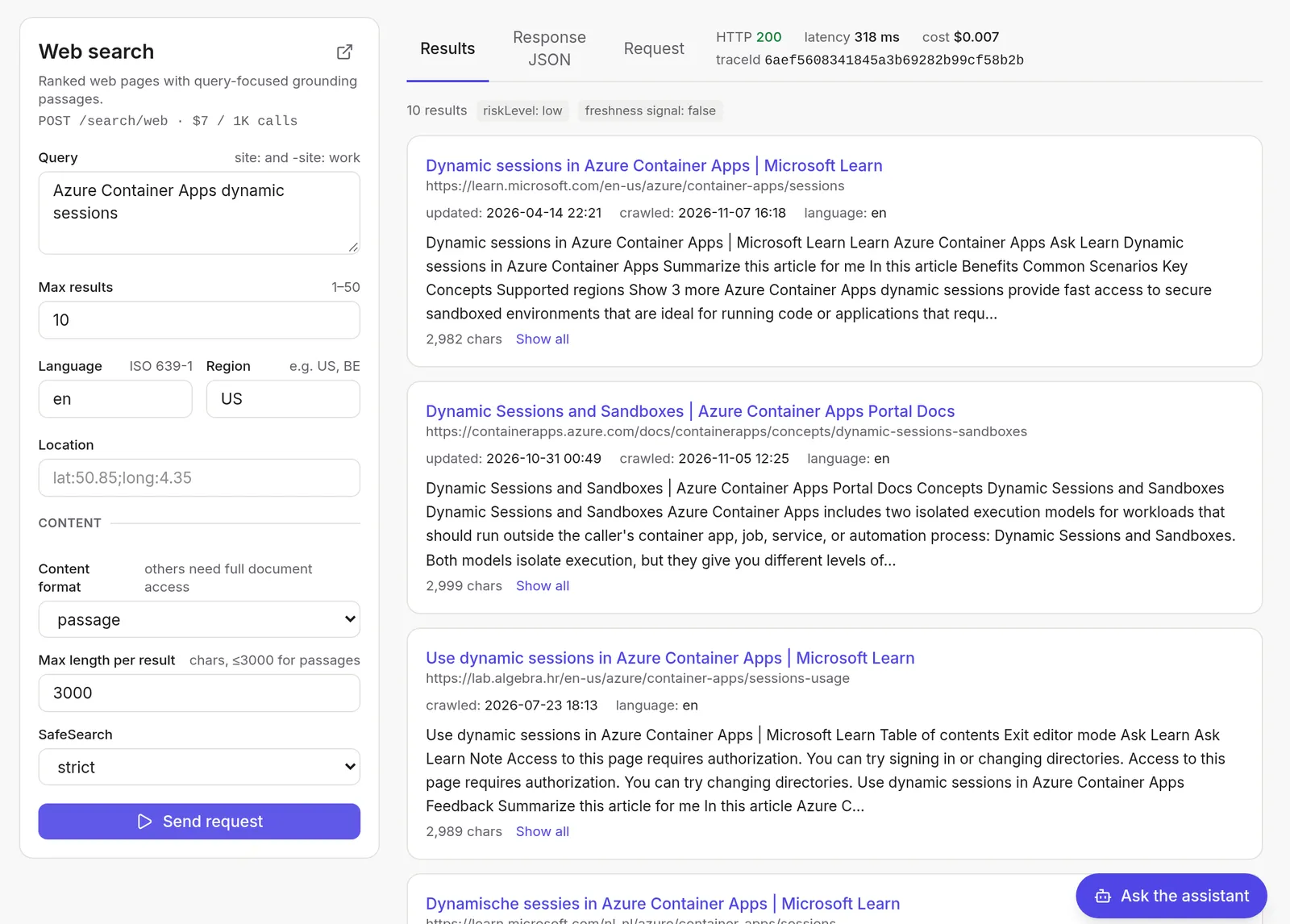
Here’s the explorer after a web search. Above the results you see the call’s latency (318 ms), its cost and the traceId:
What is Web IQ?
Web IQ is a set of web search and grounding APIs for language models and agents. It returns ranked content that is ready to cite, and your own model writes the answer from it. Web IQ itself contains no language model. According to Microsoft, the same platform powers Copilot and ChatGPT.
You call it at https://api.microsoft.ai/v3 with a POST request. Authentication uses an API key in the x-apikey header, or a Microsoft Entra token (client credentials, scope https://api.microsoft.ai/.default) for production. These are the endpoints:
/search/webreturns ranked pages, up to 50 of them. You can usesite:and-site:in the query and set language, region, location and SafeSearch./search/newsreturns up to 20 articles with publisher, thumbnail and dates./search/imageshas filters for aspect ratio, color, size, pixel bounds and watermark-free images./search/videosreturns AI summaries, “moments” (chapters), view counts, embedding info and playlists, with filters for freshness, duration and resolution./browsereturns the content of one URL. WithliveCrawl: "fallback"it also crawls pages that aren’t in the index yet. While that crawl runs, it answers 202 with aretryAfter, and crawl failures come back with detailed error codes./auto(beta) returns typed “evidence” (text, image, video, weather, time zone) with citations. Microsoft enables it per AppID on request; until then it answers 403.
A web search with curl looks like this:
curl -X POST "https://api.microsoft.ai/v3/search/web" \
  -H "x-apikey: $WEBIQ_API_KEY" \
  -H "content-type: application/json" \
  -d '{
    "query": "Azure Container Apps dynamic sessions",
    "maxResults": 10,
    "language": "en",
    "region": "US",
    "contentFormat": "passage",
    "maxLength": 3000
  }'
contentFormat: "passage" is the default. Each result then carries passages: the parts of the page that best match your query, up to maxLength characters. Microsoft recommends passages for grounding, and they keep the number of tokens you send to your model down. Sometimes you want a whole page, for example to summarize it. For that you can set contentFormat to text, html or markdown and get up to 500,000 characters per page. Microsoft calls this “full document access”, and you have to ask for it with a support request. Without it, those formats return a 403 and passages stop at 3,000 characters per result. The content formats page has the details.
When something goes wrong, every endpoint returns an error with the same shape: errorCode, errorCategory, userMessage, retryAfter and traceId. The default rate limit is 15 queries per second per AppID, shared by all its API keys. Above it you get a 429. If you need more, you can ask Microsoft for a higher limit with a support request.
Is it fast?
Yes, very. Of all the grounding options I’ve tried, Web IQ is the fastest by a wide margin. From Belgium, through the local proxy in my app, web, news, images and videos answered in 160 to 430 ms, and a browse of an indexed page took about 250 ms. Search results come back before you’ve had time to look away from the screen. 😎
That matches what Microsoft claims. Their benchmark puts the P95 latency at 164 ms, about 2.5 times faster than the next service, with the highest “grounding satisfaction” and the fewest tokens. Speed matters for agents in particular: an agent often makes several search calls before it answers, and each call adds to the time your user waits.
What does it cost?
Since 16 October 2026 these prices apply:
- web, news, images and videos: $7 per 1,000 calls
- browse: $1 per 1,000 calls
- auto: free while it’s in beta
⚠️ Important: Web IQ needs a paid Azure subscription. Azure credits don’t work, so your MSDN or sponsorship subscription is out.
Terms worth knowing
The Web IQ Terms of Use set a few rules that affect how you build your app:
- Show citations next to the answer.
- Show at most 200 characters from one source.
- Don’t cache or store results. The exceptions are a user’s own chat history and your internal work product.
- Don’t use image and video files themselves for grounding. Their metadata is fine.
What does the MCP server do?
Web IQ also has an MCP server at https://api.microsoft.ai/v3/mcp. It uses Streamable HTTP and the same x-apikey header. The server is stateless, so there is no session id to keep track of.
Its tools are web, news, images, videos and browse, and they take the same parameters as the REST API. The server lists only the tools your AppID may call, so auto doesn’t show up until Microsoft enables it for you. A tool result carries the same JSON as the REST response, twice: as text content and as structuredContent. One thing I noticed: the MCP news tool takes a freshness parameter that the REST reference doesn’t list.
To use it from VS Code, the Copilot CLI or Claude Code, a small mcp.json is all you need:
{
  "mcpServers": {
    "WebIQ-MCP": {
      "url": "https://api.microsoft.ai/v3/mcp",
      "type": "http",
      "headers": {
        "x-apikey": "<your-api-key>"
      }
    }
  }
}
The file name and location differ per client (the Copilot CLI reads ~/.copilot/mcp-config.json, Claude Code a .mcp.json in your project), but the content is the same. Your coding agent then has fast web search without any extra code.
How do you enable it in Azure?
Setting it up takes three steps.
-
Create a Microsoft Web IQ resource in the Azure portal. Search for Microsoft Web IQ, select Create, pick a subscription and resource group, and accept the terms. With the Azure CLI, register the provider first and then create the resource:
az provider register --namespace Microsoft.WebIQ --wait
az resource create -g <resource-group> -n <name> \
  --resource-type Microsoft.WebIQ/accounts --api-version 2026-06-01-preview --is-full-object \
  --properties '{"location":"global","kind":"WebIQ.Grounding","sku":{"name":"G3"},"properties":{"statisticsEnabled":false}}'
The resource only meters your usage. Your app never calls it: it talks to
api.microsoft.aidirectly. -
Sign in to the Web IQ portal and connect the resource. That creates your AppID.
-
Create an API key under Profile Management. The portal’s Playground lets you try requests right away.
⚠️ Gotcha: I first signed in to the Web IQ portal with a personal Microsoft account (hotmail). The sign-in itself worked, but the portal then failed with “We couldn’t load your account”. A work account in the same tenant worked fine.
If the CLI tells you the feature is not enabled for your subscription, you need to ask your Microsoft contact to enable Web IQ for it. The CLI guide has the details.
The explorer app
I wanted to see what every endpoint returns before writing an agent against it, so I built webiq-explorer. It’s a local web app with a FastAPI backend and a React frontend. The backend proxies the calls to Web IQ, so the API key never reaches the browser. The app has two parts, and each one calls Web IQ in its own way:
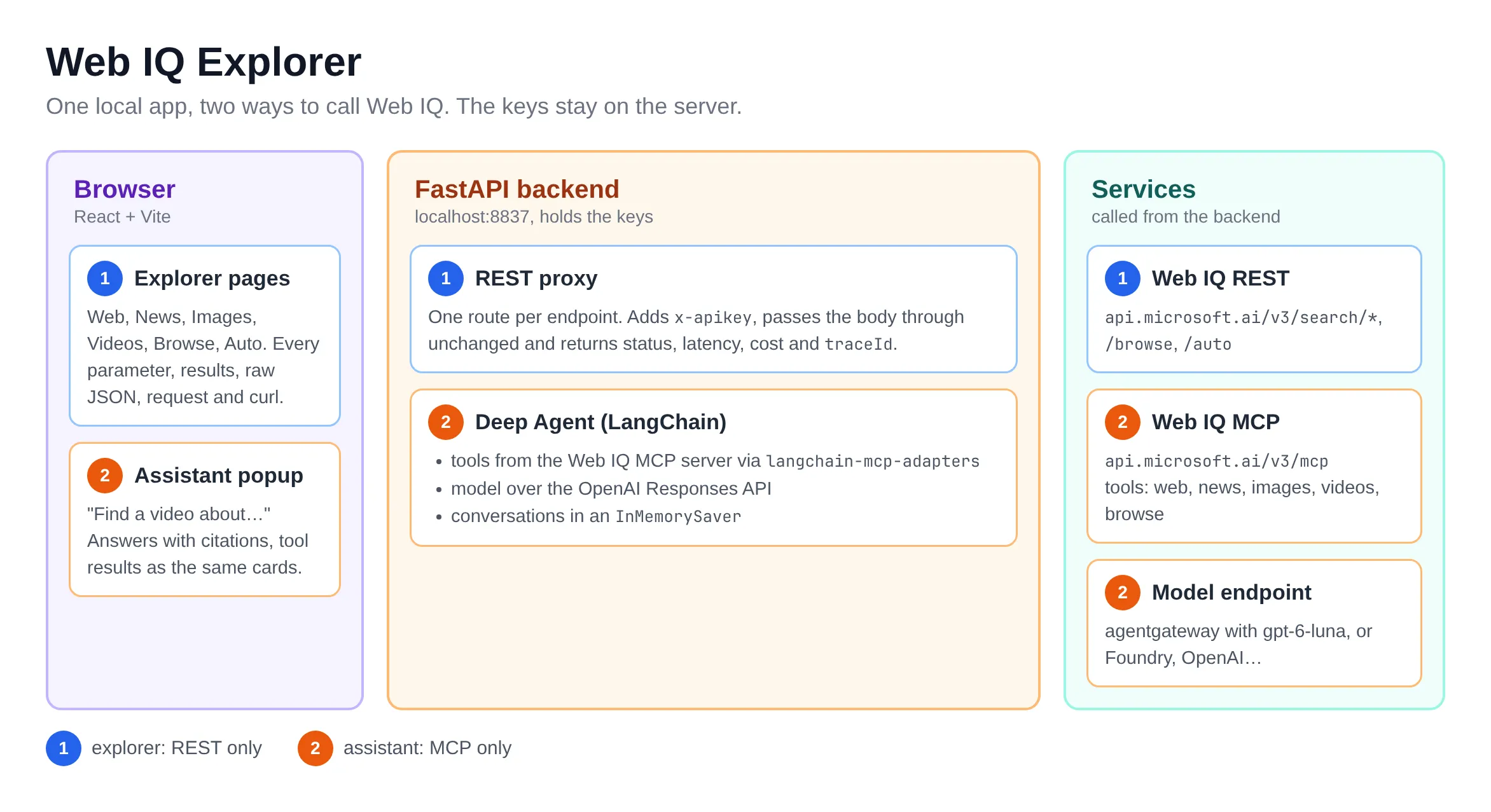
One page per endpoint
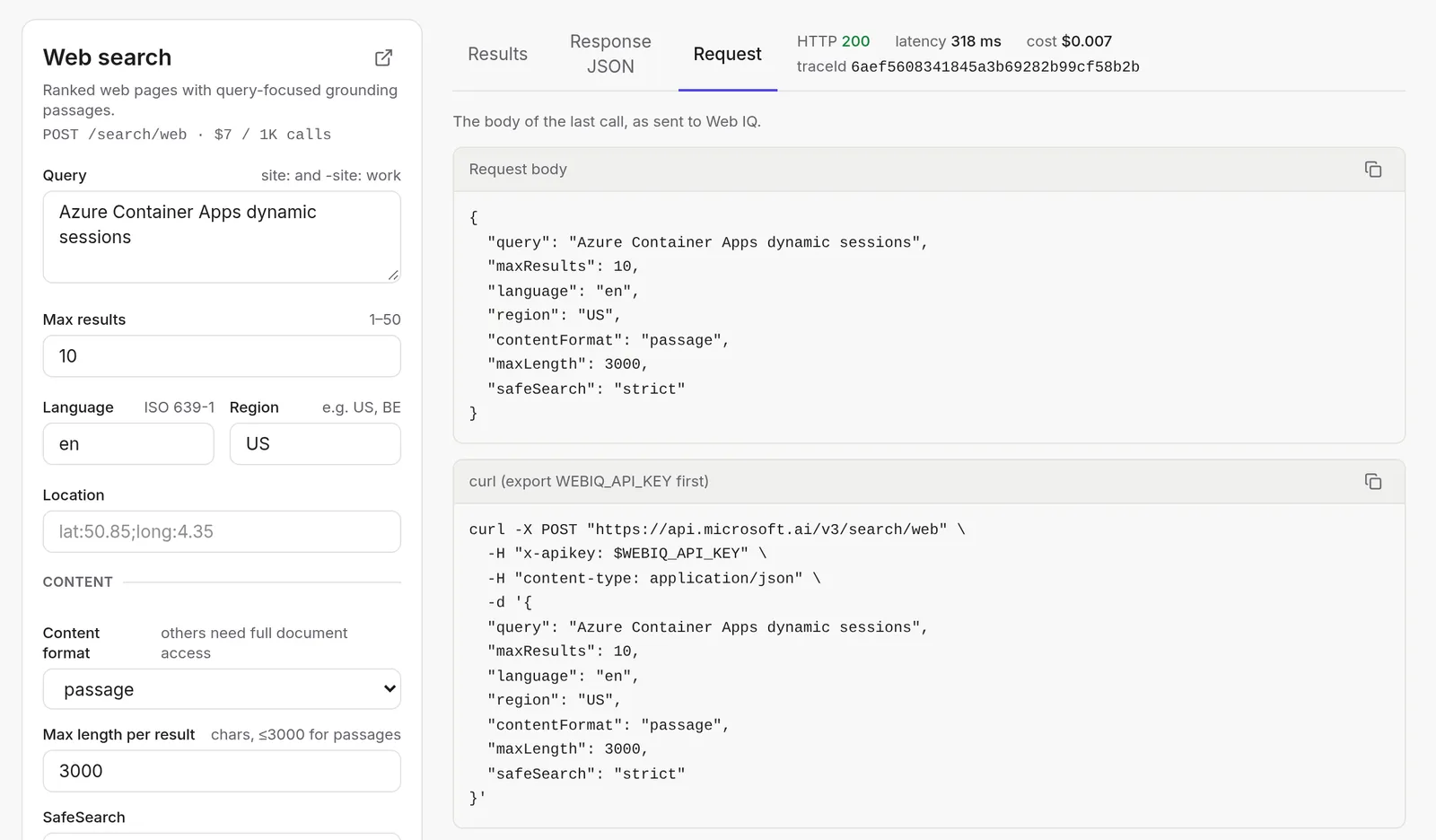
Each endpoint has its own page with every parameter from the API reference. A call shows the rendered results, the raw JSON response and the exact request body with a matching curl command. Above the results you see the HTTP status, latency, cost and traceId, and the header keeps a running total of what the calls from your tab cost.
The Request tab shows what the backend sent, ready to paste in a terminal:
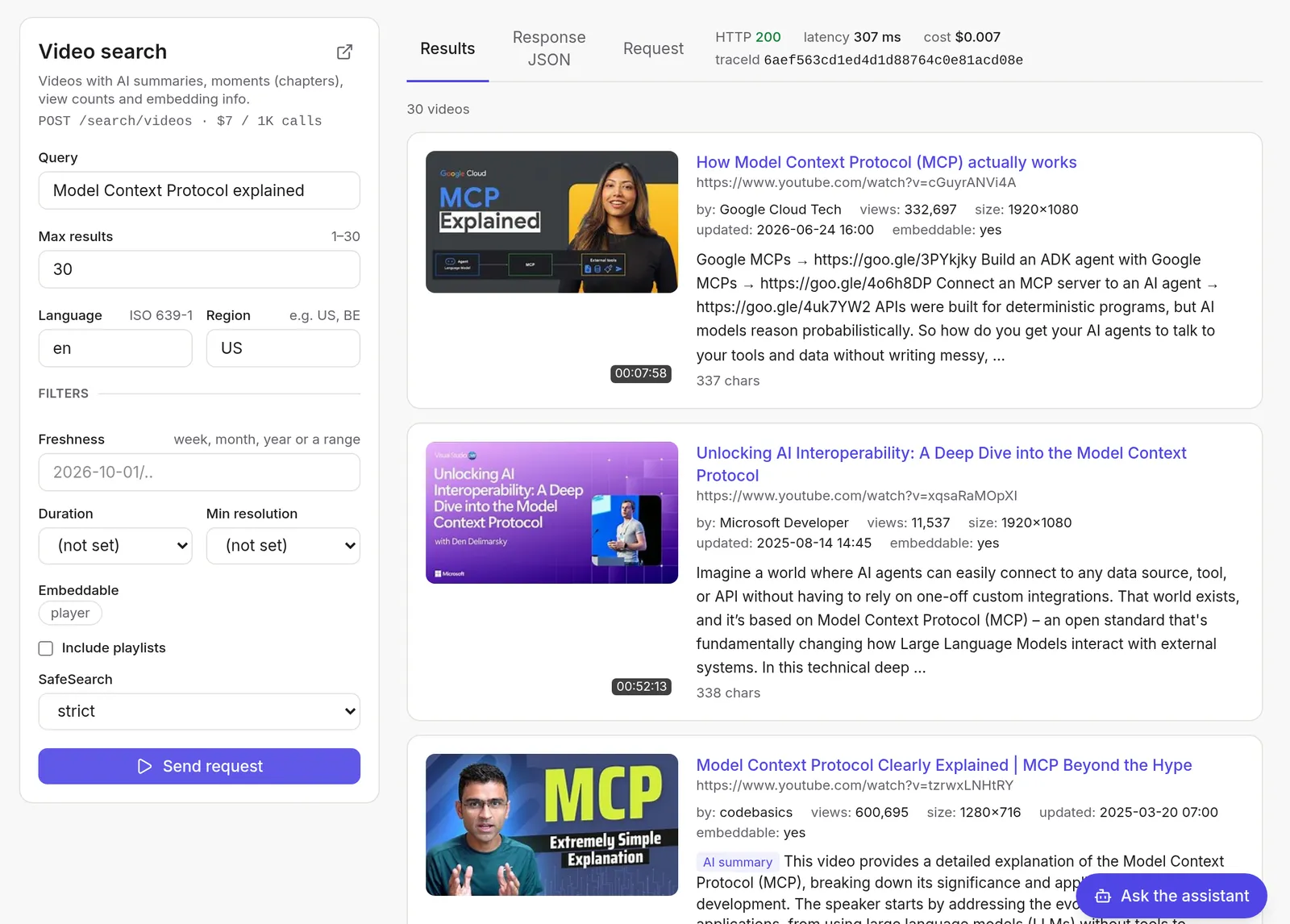
The videos page shows more than the other endpoints. Look at the AI summary on the third result, and the channel, views, resolution and embedding info on each card:
An assistant that uses MCP
The “Ask the assistant” button opens a chat popup. Behind it runs a LangChain Deep Agent that uses Web IQ only through the MCP server, via langchain-mcp-adapters. The tools come straight from the server:
client = MultiServerMCPClient(
    {
        "webiq": {
            "transport": "streamable_http",
            "url": "https://api.microsoft.ai/v3/mcp",
            "headers": {"x-apikey": settings.webiq_api_key},
        }
    }
)
tools = await client.get_tools()

agent = create_deep_agent(
    model=model,
    tools=tools,
    middleware=[OnlyTheseTools({t.name for t in tools}, _prompt)],
    checkpointer=InMemorySaver(),
)
# ...
Deep Agents always add file tools, a todo list and a subagent tool. This assistant only searches, so a small middleware offers the model just the Web IQ tools and the app’s own prompt. The prompt maps requests to tools: “find a video about…” goes to videos, “find news about…” to news, and so on. Conversations live in an InMemorySaver, so they last until you clear them or restart the app, and nothing is written to disk.
The model is gpt-6-luna, a cheap one, which I reach through agentgateway on my machine. That’s plenty: the agent mostly picks one tool and summarizes what comes back.
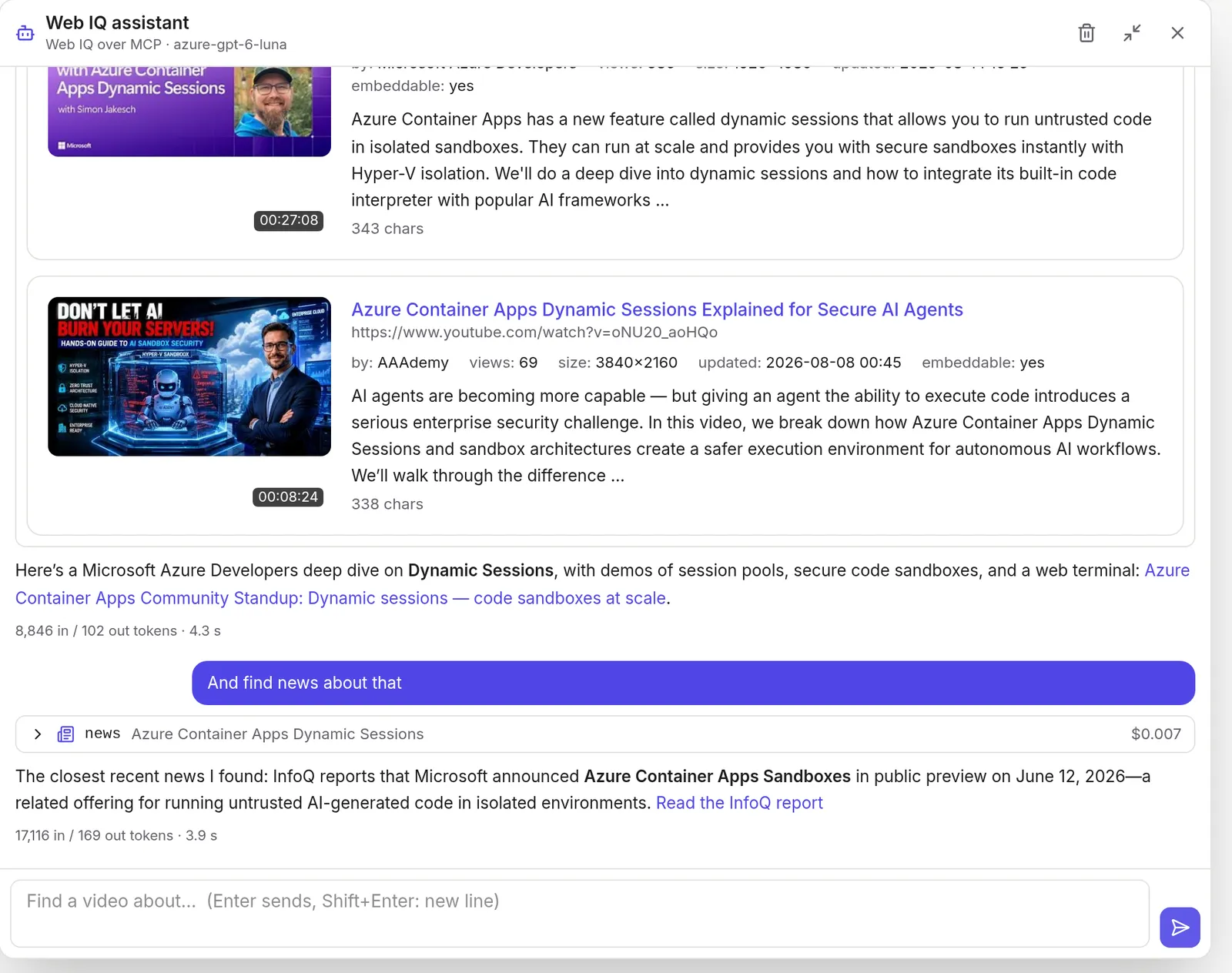
In the next screenshot I first asked for a video about Azure Container Apps dynamic sessions and then typed “And find news about that”. The agent knew what “that” meant from the conversation and called the news tool. Video results show as the same cards the explorer pages use, and each turn shows its tokens and time:
Use it with your own Web IQ resource and model
To run the explorer yourself, you need uv, Node.js 24 or later, your own Web IQ resource and API key (see above), and a model endpoint for the assistant. Clone the repo and copy .env.example to .env. Only WEBIQ_API_KEY is required; the explorer pages work without a model.
For the assistant, point three settings at any endpoint that supports the OpenAI Responses API with function calling. That can be Azure AI Foundry, OpenAI, or a gateway such as agentgateway:
WEBIQ_API_KEY=<your-web-iq-key>

# Azure AI Foundry (Azure OpenAI v1 endpoint)
AGENT_BASE_URL=https://<your-resource>.openai.azure.com/openai/v1/
AGENT_MODEL=<your-deployment-name>
AGENT_API_KEY=<your-key>

# or a local agentgateway, which holds the real provider keys
# AGENT_BASE_URL=http://localhost:4000/v1
# AGENT_MODEL=<a model name the gateway exposes>
# AGENT_API_KEY=not-needed
Then run the app:
scripts/run-local.shThe script builds the frontend and serves everything on http://localhost:8837. Every search costs real money, so keep an eye on the running total in the header. At $7 per 1,000 calls you can explore for a long time before it hurts, though. 😊
What you don’t get
- There is no SLA.
/autois in beta and needs a request to Microsoft before your AppID can use it.- Whole pages: out of the box you only get passages, at most 3,000 characters per result. Full pages as text, HTML or markdown need a support request to Microsoft first.
- You can’t cache or store results, and you must show citations and stay under 200 characters per source.
Wrapping up
I think Microsoft finally got web grounding right with Web IQ. It’s fast, and as a plain API and an MCP server it works with whatever agent framework and model you already have. If your agents need web grounding, Web IQ is probably the best option out there.
If you spot any errors or have questions, feel free to reach out!
If this post helped you, you can buy me a coffee ☕
Comments
Comments are stored as GitHub Discussions: sign in with GitHub to join in.