# Deploying a multi-agent solution with MCP and A2A to Azure Container Apps
- URL: https://baeke.info/2025/07/18/deploying-a-multi-agent-solution-with-mcp-and-a2a-to-azure-container-apps/
- Author: Geert Baeke
- Published: July 18, 2025 (updated October 27, 2026)
- Topics: AI, a2a, agents, ai, artificial-intelligence, azure, chatgpt, containers, foundry, google, llm, multiagent, openai, technology
In previous posts, we discussed [multi-agent scenarios](https://baeke.info/2025/07/11/building-multi-agent-solutions-what-are-your-options/), how A2A servers work ([here](https://baeke.info/2025/07/14/googles-a2a-taking-a-closer-look/) and [here](https://baeke.info/2025/07/15/using-tasks-with-streaming-in-google-agent2agent-a2a/)) and how to deploy the [infrastructure](https://baeke.info/2025/07/16/deploying-ai-foundry-agents-and-azure-container-apps-to-support-an-agent2agent-solution/) to host a multi-agent application on Azure with Azure Container Apps and AI Foundry.
In this post, we will take a look at deploying the different components of the solution as containers in Azure Container Apps. This is what we will build:
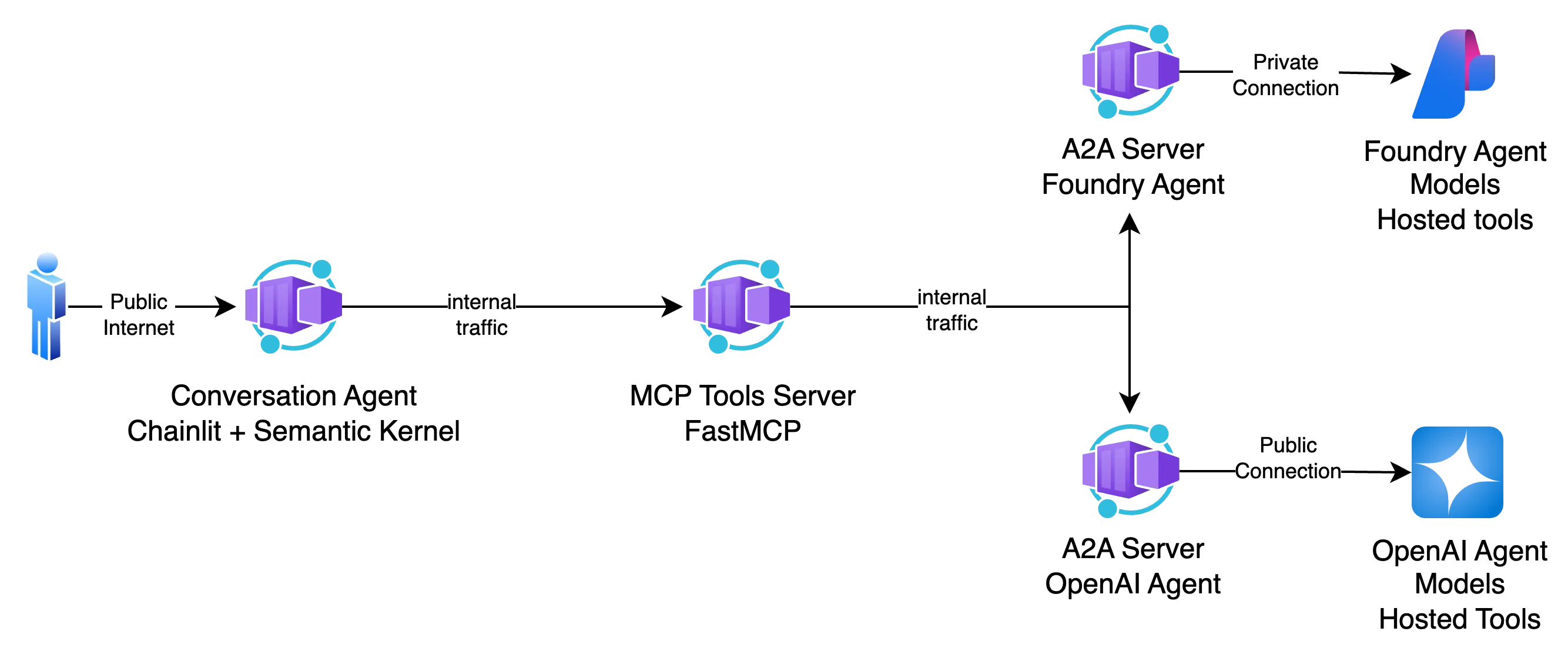
*Multi-agent solution with MCP and A2A*
There are four main components:
| | |
| --- | --- |
| **Component** | **Description** |
| Conversation Agent | Presents a chat interface to the user. Built with [Chainlit](https://docs.chainlit.io/get-started/overview) and [Semantic Kernel](https://learn.microsoft.com/en-us/semantic-kernel/overview/). Uses an OpenAI model. This could be switched to an Azure OpenAI model easily.
The agent uses two tools, rag and web, hosted by the MCP server. |
| MCP Tools Server | MCP server built with Python [FastMCP](https://github.com/jlowin/fastmcp). It exposes two tools, web and rag. The tools use an A2A client to interact with the A2A servers for the web and rag agents.
Not exposed to the Internet. Used to demonstrate MCP and A2A together. We could have called the A2A servers directly from the conversation agent without MCP. |
| A2A Server for Foundry Agent (does RAG) | This agent uses an Azure AI Foundry Agent with a hosted file-based RAG tool to provide answers about Contoso products.
Not exposed to the Internet. Communicates privately with the Azure AI Foundry project. |
| A2A Server for OpenAI Agent (does web searches) | This agent uses an OpenAI Agent SDK agent with the hosted web search tool.
Not exposed to the Internet. Communicates over the Internet with the OpenAI backend. This could easily be replaced with an Azure AI Foundry Agent that uses Bing Search. As this is an example about A2A, using a different technology makes more sense. 😊 |
Before delving into the four different components, it is important to know that the mcp, web and rag containers do not use their internal ingresses to communicate over TLS. That means that the mcp container for example, will talk to the web container using `http://ca-web` instead of something like `https://ca-web.internal.ACA_environment_default_domain`.
There is something to be said for using messaging to facilitate communication between agents. They are a form of **microservices** after all. In this example however, all communication is synchronous and uses HTTP.
This is a **technical example** that could be implemented in a single in-process agent with two tools. However, the emphasis is on multi-agent communication across process boundaries with Google’s Agent2Agent protocol.
Let’s gets started with the Conversation Agent!
## Conversation Agent
The conversation agent maintains a conversation with the end user and keeps track of chat history. The agent, written in Semantic Kernel, has two tools:
- **web-search**: uses the OpenAI Agent A2A server to search the web via OpenAI’s hosted web search tool
- **rag-search**: uses the Azure AI Foundry A2A server to search for Contoso projects via a hosted RAG tool
The user interface to the agent is provided by Chainlit:
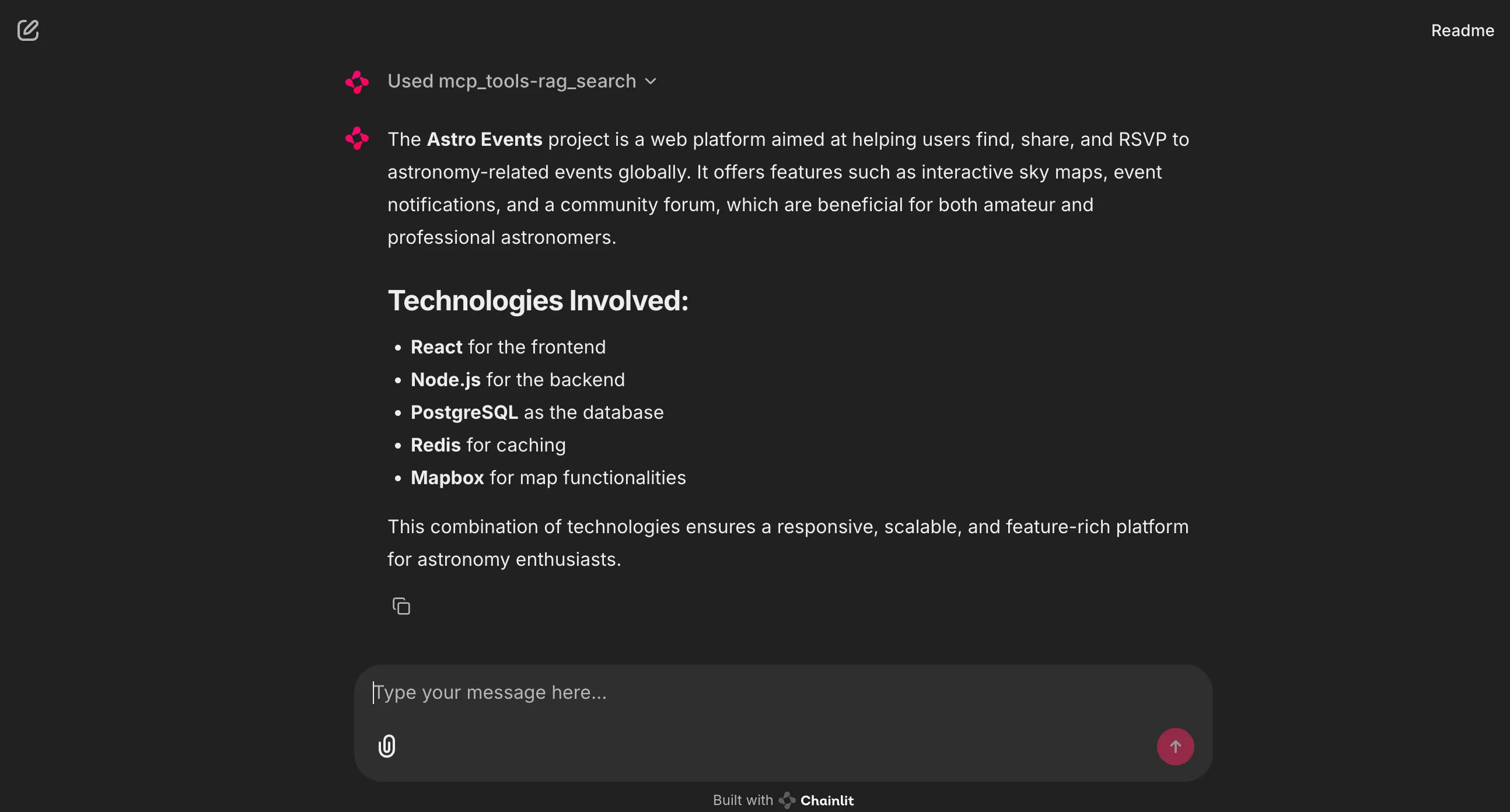
*Chainlit UI*
Above, I asked for information about a project. The agent is configured to use the **rag-search** tool to find project information. Under the hood, an A2A Server that wraps an Azure AI Foundry Agent is used to obtain this information. Via a **filter**, Chainlit supports visualizing when tools are called as can be seen at the top of the screen. It basically has hooks into the kernel object that gets created by Semantic Kernel.
The code for this Chainlit-hosted agent is on [GitHub](https://github.com/gbaeke/multi_agent_aca/tree/main/conversation). The code in `main.py` uses an environment variable, `MCP_SERVER_URL`, that contains the address of the MCP server. As discussed above this will be `http://containername/mcp` (e.g., `http://ca-mcp/mcp`).
Following the typical Semantic Kernel approach, a kernel is created . Here is a snippet of code:
```python
# Create the Semantic Kernel
kernel = Kernel()
# Add AI service to kernel
ai_service = OpenAIChatCompletion(ai_model_id="gpt-4o")
kernel.add_service(ai_service)
logger.debug("Kernel and AI service initialized successfully")
# Add MCP tools plugin to kernel (uses global client)
tools_plugin = MCPToolsPlugin()
kernel.add_plugin(tools_plugin, plugin_name="mcp_tools")
logger.debug("MCP tools plugin added to kernel")
```
Note that we are **not using** Semantic Kernel’s [built-in support](https://github.com/microsoft/semantic-kernel/tree/main/python/samples/concepts/mcp) for remote MCP servers that use streamable HTTP. Instead, we create a plugin via the `MCPToolsPlugin` [class](https://github.com/gbaeke/multi_agent_aca/blob/main/conversation/main.py#L71). That class defines two kernel functions, `rag_search` and `web_search`. In such a function, you can do what you want. I did not have to use MCP and could have called the A2A servers directly using the A2A client.
In our functions, we do use the MCP client from FastMCP to call the appropriate tool on the MCP server. The call to the A2A servers is implemented in the MCP server’s tools.
⚠️ This approach was chosen to illustrate that even if your framework does not natively support MCP, under the hood this is always **LLM** **function calling**. Kernel functions in Semantic Kernel are simply an abstraction on top of function calling. If you use Semantic Kernel’s native support for MCP, the tools on the MCP server would automatically be created as kernel functions. This **native** support requires much less code.
Now that we have the conversation agent up and running with Chainlit and Semantic Kernel, let’s look at the MCP server.
## MCP Server
The conversation agent uses an MCP client (from the FastMCP library) to call tools hosted by the MCP server. This illustrates the separation of tool implementation from agent implementation.
The MCP server is implemented in [main.py](https://github.com/gbaeke/multi_agent_aca/blob/main/mcp/main.py). In its most basic form, an MCP server with a few tools is really simple. This MCP server just defines **two tools**: a web tool and a rag tool.
The web tool looks like this:
```python
@mcp.tool()
async def web_tool(query: str) -> str:
"""
Perform a web search for the given query.
Args:
query: The search query to perform
Returns:
Search results as a string
"""
logger.info(f"Web tool called with query: {query}")
logger.info(f"Using web A2A agent at: {WEB_A2A_BASE_URL}")
try:
return await _send_a2a_message(query, WEB_A2A_BASE_URL)
except Exception as e:
logger.error(f"Error performing web search: {e}")
return f"Error performing web search: {str(e)}"
```
This tool only does one thing: send a message to the A2A server on the address in `WEB_A2A_BASE_URL`. In Azure Container Apps, this URL is `http://ca-web`. The rag tool is implemented in a similar way. You can check the code of the `_send_a2a_message` function on [GitHub](https://github.com/gbaeke/multi_agent_aca/blob/main/mcp/main.py).
⚠️ The addresses of the A2A servers are supplied to the mcp container app via environment variables `WEB_A2A_BASE_URL` and `RAG_A2A_BASE_URL`.
We now have the following implemented:
```
conversation --tool call--> MCP Server --run tool--> A2A Server
```
All traffic is synchronous and over http (not https)! Everything depends on the correct tool call being made by the conversation agent and the agents in the A2A servers. The rest is just plumbing! No magic! 😊
## A2A Servers
You can check my earlier posts about A2A servers for background information:
- [Simple synchronous messaging](https://baeke.info/2025/07/14/googles-a2a-taking-a-closer-look/)
- [Tasks with streaming responses](https://baeke.info/2025/07/15/using-tasks-with-streaming-in-google-agent2agent-a2a/)
It is important to note that the A2A server (rag) uses Azure AI Foundry. To authenticate to AI Foundry, we need to use a **managed identity**.
The rag container needs the following environment variables:
- `RAG_A2A_BASE_URL`: required to set the correct url in the agent card
- `INTERNAL_PORT`: port to run on (e.g., 80)
- `FOUNDRY_PROJECT`: url to the Foundry project (e.g., [https://FOUNDRY-RESOURCE.services.ai.azure.com/api/projects/FOUNDRY-PROJECT](https://FOUNDRY-RESOURCE.services.ai.azure.com/api/projects/FOUNDRY-PROJECT)
- `ASSISTANT_ID`: id of the agent you want to use; needs to exist in Foundry project
- `CLIENT_ID`: the client id of the user assigned managed identity; this identity is created in the [Bicep](https://github.com/gbaeke/multi_agent_aca/blob/main/bicep/main.bicep) script; a role is assigned as well
During deployment of the container apps, a managed identity (that has the client id above) is assigned to the container. In the A2A server code that contains the code to talk to Foundry, this identity is used as follows:
```python
if client_id:
logger.info(f"Using ManagedIdentityCredential with client ID: {client_id}")
credential = ManagedIdentityCredential(client_id=client_id)
else:
logger.info("Using DefaultAzureCredential")
credential = DefaultAzureCredential()
```
This allows for the use of the Azure CLI identity when the rag agent is running on you local machine. Full code is in `[Agent_Executor.py](https://github.com/gbaeke/multi_agent_aca/blob/main/rag/agent_executor.py)`.
⚠️ If you run the rag A2A server on your local machine, ensure you allow your IP address in the firewall settings of the Azure AI Foundry resource.
Full code for the A2A servers:
- Rag agent (Foundry): [https://github.com/gbaeke/multi\_agent\_aca/tree/main/rag](https://github.com/gbaeke/multi_agent_aca/tree/main/rag)
- Web agent (OpenAI Agent SDK): [https://github.com/gbaeke/multi\_agent\_aca/tree/main/web](https://github.com/gbaeke/multi_agent_aca/tree/main/web)
## Deployment
To make it easy to deploy the containers to the Azure Container Apps environment (discussed in [previous post](https://baeke.info/2025/07/16/deploying-ai-foundry-agents-and-azure-container-apps-to-support-an-agent2agent-solution/)), use the following script: [https://github.com/gbaeke/multi\_agent\_aca/blob/main/deploy\_containers.sh](https://github.com/gbaeke/multi_agent_aca/blob/main/deploy_containers.sh)
At the top of the script, change the variables to match your environment:
```bash
ACR_NAME="SHORT_ACR_NAME"
ACR_URL="SHORT_ACR_NAME.azurecr.io"
RESOURCE_GROUP="RESOURCE_GROUP"
CONTAINER_APP_ENV="CONTAINER_APP_ENV_NAME"
MANAGED_IDENTITY="MANAGED_IDENTITY_NAME"
```
To deploy, simply run `deploy_containers.sh --to-build conversation,mcp,web,rag`. This does the following:
- Builds and pushes the four containers using an ACR Task (no local Docker required)
- Deploys the four containers with appropriate secrets and environment variables; serets are read from a `.env` file
Ensure that you have this `.env` in the same folder with the following values:
```bash
OPENAI_API_KEY="your_openai_api_key_here"
# Replace with your actual OpenAI API key
FOUNDRY_PROJECT="your_foundry_project_url"
# The URL of the Foundry project endpoint you're connecting to
# Find it in the properties of the AI Foundry project
ASSISTANT_ID="your_assistant_id_here"
# The unique ID of the agent you're referencing
```
This should deploy the four containers as shown below:

*conversation, mcp, web and rag containers*
Now grab the ingress URL (aka Application Url) of the conversation container:

*Application URL (ingress URL) to the conversation app*
Paste that URL in your browser. Hopefully the Chainlit UI is shown. If not, check the following:
- Chainlit container has the `MCP_SERVER_URL` set to `http://ca-mcp/mcp` and also has you OpenAI key in `OPENAI_API_KEY`
- MCP container has the `WEB_A2A_BASE_URL` and `RAG_A2A_BASE_URL` url set to `http://ca-web` and `http://ca-rag`
- Web container has `WEB_A2A_BASE_URL` set to `http://ca-web` and also has an `OPENAI_API_KEY`
- Rag container has `RAG_A2A_BASE_URL` set to `http://ca-rag` and has environment variables set to use the Azure AI Foundry agent; also check the managed identity of the container has access rights to AI Foundry
Normally these should all be set by both the Bicep and the container deployment script.
## Wrapping Up
If you’ve made it this far and tried to implement this yourself, you’ve likely realized how much effort it takes to get everything up and running. About 99% of the work is infrastructure and plumbing; only 1% is actual agent code. In more complex agentic applications, the ratio may shift slightly, but infrastructure will still dominate the effort.
We have not even touched on things like logging, metrics, tracing the end-to-end communication path, load balancing, saving agent state and much, much more.
This brings me back to a key point from an earlier post:
**If you can build your multi-agent solution in-process, or use an agent PaaS like Azure AI Foundry, do it.**
Only choose the approach I described above when no other viable option exists or when you’re building larger solutions where multiple teams develop agents that must coexist within the same system.