
In a previous article, I wrote about the AKS Azure Cloud Provider and its support for Azure Private Link. In summary, the functionality allows for the following:
- creation of a Kubernetes service of type LoadBalancer
- via an annotation on the service, the Azure Cloud Provider creates an internal load balancer (ILB) instead of a public one
- via extra annotations on the service, the Azure Cloud Provider creates an Azure Private Link Service for the Internal Load Balancer (🆕)
In the article, I used Azure Front Door as an example to securely publish the Kubernetes service to the Internet via private link.
Although you could publish all your services using the approach above, that would not be very efficient. In the real world, you would use an Ingress Controller like ingress-nginx to avoid the overhead of one service of type LoadBalancer per application.
Publish the Ingress Controller with Private Link Service
In combination with the Private Link Service functionality, you can just publish an Ingress Controller like ingress-nginx. That would look like the diagram below:
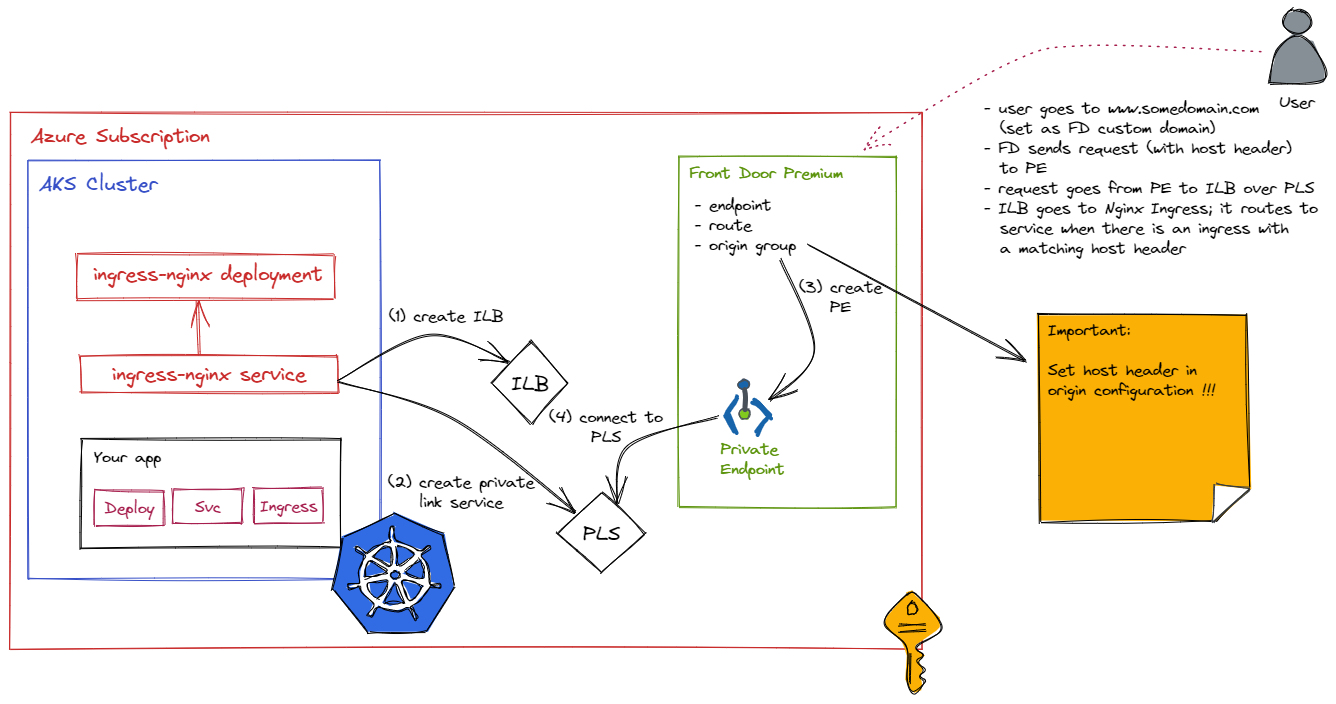
In the above diagram, our app does not use a LoadBalancer service. Instead, the service is of the ClusterIP type. To publish the app externally, an ingress resource is created to publish the app via ingress-nginx. The ingress resource refers to the ClusterIP service super-api. There is nothing new about this. This is Kubernetes ingress as usual:
apiVersion: networking.k8s.io/v1
kind: Ingress
metadata:
  name: super-api-ingress
spec:
  ingressClassName: nginx
  rules:
  - host: www.myingress.com
    http:
      paths:
      - pathType: Prefix
        path: "/"
        backend:
          service:
            name: super-api
            port:
              number: 80
Note that I am using the host http://www.myingress.com as an example here. In Front Door, I will need to configure a custom host header that matches the ingress host. Whenever Front Door connects to the Ingress Controller via Private Link Service, the host header will be sent to allow ingress-nginx to route traffic to the super-api service.
In the diagram, you can see that it is the ingress-nginx service that needs the annotations to create a private link service. When you install ingress-nginx with Helm, just supply a values file with the following content:
controller:
 service:
    annotations:
      service.beta.kubernetes.io/azure-load-balancer-internal: "true"
      service.beta.kubernetes.io/azure-pls-create: "true"
      service.beta.kubernetes.io/azure-pls-ip-configuration-ip-address: IP_IN_SUBNET
      service.beta.kubernetes.io/azure-pls-ip-configuration-ip-address-count: "1"
      service.beta.kubernetes.io/azure-pls-ip-configuration-subnet: SUBNET_NAME
      service.beta.kubernetes.io/azure-pls-name: PLS_NAME
      service.beta.kubernetes.io/azure-pls-proxy-protocol: "false"
      service.beta.kubernetes.io/azure-pls-visibility: '*'
Via the above annotations, the service created by the ingress-nginx Helm chart will use an internal load balancer. In addition, a private link service for the load balancer will be created.
Front Door Config
The Front Door configuration is almost the same as before, except that we need to configure a host header on the origin:
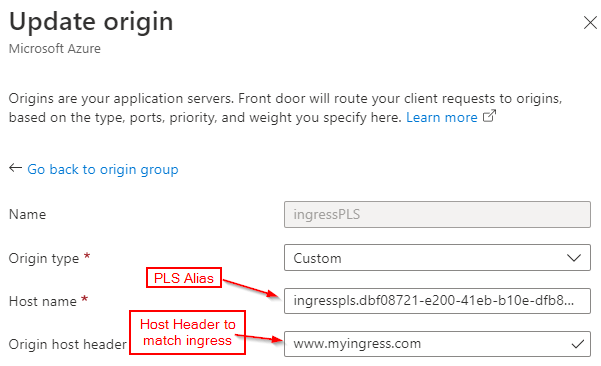
When I issue the command below (FQDN is the Front Door endpoint):
curl https://aks-agbyhedaggfpf5bs.z01.azurefd.net/source
the response is the following:
Hello from Super API
Source IP and port: 10.244.0.12:40244
X-Forwarded-For header: 10.224.10.20

All headers:

HTTP header: X-Real-Ip: [10.224.10.20]
HTTP header: X-Forwarded-Scheme: [http]
HTTP header: Via: [2.0 Azure]
HTTP header: X-Azure-Socketip: [MY HOME IP]
HTTP header: X-Forwarded-Host: [www.myingress.com]
HTTP header: Accept: [*/*]
HTTP header: X-Azure-Clientip: [MY HOME IP]
HTTP header: X-Azure-Fdid: [f76ca0ce-32ed-8754-98a9-e6c02a7765543]
HTTP header: X-Request-Id: [5fd6bb9c1a4adf4834be34ce606d980e]
HTTP header: X-Forwarded-For: [10.224.10.20]
HTTP header: X-Forwarded-Port: [80]
HTTP header: X-Original-Forwarded-For: [MY HOME IP, 147.243.113.173]
HTTP header: User-Agent: [curl/7.58.0]
HTTP header: X-Azure-Requestchain: [hops=2]
HTTP header: X-Forwarded-Proto: [http]
HTTP header: X-Scheme: [http]
HTTP header: X-Azure-Ref: [0nPGlYgAAAABefORrczaWQ52AJa/JqbBAQlJVMzBFREdFMDcxMgBmNzZjYTBjZS0yOWVkLTQ1NzUtOThhOS1lNmMwMmE5NDM0Mzk=, 20220612T140100Z-nqz5dv28ch6b76vb4pnq0fu7r40000001td0000000002u0a]
The /source endpoint of super-api dumps all the HTTP headers. Note the following:
- X-Real-Ip: is the address used for NATting by the private link service
- X-Azure-Fdid: is the Front Door Id that allows us to verify that the request indeed passed Front Door
- X-Azure-Clientip: my home IP address; this is the result of setting
externalTrafficPolicy: Localon the ingress-nginx service; the script I used to install ingress-nginx happened to have this value set; it is not required unless you want the actual client IP address to be reported - X-Forwarded-Host: the host header; the original FQDN aks-agbyhedaggfpf5bs.z01.azurefd.net cannot be seen
In the real world, you would configure a custom domain in Front Door to match the configured host header.
Conclusion
In this post, we published a Kubernetes Ingress Controller (ingress-nginx) via an internal load balancer and Azure Private Link. A service like Azure Front Door can use this functionality to provide external connectivity to the internal Ingress Controller with extra security features such as Azure WAF. You do not have to use Front Door. You can provide access to the Ingress Controller from a Private Endpoint in any network and any subscription, including subscriptions you do not control.
Although this functionality is interesting, it is not automated and integrated with Kubernetes ingress functionality. For that reason alone, I would not recommend using this. It does provide the foundation to create an alternative to Application Gateway Ingress Controller. The only thing that is required is to write a controller that integrates Kubernetes ingress with Front Door instead of Application Gateway. 😉
 baeke.info
Geert, very valuable post, thanks.
Question though; when you mention you do not recommend this because it is not automated and integrated with Kubernetes ingress functionality, what do you mean exactly?
What I meant is that I think Azure should offer a fully managed option where you can simply add an ingress controller that offers this for you. There’s too much manual plumbing to take care of which goes against cloud principles. All the pieces are there for Azure to offer this service. They have AGIC which does that with App Gateway but we find that solution somewhat lacking and recommend open source ingress controllers such as nginx.
To publish the app externally, an ingress resource is created to publish the app via ingress-nginx. The ingress resource refers to the ClusterIP service super-api.
How were you able to resolve the ClusterIP to DNS? (e.g. http://www.ingress.com) I thought ClusterIPs and coreDNS records were local to only the cluster.
The connection from FD to AKS ingress uses a host header. The ingress uses that host header and matches it to the internal service. Internal services are automatically resolved to the ClusterIP via Kubernetes DNS…
Thanks Geert!
I’ve basically followed your setup to the tee, but for some reason I’m still running into issues. Here are all the things I’ve done
1. got PLS generated from ingress annotations, and pointed AFD origin to PLS, and approved
2. logs show ingress has been ensured and installed successfully
3. set host header in AFD origin as http://www.jonathantsho.com as an example
4. set host name to the PLS Alias
5. SSH into a pod to check if ingress is working, and it is
The only additional step that I’ve taken is to route the host name used in ingress to an Azure DNS Zone that points to the external IP of the ingress controller, in which I’ve used your annotations file to install.
basically this is how I’ve done it
—Ingress file—
apiVersion: networking.k8s.io/v1
kind: Ingress
metadata:
name: ingress-hello-world-svc
namespace: default
spec:
ingressClassName: nginx
rules:
– host: http://www.jonathantsho.com
http:
paths:
– pathType: Prefix
backend:
service:
name: hello-world-service
port:
number: 80
path: /
DNS Zone (not the private one) (jonathantsho.com)
A record – www
points to 10.4.16.35
NAMESPACE NAME TYPE CLUSTER-IP EXTERNAL-IP PORT(S) AGE
ingress-nginx ingress-nginx-controllerLoadBalancer 10.4.20.99 10.4.16.35 80:30802/TCP,443:30359/TCP
Some additional info:
—Super API setup—
apiVersion: apps/v1
kind: Deployment
metadata:
name: hello-world
spec:
selector:
matchLabels:
app: hello-world
replicas: 3
template:
metadata:
labels:
app: hello-world
spec:
containers:
– name: hello-world
image: ghcr.io/gbaeke/super:1.0.7
ports:
– containerPort: 8080
—
kind: Service
apiVersion: v1
metadata:
name: hello-world-service
spec:
selector:
app: hello-world
ports:
– protocol: TCP
port: 80
targetPort: 8080
type: ClusterIP
It’s not easy to troubleshoot like this but ensure the following is true:
– the hostname you use to connect to super-api is a hostname defined at the Front Door level; it can be a default one ending in azurefd.net or a custom one
– ensure that the host header you set in Front Door is just the host, no http:// in front; so something like http://www.domain.com not http://www.domain.com
– ensure the host in the ingress matches the host header in Front Door, so here http://www.domain.com instead of http://www.domain.com
– you do not need any public DNS records UNLESS you set a custom domain in Front Door; in that case you create a CNAME to map to the azurefd.net host name; but my example does not use or need that
So: you —connect to FD with xyz.azurefd.net —> FD — connects to ILB via private link and sends the configured host header —> ILB — traffic routed to internal nginx ingress –> Nginx Ingress — sees host header in request and routes to Kubernetes backend services –> service — routes traffic to pod –> pod