
Image above from: https://kustomize.io/
When you have to deploy an application to multiple environments like dev, test and production there are many solutions available to you. You can manually deploy the app (Nooooooo! 😉), use a CI/CD system like Azure DevOps and its release pipelines (with or without Helm) or maybe even a “GitOps” approach where deployments are driven by a tool such as Flux or Argo based on a git repository.
In the latter case, you probably want to use a configuration management tool like Kustomize for environment management. Instead of explaining what it does, let’s take a look at an example. Suppose I have an app that can be deployed with the following yaml files:
- redis-deployment.yaml: simple deployment of Redis
- redis-service.yaml: service to connect to Redis on port 6379 (Cluster IP)
- realtime-deployment.yaml: application that uses the socket.io library to display real-time updates coming from a Redis channel
- realtime-service.yaml: service to connect to the socket.io application on port 80 (Cluster IP)
- realtime-ingress.yaml: ingress resource that defines the hostname and TLS certificate for the socket.io application (works with nginx ingress controller)
Let’s call this collection of files the base and put them all in a folder:
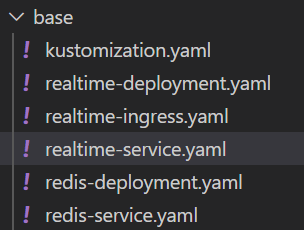
Now I would like to modify these files just a bit, to install them in a dev namespace called realtime-dev. In the ingress definition I want to change the name of the host to realdev.baeke.info instead of real.baeke.info for production. We can use Kustomize to reach that goal.
In the base folder, we can add a kustomization.yaml file like so:
apiVersion: kustomize.config.k8s.io/v1beta1
kind: Kustomization
resources:
- realtime-ingress.yaml
- realtime-service.yaml
- redis-deployment.yaml
- redis-service.yaml
- realtime-deployment.yaml
This lists all the resources we would like to deploy.
Now we can create a folder for our patches. The patches define the changes to the base. Create a folder called dev (next to base). We will add the following files (one file blurred because it’s not relevant to this post):
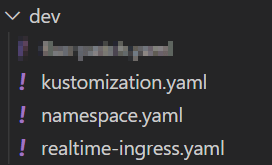
kustomization.yaml contains the following:
apiVersion: kustomize.config.k8s.io/v1beta1
kind: Kustomization
namespace: realtime-dev
resources:
- ./namespace.yaml
bases:
- ../base
patchesStrategicMerge:
- realtime-ingress.yaml
The namespace: realtime-dev ensures that our base resource definitions are updated with that namespace. In resources, we ensure that namespace gets created. The file namespace.yaml contains the following:
apiVersion: v1
kind: Namespace
metadata:
  name: realtime-dev
With patchesStrategicMerge we specify the file(s) that contain(s) our patches, in this case just realtime-ingress.yaml to modify the hostname:
apiVersion: extensions/v1beta1
kind: Ingress
metadata:
  annotations:
    cert-manager.io/cluster-issuer: letsencrypt-prod
    kubernetes.io/ingress.class: nginx
  name: realtime-ingress
spec:
  rules:
  - host: realdev.baeke.info
    http:
      paths:
      - backend:
          serviceName: realtime
          servicePort: 80
        path: /
  tls:
  - hosts:
    - realdev.baeke.info
    secretName: real-dev-baeke-info-tls
Note that we also use certmanager here to issue a certificate to use on the ingress. For dev environments, it is better to use the Let’s Encrypt staging issuer instead of the production issuer.
We are now ready to generate the manifests for the dev environment. From the parent folder of base and dev, run the following command:
kubectl kustomize dev
The above command generates the patched manifests like so:
apiVersion: v1
kind: Namespace
metadata:
  name: realtime-dev
---
apiVersion: v1
kind: Service
metadata:
  labels:
    app: realtime
  name: realtime
  namespace: realtime-dev
spec:
  ports:
  - port: 80
    targetPort: 8080
  selector:
    app: realtime
---
apiVersion: v1
kind: Service
metadata:
  labels:
    app: redis
  name: redis
  namespace: realtime-dev
spec:
  ports:
  - port: 6379
    targetPort: 6379
  selector:
    app: redis
---
apiVersion: apps/v1
kind: Deployment
metadata:
  labels:
    app: realtime
  name: realtime
  namespace: realtime-dev
spec:
  replicas: 1
  selector:
    matchLabels:
      app: realtime
  template:
    metadata:
      labels:
        app: realtime
    spec:
      containers:
      - env:
        - name: REDISHOST
          value: redis:6379
        image: gbaeke/fluxapp:1.0.5
        name: realtime
        ports:
        - containerPort: 8080
        resources:
          limits:
            cpu: 150m
            memory: 150Mi
          requests:
            cpu: 25m
            memory: 50Mi
---
apiVersion: apps/v1
kind: Deployment
metadata:
  labels:
    app: redis
  name: redis
  namespace: realtime-dev
spec:
  replicas: 1
  selector:
    matchLabels:
      app: redis
  template:
    metadata:
      labels:
        app: redis
    spec:
      containers:
      - image: redis:4-32bit
        name: redis
        ports:
        - containerPort: 6379
        resources:
          requests:
            cpu: 200m
            memory: 100Mi
---
apiVersion: extensions/v1beta1
kind: Ingress
metadata:
  annotations:
    cert-manager.io/cluster-issuer: letsencrypt-prod
    kubernetes.io/ingress.class: nginx
  name: realtime-ingress
  namespace: realtime-dev
spec:
  rules:
  - host: realdev.baeke.info
    http:
      paths:
      - backend:
          serviceName: realtime
          servicePort: 80
        path: /
  tls:
  - hosts:
    - realdev.baeke.info
    secretName: real-dev-baeke-info-tls
Note that namespace realtime-dev is used everywhere and that the Ingress resource uses realdev.baeke.info. The original Ingress resource looked like below:
apiVersion: extensions/v1beta1
kind: Ingress
metadata:
  name: realtime-ingress
  annotations:
    kubernetes.io/ingress.class: nginx
    cert-manager.io/cluster-issuer: "letsencrypt-prod"
spec:
  tls:
  - hosts:
    - real.baeke.info
    secretName: real-baeke-info-tls
  rules:
  - host: real.baeke.info
    http:
      paths:
      - path: /
        backend:
          serviceName: realtime
          servicePort: 80
As you can see, Kustomize has updated the host in tls: and rules: and also modified the secret name (which will be created by certmanager).
You have probably seen that Kustomize is integrated with kubectl. It’s also available as a standalone executable.
To directly apply the patched manifests to your cluster, run kubectl apply -k dev. The result:
namespace/realtime-dev created
service/realtime created
service/redis created
deployment.apps/realtime created
deployment.apps/redis created
ingress.extensions/realtime-ingress created
In another post, we will look at using Kustomize with Flux. Stay tuned!
 baeke.info